A .NET 9 C# library for parsing and extracting data from MXF (Material Exchange Format), extracted data streams, VBI (Vertical Blanking Interval), T42 (Teletext packet stream), and MPEG-TS (Transport Stream) files, with SMPTE timecode and Teletext caption support (OP-42 & OP-47 in particular).
A .NET 9 C# library for parsing and extracting data from MXF (Material Exchange Format) files and their ancillary data streams (ANC), raw Vertical Blanking Interval (VBI), Teletext packet stream (T42), and MPEG-TS (Transport Stream) files, with SMPTE timecode and Teletext caption support.
Why "opx"?
The opx in libopx is a play on both MXF's "Operational Pattern" designations, such as OP-1a and OP-Atom, and the Free TV Australia "Operational Practice" standards and for closed captions and Teletext subtitles (the primary focus of this library).
OP-42
OP-47
Features
Multi-format support: MXF, ANC, VBI, T42, and MPEG-TS file parsing
Format and Subtitle conversion: Automatic VBI ↔ T42 conversion, plus RCWT (Raw Captions With Time) and EBU STL output
MPEG-TS teletext extraction: Automatic PAT/PMT parsing with DVB teletext support
Teletext filtering: Magazine and row-based filtering with Unicode mapping
SMPTE timecode: Full timecode calculations with various frame rates
MXF processing: Stream extraction and demuxing capabilities
CLI tool: Unified opx command-line interface for easy access to all features
Convert between HD and SD T42 and VBI formats or vice versa. You can even pipe that data to other applications like ffmpeg or mpv.
Examples
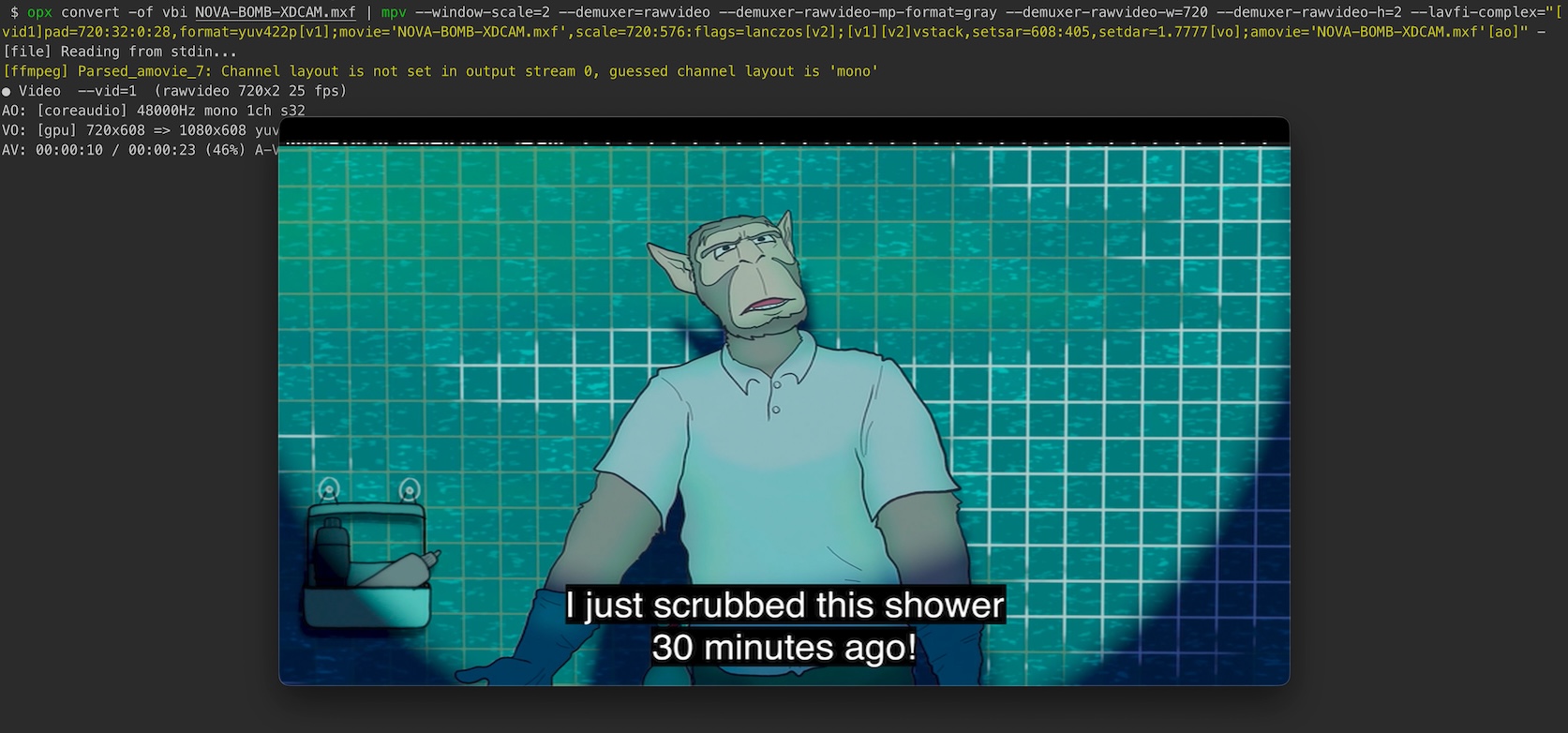
Piping Teletext Data: Extract ancillary data from an MXF file, convert it to vertical blanking interval (VBI) format, and pipe it directly to mpv for display:
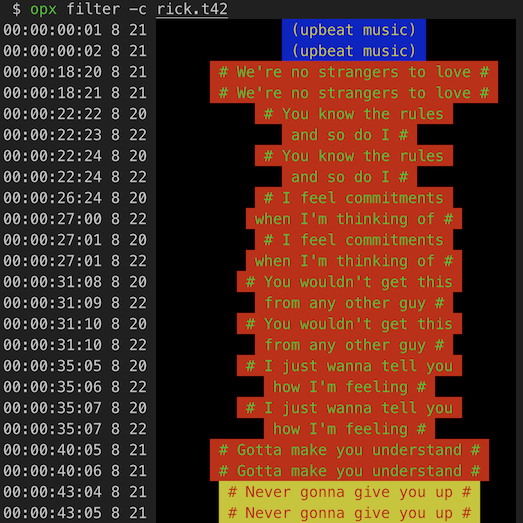
ANSI Escaped Teletext: Supports parsing and filtering of teletext data with ANSI escape sequences:
Quick Start
Installation
Add the package reference to your project file from NuGet.org.
# Filter teletext data by magazine and rows
opx filter -m 8 -r 20,22 input.vbi

# Filter MPEG-TS teletext (auto-detects PIDs)
opx filter input.ts

# Filter MPEG-TS with specific PID
opx filter --pid 70 input.ts

# Convert between formats (auto-detected from extension)
opx convert input.vbi output.t42

# Convert MPEG-TS to T42
opx convert --pid 70 input.ts output.t42

# Convert to EBU STL subtitle format
opx convert -c input.mxf output.stl

# Extract specific streams from MXF files (data, video, audio, etc.)
opx extract -k d,v input.mxf
Using the Library
New in v2.4.0: FormatIO fluent API provides a unified, simplified interface for all teletext operations.
using nathanbutlerDEV.libopx;

// Parse and filter teletext data (auto-detects format from extension)
using var io = FormatIO.Open("input.vbi");
foreach (var line in io.ParseLines(magazine: 8, rows: [20, 22]))
{
    Console.WriteLine(line.Text);
}

// Filter and convert in one pass
using var io2 = FormatIO.Open("input.vbi")
    .Filter(magazine: 8, rows: [20, 22])
    .ConvertTo(Format.T42);
io2.SaveTo("output.t42");

// Parse MPEG-TS with PID filtering
using var io3 = FormatIO.Open("input.ts")
    .WithPIDs(70);
foreach (var line in io3.ParseLines(magazine: 8))
{
    Console.WriteLine(line.Text);
}

// Convert to EBU STL subtitle format
using var io4 = FormatIO.Open("input.mxf");
await io4.ConvertTo(Format.STL)
    .Filter(magazine: 8, rows: [20, 21, 22, 23, 24])
    .SaveToAsync("output.stl");
Migration Note: The old API (new VBI(), new T42(), etc.) is deprecated but still works in v2.4.0 with warnings. It will be removed in v3.0.0. See CHANGELOG.md for migration details.
vhs-teletext - Software to recover teletext data from VHS recordings (inspiration for filter command)
MXFInspect - Tool for displaying the internal structure of MXF files (was super helpful for understanding MXF parsing and the intricacies of SMPTE timecodes)
bmxtranswrap - BBC's MXF processing library and utilities (inspiration for extract command)
SubtitleEdit - An incredibly useful C# library and software for subtitle editing and processing
CCExtractor - Closed caption and subtitle extraction and processing
ffmpeg - The swiss army knife of multimedia processing