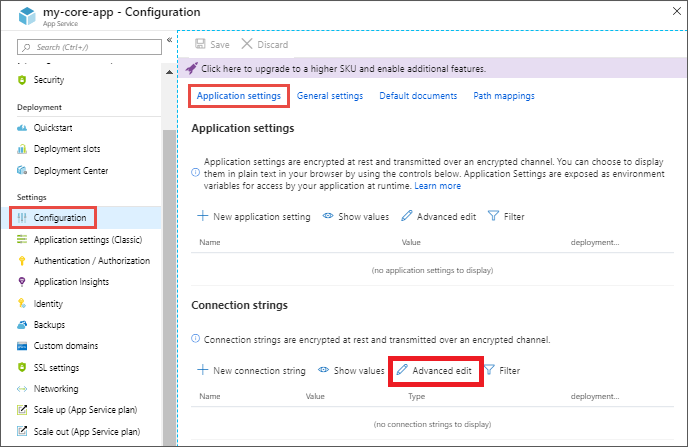
Dotnet tool AppSettings convert appsettings.json to Azure AppService Configuration Application Settings
$ dotnet add package dotnet-appsettingsThe tool to convert appsettings.json files to Docker Compose environment format (yaml) or json name-value format support bulk update to Application Settings on Azure AppService.
0.2.0 support .NET Runtime and .NET SDK 6.0.{
"Logging": {
"LogLevel": {
"Default": "Information",
"Microsoft": "Warning",
"Microsoft.Hosting.Lifetime": "Information"
}
},
"Array": [
{
"Name": "Value1"
},
{
"Name": "Value2"
}
],
"AllowedHosts": "*"
}
docker-compose.ymlservices:
webapi:
environment:
- AllowedHosts=*
- Array__0__Name=Value1
- Array__1__Name=Value2
- Logging__LogLevel__Default=Information
- Logging__LogLevel__Microsoft=Warning
- Logging__LogLevel__Microsoft.Hosting.Lifetime=Information

[
{
"name": "AllowedHosts",
"value": "*",
"slotSetting": false
},
{
"name": "Array__0__Name",
"value": "Value1",
"slotSetting": false
},
{
"name": "Array__1__Name",
"value": "Value2",
"slotSetting": false
},
{
"name": "Logging__LogLevel__Default",
"value": "Information",
"slotSetting": false
},
{
"name": "Logging__LogLevel__Microsoft",
"value": "Warning",
"slotSetting": false
},
{
"name": "Logging__LogLevel__Microsoft.Hosting.Lifetime",
"value": "Information",
"slotSetting": false
}
]AllowedHosts
*
Array__0__Name
Value1
Array__1__Name
Value2
Logging__LogLevel__Default
Information
Logging__LogLevel__Microsoft
Warning
Logging__LogLevel__Microsoft.Hosting.Lifetime
InformationDownload and install the .NET Core 3.1 SDK or .NET Core 5 SDK or newer. Once installed the .NET Core SDK, run the following command:
dotnet tool install --global dotnet-appsettings
If you already have a previous version of dotnet-appsettings installed, you can upgrade to the latest version using the following command:
dotnet tool update --global dotnet-appsettings
Usage
appsettings appsettings.json appsettings.Production.json
You can install the tool dotnet-appsettings to a folder
dotnet tool install dotnet-appsettings --tool-path C:\Development\Project1\tools
Usage
C:\Development\Project1\tools\appsettings.exe appsettings.json appsettings.Production.json
You can either install the tool locally in the project folder scope as https://docs.microsoft.com/en-us/dotnet/core/tools/local-tools-how-to-use
cd /d C:\Development\Project1
dotnet new tool-manifest
dotnet tool install dotnet-appsettings
Usage
C:\Development\Project1\Core> dotnet appsettings appsettings.json appsettings.Production.json
Command line global:
appsettings [appsettings.json [appsettings.Production.json]]
Command line local:
dotnet appsettings [appsettings.json [appsettings.Production.json]]
Command line tool path:
"C:\Development\Project1\tools\appsettings.exe" [appsettings.json [appsettings.Production.json]]
Parameters:
-p|--path path to appsettings.json, appsettings.Production.json
-o|--output-file path to output-file.json
-e|--environment output in docker compose environment
-t|--text output in text format
--skip-slot-setting skip SlotSetting=false
-?|-h|--help help
--version version of this tool