Merq: Message Bus (Commands + Events) mediator for internal application architecture via command and event messages.
Only the main application assembly needs to reference this package. Components and extensions can simply reference the interfaces in Merq.Abstractions.
These patterns are well established in microservices and service oriented
architectures, but their benefits can be applied to apps too, especially
extensible ones where multiple teams can contribute extensions which
are composed at run-time.
The resulting improved decoupling between components makes it easier to evolve
them independently, while improving discoverability of available commands and
events. You can see this approach applied in the real world in
VSCode commands
and various events such as window events.
Clearly, in the case of VSCode, everything is in-process, but the benefits of
a clean and predictable API are pretty obvious.
Merq provides the same capabilities for .NET apps.
Events
Events can be any type, there is no restriction or interfaces you must implement.
Nowadays, C# record types
are a perfect fit for event data types. An example event could be a one-liner such as:
public record ItemShipped(string Id, DateTimeOffset Date);
The events-based API surface on the message bus is simple enough:
public interface IMessageBus
{
    void Notify<TEvent>(TEvent e);
    IObservable<TEvent> Observe<TEvent>();
}
By relying on IObservable<TEvent>, Merq integrates seamlessly with
more powerful event-driven handling via System.Reactive
or the more lightweight .
Subscribing to events with either of those packages is trivial:
IDisposable subscription;

// constructor may use DI to get the dependency
public CustomerViewModel(IMessageBus bus)
{
    subscription = bus.Observe<ItemShipped>().Subscribe(OnItemShipped);
}

void OnItemShipped(ItemShipped e) => // Refresh item status

public void Dispose() => subscription.Dispose();
In addition to event producers just invoking Notify, they can also be
implemented as IObservable<TEvent> directly, which is useful when the
producer is itself an observable sequence.
Both features integrate seamlessly and leverage all the power of
Reactive Extensions.
Commands
Commands can also be any type, and C# records make for concise definitions:
record CancelOrder(string OrderId) : IAsyncCommand;
Unlike events, command messages need to signal the invocation style they require
for execution:
Scenario
Interface
Invocation
void synchronous command
ICommand
IMessageBus.Execute(command)
value-returning synchronous command
ICommand<TResult>
var result = await IMessageBus.Execute(command)
void asynchronous command
IAsyncCommand
await IMessageBus.ExecuteAsync(command)
value-returning asynchronous command
IAsyncCommand<TResult>
var result = await IMessageBus.ExecuteAsync(command)
async stream command
IStreamCommand<TResult>
await foreach(var item in IMessageBus.ExecuteStream(command))
The sample command shown before can be executed using the following code:
// perhaps a method invoked when a user
// clicks/taps a Cancel button next to an order
async Task OnCancel(string orderId)
{
    await bus.ExecuteAsync(new CancelOrder(orderId), CancellationToken.None);
    // refresh UI for new state.
}
An example of a synchronous command could be:
// Command declaration
record SignOut() : ICommand;

// Command invocation
void OnSignOut() => bus.Execute(new SignOut());

// or alternatively, for void commands that have no additional data:
void OnSignOut() => bus.Execute<SignOut>();
The marker interfaces on the command messages drive the compiler to only allow
the right invocation style on the message bus, as defined by the command author:
For example, to create a value-returning async command that retrieves some
value, you would have:
record FindDocuments(string Filter) : IAsyncCommand<IEnumerable<string>>;

class FindDocumentsHandler : IAsyncCommandHandler<FindDocument, IEnumerable<string>>
{
    public bool CanExecute(FindDocument command) => !string.IsNullOrEmpty(command.Filter);

    public Task<IEnumerable<string>> ExecuteAsync(FindDocument command, CancellationToken cancellation)
        => // evaluate command.Filter across all documents and return matches
}
In order to execute such command, the only execute method the compiler will allow
is:
If the consumer tries to use Execute, the compiler will complain that the
command does not implement ICommand<TResult>, which is the synchronous version
of the marker interface.
While these marker interfaces on the command messages might seem unnecessary,
they are actually quite important. They solve a key problem that execution
abstractions face: whether a command execution is synchronous or asynchronous
(as well as void or value-returning) should not be abstracted away since
otherwise you can end up in two common anti-patterns (i.e. async guidelines for ASP.NET),
known as sync over async and
async over sync.
Likewise, mistakes cannot be made when implementing the handler, since the
handler interfaces define constraints on what the commands must implement:
// sync
public interface ICommandHandler<in TCommand> : ... where TCommand : ICommand;
public interface ICommandHandler<in TCommand, out TResult> : ... where TCommand : ICommand<TResult>;

// async
public interface IAsyncCommandHandler<in TCommand> : ... where TCommand : IAsyncCommand;
public interface IAsyncCommandHandler<in TCommand, TResult> : ... where TCommand : IAsyncCommand<TResult>

// async stream
public interface IStreamCommandHandler<in TCommand, out TResult>: ... where TCommand : IStreamCommand<TResult>
This design choice also makes it impossible to end up executing a command
implementation improperly.
In addition to execution, the IMessageBus also provides a mechanism to determine
if a command has a registered handler at all via the CanHandle<T> method as well
as a validation mechanism via CanExecute<T>, as shown above in the FindDocumentsHandler example.
Commands can notify new events, and event observers/subscribers can in turn
execute commands.
Async Streams
For .NET6+ apps, Merq also supports async streams
as a command invocation style. This is useful for scenarios where the command
execution produces a potentially large number of results, and the consumer
wants to process them as they are produced, rather than waiting for the entire
sequence to be produced.
For example, the filter documents command above could be implemented as an
async stream command instead:
record FindDocuments(string Filter) : IStreamCommand<string>;

class FindDocumentsHandler : IStreamCommandHandler<FindDocument, string>
{
    public bool CanExecute(FindDocument command) => !string.IsNullOrEmpty(command.Filter);

    public async IAsyncEnumerable<string> ExecuteAsync(FindDocument command, [EnumeratorCancellation] CancellationToken cancellation)
    {
        await foreach (var file in FindFilesAsync(command.Filter, cancellation))
            yield return file;
    }
}
In order to execute such command, the only execute method the compiler will allow
is:
await foreach (var file in bus.ExecuteStream(new FindDocuments("*.json")))
    Console.WriteLine(file);
Analyzers and Code Fixes
Beyond the compiler complaining, Merq also provides a set of analyzers and
code fixes to learn the patterns and avoid common mistakes. For example, if you
created a simple record to use as a command, such as:
public record Echo(string Message);
And then tried to implement a command handler for it:
public class EchoHandler : ICommandHandler<Echo>
{
}
the compiler would immediately complain about various contraints and interfaces
that aren't satisfied due to the requirements on the Echo type itself. For
a seasoned Merq developer, this is a no-brainer, but for new developers,
it can be a bit puzzling:
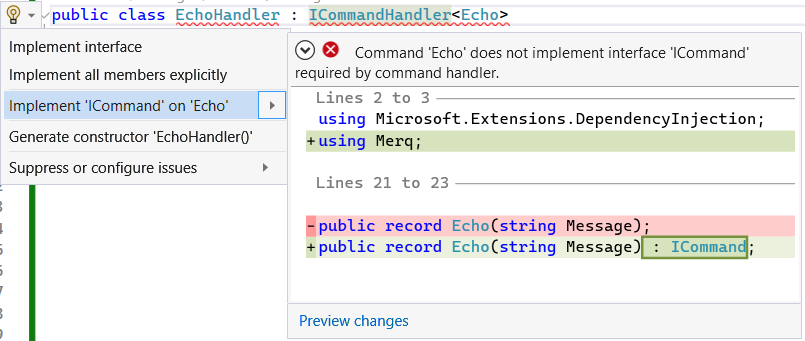
A code fix is provided to automatically implement the required interfaces
in this case:
Likewise, if a consumer attempted to invoke the above Echo command asynchronously
(known as the async over sync anti-pattern),
they would get a somewhat unintuitive compiler error:
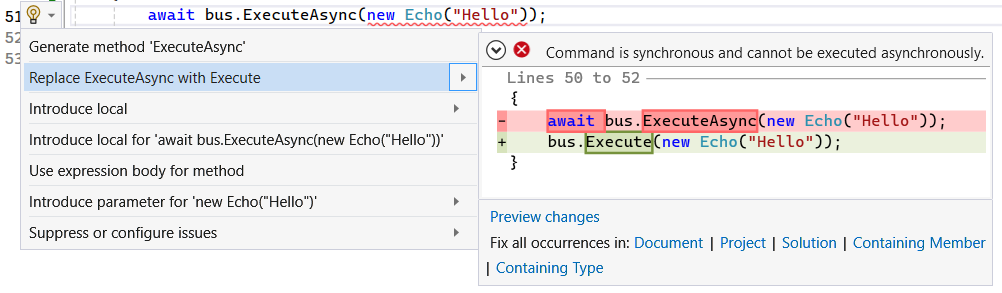
But the second error is more helpful, since it points to the actual problem,
and a code fix can be applied to resolve it:
The same analyzers and code fixes are provided for the opposite anti-pattern,
known as sync over async,
where a synchronous command is executed asynchronously.