A simple in-memory and Redis hybrid caching solution for .NET applications.
It provides a way to cache frequently accessed data in memory for fast access and automatically falls back to using Redis as a persistent cache when memory cache capacity is exceeded.
HybridRedisCache is a simple in-memory and Redis hybrid caching solution for .NET applications.
It provides a way to cache frequently accessed data in memory for fast access and automatically falls back to using
Redis as a persistent cache when memory cache capacity is exceeded.
Types of Cache
Basically, there are two types of caching .NET Core supports
In-Memory Caching
Distributed Caching
When we use In-Memory Cache then in that case data is stored in the application server memory and whenever we need then
we fetch data from that and use it wherever we need it. And in Distributed Caching there are many third-party mechanisms
like Redis and many others. But in this section, we work with the Redis Cache in the .NET Core.
Distributed Caching
Basically, in distributed caching data are stored and shared between multiple servers
Also, it’s easy to improve the scalability and performance of the application after managing the load between multiple
servers when we use a multi-tenant application
Suppose, In the future, if one server crashes and restarts then the application does not have any impact because
multiple servers are as per our need if we want
Redis is the most popular cache which is used by many companies nowadays to improve the performance and scalability of
the application. So, we are going to discuss Redis and its usage one by one.
Redis Cache
Redis is an Open Source (BSD Licensed) in-memory Data Structure store used as a database.
Basically, it is used to store the frequently used and some static data inside the cache and use and reserve that as per
user requirement.
There are many data structures present in the Redis that we are able to use like List, Set, Hashing, Stream, and many
more to store the data.
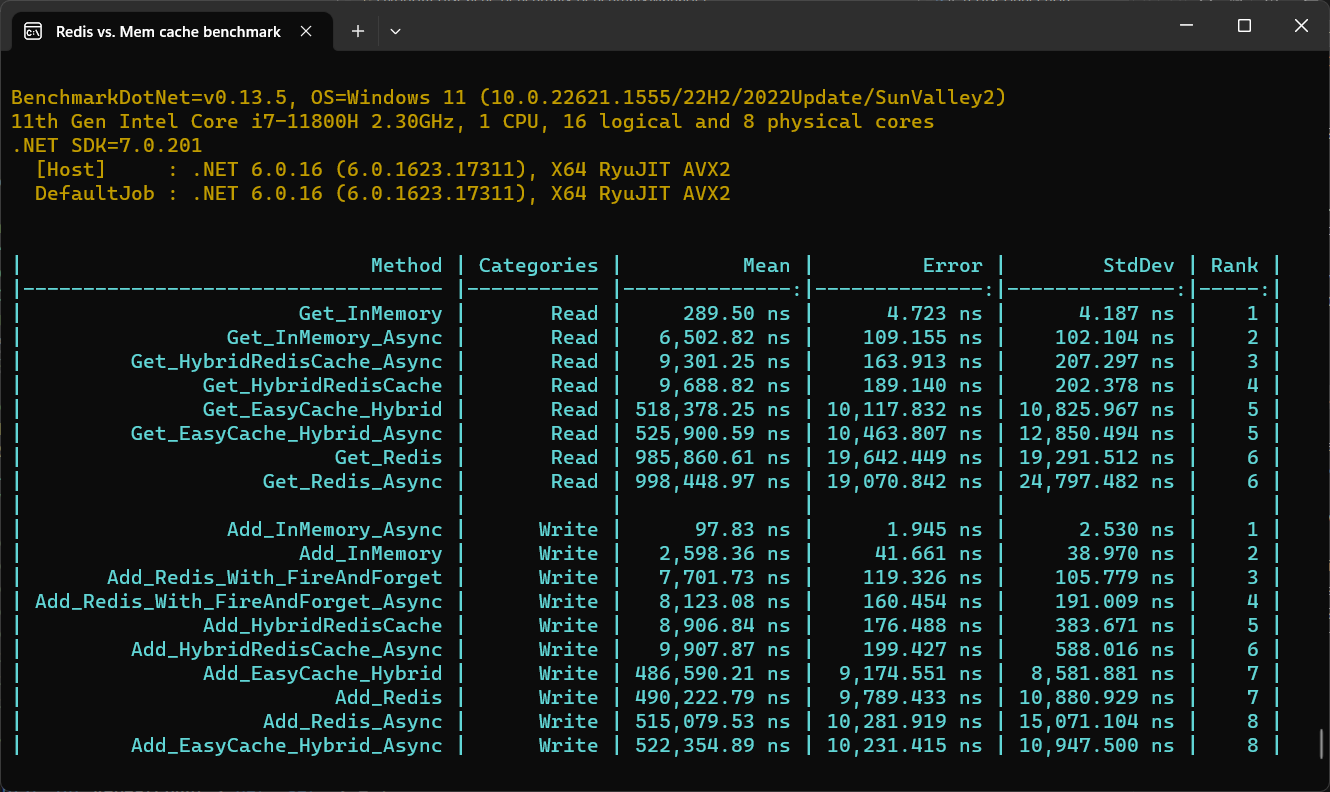
Redis vs. In-Memory caching in single instance benchmark
Installation
You can install the HybridRedisCache package using NuGet:
PM> Install-Package HybridRedisCache
Installing via the .NET Core command line interface:
dotnet add package HybridRedisCache
Usage
Simple usage in console applications
To use HybridCache, you can create an instance of the HybridCache class and then call its Set and Get methods to
cache and retrieve data, respectively.
Here's an example:
using HybridRedisCache;

...

// Create a new instance of HybridCache with cache options
var options = new HybridCachingOptions()
{
    DefaultLocalExpirationTime = TimeSpan.FromMinutes(1),
    DefaultDistributedExpirationTime = TimeSpan.FromDays(1),
    InstancesSharedName = "SampleApp",
    ThrowIfDistributedCacheError = true,
    RedisConnectString = "localhost",
    BusRetryCount = 10,
    AbortOnConnectFail = true,
    ReconfigureOnConnectFail = true,
    MaxReconfigureAttempts = 10,
    EnableLogging = true,
    EnableTracing = true,
    ThreadPoolSocketManagerEnable = true,
    FlushLocalCacheOnBusReconnection = true,
    TracingActivitySourceName = nameof(HybridRedisCache),
    EnableRedisClientTracking = true
};
var cache = new HybridCache(options);

// Cache a string value with the key "mykey" for 1 minute
cache.Set("mykey", "myvalue", TimeSpan.FromMinutes(1));

// Retrieve the cached value with the key "mykey"
var value = cache.Get<string>("mykey");

// Retrieve the cached value with the key "mykey"
// If not exist create one by dataRetriever method
var value = await cache.GetAsync("mykey",
        dataRetriever: async key => await CreateValueTaskAsync(key, ...),
        localExpiry: TimeSpan.FromMinutes(1),
        redisExpiry: TimeSpan.FromHours(6),
        fireAndForget: true);
[Route("api/[controller]")]
public class WeatherForecastController : Controller
{
    private readonly IHybridCache _cacheService;

    public VWeatherForecastController(IHybridCache cacheService)
    {
        this._cacheService = cacheService;
    }

    [HttpGet]
    public string Handle()
    {
        //Set
        _cacheService.Set("demo", "123", TimeSpan.FromMinutes(1));

        //Set Async
        await _cacheService.SetAsync("demo", "123", TimeSpan.FromMinutes(1));
    }

    [HttpGet)]
    public async Task<WeatherForecast> Get(int id)
    {
        var data = await _cacheService.GetAsync<WeatherForecast>(id);
        return data;
    }

    [HttpGet)]
    public IEnumerable<WeatherForecast> Get()
    {
        var data = _cacheService.Get<IEnumerable<WeatherForecast>>("demo");
        return data;
    }
}
Features
HybridCache is a caching library that provides a number of advantages over traditional in-memory caching solutions.
One of its key features is the ability to persist caches between instances and sync data for all instances.
With HybridCache, you can create multiple instances of the cache that share the same Redis cache,
allowing you to scale out your application and distribute caching across multiple instances.
This ensures that all instances of your application have access to the same cached data,
regardless of which instance originally created the cache.
When a value is set in the cache using one instance, the cache invalidation message is sent to all other instances,
ensuring that the cached data is synchronized across all instances.
This allows you to take advantage of the benefits of caching,
such as reduced latency and improved performance, while ensuring that the cached data is consistent across all
instances.
Other features of HybridCache include:
Multiple cache layers: Supports both in-memory and Redis caching layers, allowing for flexible caching strategies.
Automatic expiration: Cached data can automatically expire based on time-to-live (TTL) or sliding expiration policies.
Fire-and-forget caching: Enables quickly setting a value in the cache without waiting for a response, improving
performance for non-critical cache operations.
Asynchronous caching operations: Provides asynchronous cache operations to enhance application responsiveness and
scalability.
Distributed key locking: Ensures control over race conditions across multiple services, preventing conflicts with
shared resources.
Client synchronization with Redis messages: Keeps all clients in sync through Redis bus messages. For example, if a
key is updated or removed by one client, other clients will automatically clear the key from their local cache,
ensuring consistency across instances.
Overall, HybridCache provides a powerful and flexible caching solution that helps enhance the performance and
scalability of your applications while ensuring that cached data remains consistent across all instances.
When should I enable caching?
Each time the value of a cached key is modified in the database,
Redis pushes an invalidation message to all the clients that are caching the key.
This tells the clients to flush the key’s locally cached value, which is invalid.
This behavior implies a trade-off between local cache hits and invalidation messages:
keys that show a local cache hit rate greater than the invalidation message rate are the best candidates for local
tracking and caching.
Contributions are welcome! If you find a bug or have a feature request, please open an issue or submit a pull request.
If you'd like to contribute to HybridRedisCache, please follow these steps:
Fork the repository.
Create a new branch for your changes.
Make your changes and commit them.
Push your changes to your fork.
Submit a pull request.
License
HybridRedisCache is licensed under the Apache License, Version 2.0. See
the LICENSE file for more information.