Client connectivity bits, exposes a potentially cluster aware request pipeline that can be resilient to nodes dropping out of rotation.
This package is heavily optimized for the Elastic (elastic.co) product suite and Elastic Cloud (cloud.elastic.co) SAAS offering.
Transport classes and utilities shared among .NET Elastic client libraries. Provides cluster-aware, resilient HTTP transport optimized for the Elastic product suite and Elastic Cloud.
Installation
dotnet add package Elastic.Transport
Quick Start
var settings = new TransportConfiguration(new Uri("http://localhost:9200"));
var transport = new DistributedTransport(settings);

// GET request — returns body as string
var response = transport.Get<StringResponse>("/my-index/_search?q=title:hello");

// POST request — send JSON body
var body = PostData.String(@"{ ""query"": { ""match_all"": {} } }");
var searchResponse = transport.Post<StringResponse>("/my-index/_search", body);

// HEAD request — no body needed
var headResponse = transport.Head("/my-index");

// JSON DOM with safe path traversal
var jsonResponse = transport.Get<JsonResponse>("/my-index/_search?q=title:hello");
int totalHits = jsonResponse.Get<int>("hits.total.value");
string firstId = jsonResponse.Get<string>("hits.hits.[0]._id");

// Async variants
var asyncResponse = await transport.GetAsync<StringResponse>("/my-index/_search?q=title:hello");
Response Types
The generic type parameter on Get<TResponse>, Post<TResponse>, etc. controls how the response body is read:
Type
Body Representation
Notes
StringResponse
string
Good for debugging and small payloads
BytesResponse
byte[]
Raw bytes, useful for binary content
VoidResponse
(skipped)
Body is not read. Used for HEAD and fire-and-forget calls
StreamResponse
Stream
Caller must dispose. Best for large payloads
JsonResponse
JsonNode
System.Text.Json DOM with safe Get<T>() path traversal
DynamicResponse
DynamicDictionary
Dynamic path traversal via Get<T>()
PipeResponse
PipeReader
.NET 10+ only. Zero-copy streaming via System.IO.Pipelines
JsonResponse
JsonResponse deserializes JSON into a System.Text.Json.Nodes.JsonNode and exposes a Get<T>() method for safe, typed path traversal using dot-separated keys:
var response = transport.Get<JsonResponse>("/my-index/_search?q=title:hello");

// Traverse nested JSON with dot notation
int totalHits = response.Get<int>("hits.total.value");
string firstId = response.Get<string>("hits.hits.[0]._id");

// Bracket syntax for array access
string lastId = response.Get<string>("hits.hits.[last()]._id");
string firstSource = response.Get<string>("hits.hits.[first()]._source.title");

// _arbitrary_key_ traverses into the first key at that level
string fieldType = response.Get<string>("my-index.mappings.properties._arbitrary_key_.type");

// Direct DOM access is also available via .Body
JsonNode hitsNode = response.Body["hits"]["hits"];
PipeResponse (.NET 10+)
On .NET 10+, PipeResponse exposes the response body as a PipeReader for zero-copy streaming. Pair it with PostData.PipeReader() and PostData.PipeWriter() for efficient request body handling via System.IO.Pipelines.
// Response streaming — deserialize directly from PipeReader
await using var response = await transport.GetAsync<PipeResponse>("/my-index/_search");
var result = await JsonSerializer.DeserializeAsync<SearchResult>(response.Body);

// Request forwarding — pipe an ASP.NET Core request body straight through
var postData = PostData.PipeReader(context.Request.BodyReader);
await using var fwd = await transport.PostAsync<PipeResponse>("/my-index/_doc", postData);
await fwd.CopyToAsync(context.Response.BodyWriter);
var settings = new TransportConfiguration(new Uri("http://localhost:9200"));
Elastic Cloud (cloud ID)
var settings = new TransportConfiguration("my-cloud-id", new ApiKey("base64key"));
// or
var settings = new TransportConfiguration("my-cloud-id", new BasicAuthentication("user", "pass"));
Multiple nodes with a node pool
var pool = new StaticNodePool(new[]
{
    new Node(new Uri("http://node1:9200")),
    new Node(new Uri("http://node2:9200")),
    new Node(new Uri("http://node3:9200"))
});
var settings = new TransportConfiguration(pool);
var transport = new DistributedTransport(settings);
All components
var pool = new StaticNodePool(new[] { new Node(new Uri("http://localhost:9200")) });
var requestInvoker = new HttpRequestInvoker();
var product = ElasticsearchProductRegistration.Default;

var settings = new TransportConfiguration(pool, requestInvoker, productRegistration: product);
var transport = new DistributedTransport(settings);
Request Pipeline
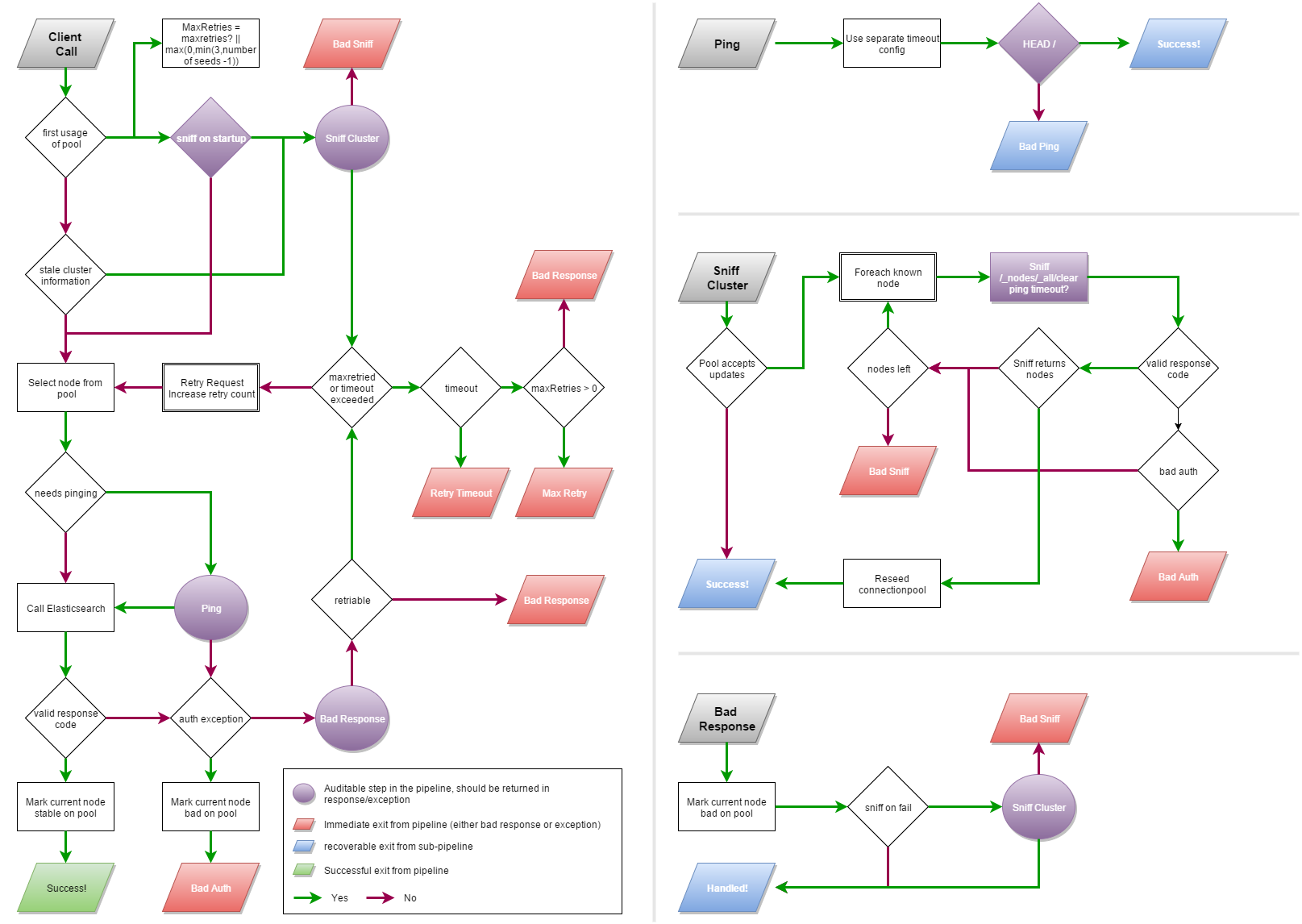
The transport models a request pipeline that handles node failover, sniffing, and pinging:
The pipeline introduces two special API calls:
Sniff — queries the cluster to discover the current node topology
Ping — the fastest possible request to check if a node is alive
The transport fails over in constant time. If a node is marked dead, it is skipped immediately (as long as the overall request timeout allows).
Components
Component
Description
NodePool
Registry of Node instances. Implementations: SingleNodePool, StaticNodePool, SniffingNodePool, StickyNodePool, CloudNodePool
IRequestInvoker
Abstraction for HTTP I/O. Default: HttpRequestInvoker
The transport also emits DiagnosticSource events for serialization timing, time-to-first-byte, and other counters.
Custom Typed Responses
Any class inheriting from TransportResponse can be used as a response type. The transport will deserialize the response body into it using System.Text.Json:
public class SearchResult : TransportResponse
{
    [JsonPropertyName("hits")]
    public HitsContainer Hits { get; set; }
}

public class HitsContainer
{
    [JsonPropertyName("total")]
    public TotalHits Total { get; set; }

    [JsonPropertyName("hits")]
    public List<Hit> Hits { get; set; }
}

public class TotalHits
{
    [JsonPropertyName("value")]
    public long Value { get; set; }
}

public class Hit
{
    [JsonPropertyName("_id")]
    public string Id { get; set; }

    [JsonPropertyName("_source")]
    public JsonNode Source { get; set; }
}

// Use it directly as a type parameter
var response = transport.Get<SearchResult>("/my-index/_search?q=title:hello");
long total = response.Hits.Total.Value;
For full control over how a response is built from the stream, implement TypedResponseBuilder<TResponse> and register it via ResponseBuilders on the configuration:
public class CsvResponse : TransportResponse
{
    public List<string[]> Rows { get; set; }
}

public class CsvResponseBuilder : TypedResponseBuilder<CsvResponse>
{
    protected override CsvResponse Build(ApiCallDetails apiCallDetails, BoundConfiguration boundConfiguration,
        Stream responseStream, string contentType, long contentLength)
    {
        using var reader = new StreamReader(responseStream);
        var rows = new List<string[]>();
        while (reader.ReadLine() is { } line)
            rows.Add(line.Split(','));
        return new CsvResponse { Rows = rows };
    }

    protected override async Task<CsvResponse> BuildAsync(ApiCallDetails apiCallDetails, BoundConfiguration boundConfiguration,
        Stream responseStream, string contentType, long contentLength, CancellationToken cancellationToken = default)
    {
        using var reader = new StreamReader(responseStream);
        var rows = new List<string[]>();
        while (await reader.ReadLineAsync(cancellationToken) is { } line)
            rows.Add(line.Split(','));
        return new CsvResponse { Rows = rows };
    }
}

var settings = new TransportConfiguration(new Uri("http://localhost:9200"))
{
    ResponseBuilders = [new CsvResponseBuilder()]
};
AOT and Source Generators
The default serializer uses System.Text.Json with a JsonSerializerContext for AOT compatibility. When using custom typed responses in AOT/trimmed applications, provide a JsonSerializerContext that includes your response types:
[JsonSerializable(typeof(SearchResult))]
[JsonSerializable(typeof(HitsContainer))]
[JsonSerializable(typeof(TotalHits))]
[JsonSerializable(typeof(Hit))]
public partial class MySerializerContext : JsonSerializerContext;
Create a concrete serializer that combines your context with the transport's built-in resolvers:
public class MySerializer : SystemTextJsonSerializer
{
    public MySerializer() : base(new TransportSerializerOptionsProvider([], null, options =>
    {
        options.TypeInfoResolver = JsonTypeInfoResolver.Combine(
            MySerializerContext.Default,
            new DefaultJsonTypeInfoResolver()
        );
    })) { }
}

var settings = new TransportConfiguration(
    new SingleNodePool(new Uri("http://localhost:9200")),
    serializer: new MySerializer()
);