manuelbl/Codecrete.SwissQRBill.Generatorv3.0.6
.NET Std2.0
Generates the new QR bills for invoicing in Switzerland. The Swiss QR bill library: - is a platform-independent library supporting PDF, SVG and PNG (based on SkiaSharp), - parses the invoice data embedded in the QR code, - generates payment slips (105mm by 210mm), A4 sheets or QR codes, - is multilingual: German, French, Italian, English, Romansh, - validates the invoice data and provides detailed validation information, - adds and retrieves structured bill information (according to Swico S1), - is easy to use and comes with many examples, - is small and fast, - is free – even for commecial use (MIT License), - is built for .NET Standard 2.0 and runs on all modern .NET platforms, - uses SkiaSharp for multi-platform support (use Codecrete.SwissQRBill.Core for minimal dependencies). See home page https://github.com/manuelbl/SwissQRBill.NET for examples and other library versions.
Get Started
$ dotnet add package Codecrete.SwissQRBill.GeneratorReadme
Swiss QR Bill for .NET
Open-source .NET library to generate Swiss QR bills. Try it yourself and create a QR bill.
Introduction
The Swiss QR bill is the new QR code based payment format that started on 30 June, 2020. The old payment slip will no longer be accepted after 30 September 2022.
The new payment slip will be sent electronically in most cases. But it can still be printed at the bottom of an invoice or added to the invoice on a separate sheet. The payer scans the QR code with his/her mobile banking app to initiate the payment. The payment just needs to be confirmed.
If the invoicing party adds structured bill information (VAT rates, payment conditions etc.) to the QR bill, posting in accounts payable can be automated. The invoicing party can also automate the accounts receivable processing as the payment includes all relevant data including a reference number. The Swiss QR bill is convenient for the payer and payee.
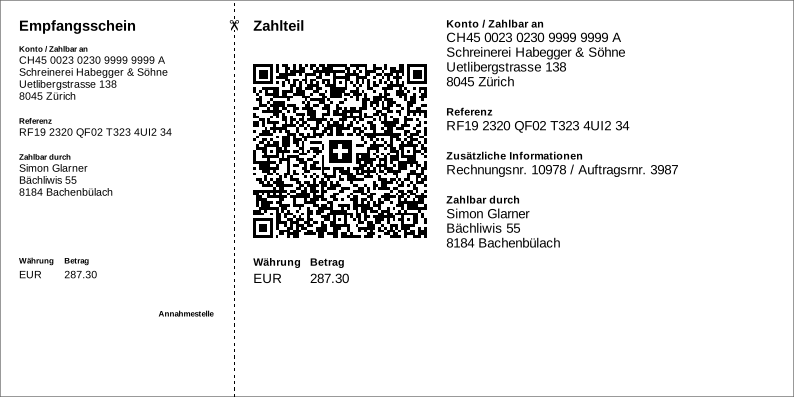
More examples can be found in the Wiki
Features
The Swiss QR bill library:
- generates QR bills as PDF, SVG and PNG files (see home page for Windows-specific EMF)
- generates payment slips (105mm by 210mm), A4 sheets or QR codes
- multilingual: German, French, Italian, English, Romansh
- validates the invoice data and provides detailed validation information
- adds or retrieves structured bill information (according to Swico S1)
- parses the invoice data embedded in the QR code
- is easy to use (see example below)
- is small and fast
- is free – even for commercial use (MIT License)
- is built for .NET Standard 2.0, i.e. it runs with .NET Core 2.0 or higher, .NET Framework 4.6.1 or higher, Mono 5.4 or higher, Universal Windows Platform 10.0.16299 or higher, Xamarin etc.
- this library version uses SkiaSharp for platform-independent PNG file generation