w-ahmad/WinUI.TableViewv1.4.0
.NET 8.0.NET 8.0-windows10.0.19041.NET 9.0.NET 9.0-windows10.0.19041
TableView/DataGrid control for WinUI.
Get Started
$ dotnet add package WinUI.TableViewReadme
WinUI.TableView
WinUI.TableView is a lightweight and fast data grid control made for WinUI apps and now supports the Uno Platform. It is easy to use, and capable of handling large numbers of items with a focus on performance. It's derived from ListView so you will experience fluent look and feel in your project. It comes with all the essential features you need, plus extras like an Excel like column filter, options buttons (for columns and the TableView) and easy data export.




Samples App
Explore the interactive WinUI.TableView samples with code snippets in a Samples App on Microsoft Store or Uno Platorm WASM:


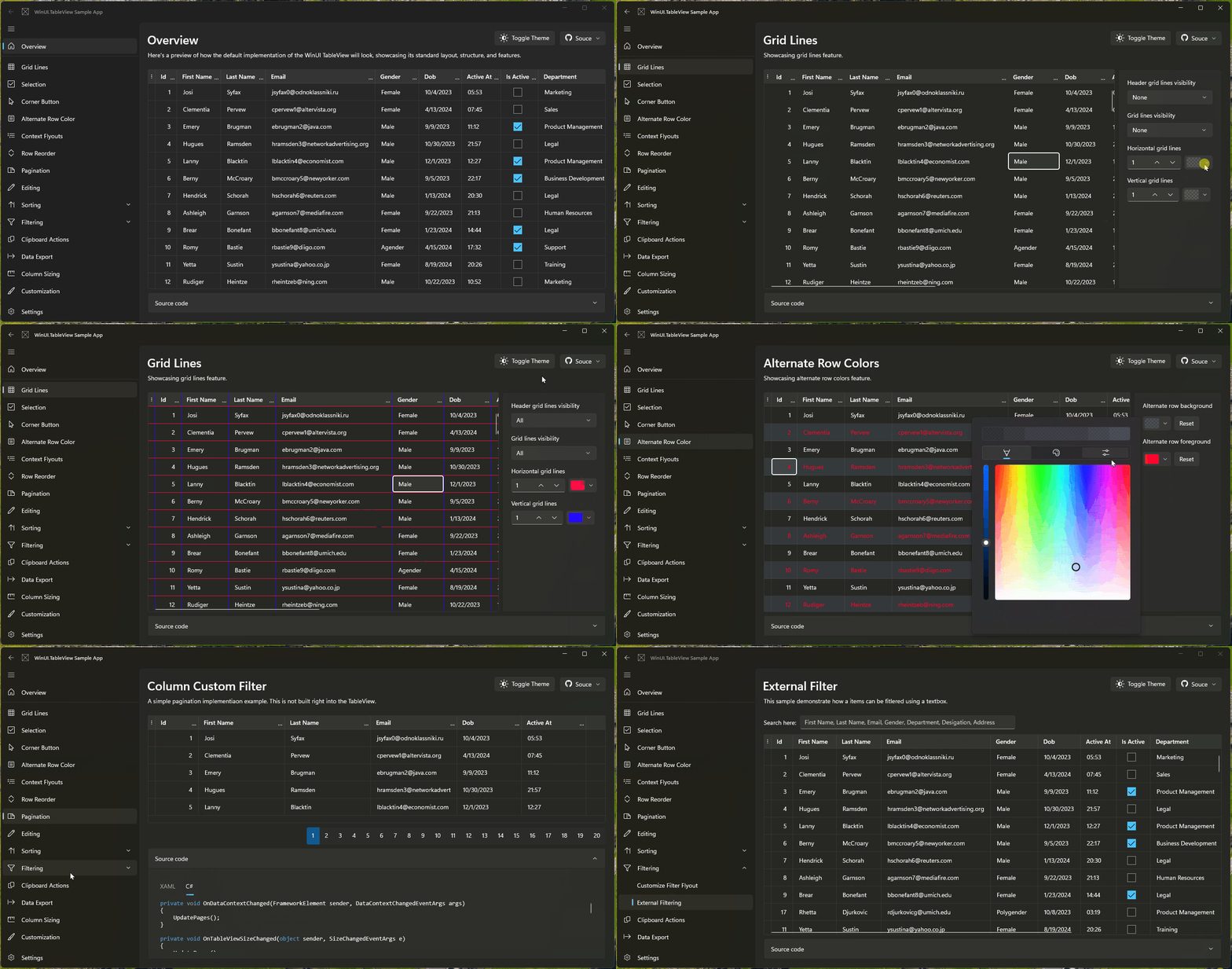
Features
- Auto-generating Columns: Automatically generate columns based on the data source.
- Individual cell selection: You can select any cell for the ease of access and better editing experience.
- Copy row or cell content: TableView allows you to copy rows or cells content, with the option to include or exclude column headers.
- Editing: Modify cell content directly within the TableView by double tapping on a cell.
- Sorting: Offers built in column sorting.
- Excel-like Column Filter: TableView allows you to filter data within columns with an excel like flyout to enhance data exploration and analysis.
- Export functionality: Built-in export functionality to export data to CSV format. This feature can be enabled by setting the
ShowExportOptions = true. - Grid Lines: Display grid lines to improve data visibility and organization.
- Localization: Support for multiple languages to enhance usability for global audiences.
- Alternate Row Colors: Apply alternate row coloring for better readability and aesthetics.
- Cell & Row Context Flyout: Provides context flyouts for cells and rows to allow quick actions.
- Row Detail Template: Displays expandable additional content for each row using
RowDetailsTemplate. - Row Headers: Adds header for each rows to display custom content using
RowHeaderTemplate. - Editing Events: Provides events to control and respond to cell edit lifecycle actions.
- Column Clipboard Binding: Enables custom clipboard copy behavior by binding column values for copy operations.
- Column Reordering: Allows users to drag and rearrange columns at runtime.
- Frozen Columns: Keeps specified number of columns fixed in place while horizontally scrolling.
- Compact Mode Support: Reduces row height and padding for higher data density layouts. Fluent Compact sizing
- Conditional Cell Styling: Applies dynamic styles to rows or cells based on data-driven conditions.
Uno Platform Support
WinUI.TableView is compatible with the Uno Platform, enabling you to use the control across multiple platforms.
Try the Uno WASM Sample App here 👉 https://tableview.samples.w-ahmad.dev/
Getting Started
1. Create a New WinUI3 or Uno Project
If you don't already have a WinUI 3 project or Uno prject, create one in Visual Studio.
2: Install NuGet Package
Inatall WinUI.TableView NuGet package to your app with your preferred method. Here is the one using NuGet Package Manager:
Install-Package WinUI.TableView
3. Add WinUI.TableView to Your XAML
In your MainWindow.xaml, add the WinUI.TableView control:
<Window
    x:Class="App1.MainWindow"
    xmlns="http://schemas.microsoft.com/winfx/2006/xaml/presentation"
    xmlns:x="http://schemas.microsoft.com/winfx/2006/xaml"
    xmlns:local="using:App1"
    xmlns:d="http://schemas.microsoft.com/expression/blend/2008"
    xmlns:mc="http://schemas.openxmlformats.org/markup-compatibility/2006"
    mc:Ignorable="d"
    xmlns:tv="using:WinUI.TableView">

    <Grid>
        <tv:TableView x:Name="MyTableView"
            ItemsSource="{x:Bind ViewModel.Items}" />
    </Grid>
</Window>
4. Bind Data to TableView
In your MainPage.xaml.cs, set up the data context and bind data to the TableView:
public sealed partial class MainWindow : Window
{
    public MainViewModel ViewModel { get; } = new MainViewModel();

    public MainWindow()
    {
        this.InitializeComponent();
    }
}
Create a simple MainViewModel with a collection of items to display:
public class MainViewModel
{
    public ObservableCollection<Item> Items { get; set; }

    public MainViewModel()
    {
        Items = new ObservableCollection<Item>
        {
            new Item { Name = "Item 1", Price = 10.0, Quantity = 1 },
            new Item { Name = "Item 2", Price = 15.0, Quantity = 2 },
            new Item { Name = "Item 3", Price = 20.0, Quantity = 3 },
            // Add more items here
        };
    }
}

public class Item : INotifyPropertyChanged
{
    private string _name;
    private double _price;
    private int _quantity;

    public string Name
    {
        get => _name;
        set
        {
            _name = value;
            OnPropertyChanged(nameof(Name));
        }
    }
    public double Price
    {
        get => _price;
        set
        {
            _price = value;
            OnPropertyChanged(nameof(Price));
        }
    }
    public int Quantity
    {
        get => _quantity;
        set
        {
            _quantity = value;
            OnPropertyChanged(nameof(Quantity));
        }
    }

    private void OnPropertyChanged(string propertyName)
    {
        PropertyChanged?.Invoke(this, new PropertyChangedEventArgs(propertyName));
    }

    public event PropertyChangedEventHandler PropertyChanged;
}
5. Run Your Application
Build and run your application. You should see the TableView populated with the rows and cells from your ViewModel.
Customization
You can customize the appearance and behavior of the TableView by modifying its properties, templates, and styles. For example:
- Column Customization: Define custom columns based on data types.
- Is ReadOnly: You can make any column or the TableView itself read only.
- Sorting and Filtering: Enable sorting and filtering on specific columns or for the all columns.
- Corner Button Mode: Use the
CornerButtonModeproperty to configure the corner button's behavior. You can select from:None: No corner button.SelectAll: Displays a "Select All" button.Options: Displays an options menu.
- Column Header and Cell Styles: Customize the styles for column headers and cells to match your application's theme or specific design requirements.
<tv:TableView x:Name="MyTableView"
              ItemsSource="{x:Bind ViewModel.Items}"
              AutoGenerateColumns="False"
              xmlns:tv="using:WinUI.TableView">
    <tv:TableView.Columns>
        <tv:TableViewTextColumn Header="Name" Binding="{Binding Name}" />
        <tv:TableViewNumberColumn Header="Price" Binding="{Binding Price}" />
        <tv:TableViewTemplateColumn Header="Quantity">
            <tv:TableViewTemplateColumn.CellTemplate>
                <DataTemplate>
                    <TextBlock Text="{Binding Quantity}" />
                </DataTemplate>
            </tv:TableViewTemplateColumn.CellTemplate>
            <tv:TableViewTemplateColumn.EditingTemplate>
                <DataTemplate>
                    <NumberBox Value="{Binding Quantity, Mode=TwoWay}" />
                </DataTemplate>
            </tv:TableViewTemplateColumn.EditingTemplate>
        </tv:TableViewTemplateColumn>
    </tv:TableView.Columns>
</tv:TableView>
Available Column Types
- TableViewTextColumn
- TableViewCheckBoxColumn
- TableViewComboBoxColumn
- TableViewNumberColumn
- TableViewToggleSwitchColumn
- TableViewTemplateColumn
- TableViewTimeColumn
- TableViewDateColumn
- TableViewHyperlinkColumn
Contributing
Contributions are welcome from the community! If you find any issues or have suggestions for improvements, please submit them through the GitHub issue tracker or consider making a pull request.
Contributors
Support WinUI.TableView
If this project saves you time or adds value to your work, please consider supporting its continued development.
Your sponsorship helps cover development time, testing, and future improvements.
👉 Become a supporter on Patreon
Every contribution makes a difference — thank you!
License
This project is licensed under the MIT License.