Quickly get a live set up using TailwindCSS and .NET web projects in Visual Studio 2022
Get Started
$ dotnet add package TailwindLiveReadme
TailwindLive for .NET Web Apps in VS 2022
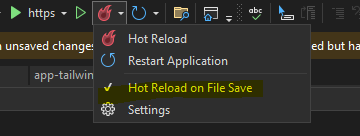
Make sure you have git bash, npm, and node installed on your local machine. Hot reload also needs to be enabled in VS2022. Works with RazorPages and Blazor Server .NET 8
Make sure Hot Reload on File Save is checked!
To help refreshing, also install the following extension for autosaving AutoSaveFile. 3 seconds for the save setting seems to work great.
For IntelliSense use the following extension Tailwind CSS VS2022 Editor Support.
Install TailwindCSS:
- Open a terminal (e.g., Command Prompt, PowerShell, or terminal in Visual Studio).
- Navigate to your project directory.
- Initialize npm to create a
package.jsonfile:
npm init -y
- Install TailwindCSS and its dependencies:
npm install -D tailwindcss postcss autoprefixer
- Generate TailwindCSS configuration files:
npx tailwindcss init -p
- This creates
tailwind.config.jsandpostcss.config.jsfiles.
Configure TailwindCSS:
-
Edit the
tailwind.config.jsfile:module.exports = { content: ["./**/*.{html,cshtml,razor,js}"], theme: { extend: {}, }, plugins: [], } -
Create a
cssfolder in thewwwrootdirectory. -
Inside the
cssfolder, create atailwind.cssfile and replace with the following content:@tailwind base; @tailwind components; @tailwind utilities; -
Inside the
cssfolder, create aapp-tailwind.cssblank file. -
Add these scripts to your
package.jsonto build and watch TailwindCSS"scripts": { "build:css": "tailwindcss build -i ./wwwroot/css/tailwind.css -o ./wwwroot/css/app-tailwind.css", "watch:css": "tailwindcss -i ./wwwroot/css/tailwind.css -o ./wwwroot/css/app-tailwind.css --watch" },
Implement Middleware
Install TailwindLive from nuget.
- Add the following line to your Home.razor or Index.cshtml files:
<div class="mb-2 text-xl font-bold text-cyan-300 dark:text-light-100">This is Tailwind CSS</div>
-
For Razor Pages add the following in the head element /Pages/Shared/Layout.cshtml
<link href="~/css/app-tailwind.css" rel="stylesheet" /> -
For Blazor add the following in the head element /Components/App.razor
<link href="/css/app-tailwind.css" rel="stylesheet" /> -
Then add the following to your Program.cs
  if (app.Environment.IsDevelopment())
  {
      app.UseGitBashMiddleware(new MiddlewareOptions
      {
          GitBashExe = "c:\\path\\to\\git-bash.exe",
          WorkingDirectory = Environment.CurrentDirectory,
          NpmBuildArguments = "-c \"npm run build:css\"", //Change these if you named your scripts differently
          NpmWatchArguments = "-c \"npm run watch:css\""
      });
  }
Build and run!
- Press control-f5 or f5 to begin the debugger.
- The build command will run and close out the window.
- Once complete the watch command will run and it will monitor the files and update the console as it reloads.
- You should see the elements change as they are saved and reloaded. If you use a utility class that hasn't been used it may take a second for Tailwind to pull it into the css file. If it doesn't seem to be updating control-f5 and it will restart a fresh build.