jsakamoto/Selenium.WebDriver.IEDriverv4.14.0
Install IE Driver(x86) for Selenium WebDriver into your Unit Test Project. "IEDriverServer.exe" is copied to bin folder from package folder when the build process. NuGet package restoring ready, and no need to commit "IEDriverServer.exe" binary into source code control repository. / The MSBuild script that contained this package is free and unencumbered software released into the public domain. / "iedriverserver.exe" is licensed under the Apache license v.2.0.
Get Started
$ dotnet add package Selenium.WebDriver.IEDriverReadme
NuGet package - Selenium WebDriver IEDriver

What's this?
This NuGet package installs IE Driver(x86) for Selenium WebDriver into your Unit Test Project.
"IEDriverServer.exe" does not appear in Solution Explorer, but it is copied to the bin folder from the package folder during the build process.
This package is ready for NuGet package restoring, and no need to commit the "IEDriverServer.exe" binary into the source code control repository.
Warning
Since Selenium WebDriver version 4.6 was released in November 2022 or later, it has contained "Selenium Manager", which will automatically download the most suitable version and platform WebDriver executable file. So now, you can run applications that use Selenium and manipulates web browsers without this package. However, due to compatibility and some offline scenarios, we intend to keep this package for the time being.
How to install?
For example, enter the following command at the package manager console on Visual Studio.
PM> Install-Package Selenium.WebDriver.IEDriver
Required Configuration
Before automation Internet Explorer (or IE mode in Microsoft Edge), you must set up some configurations as below:
- You must set the "Protected Mode" settings for each zone to be the same value.
- You also need to set "Change the size of text, apps, and other items" to 100% in display settings.
Please see also: 🌎"Required Configuration - IE Driver Server | Selenium"
Notice
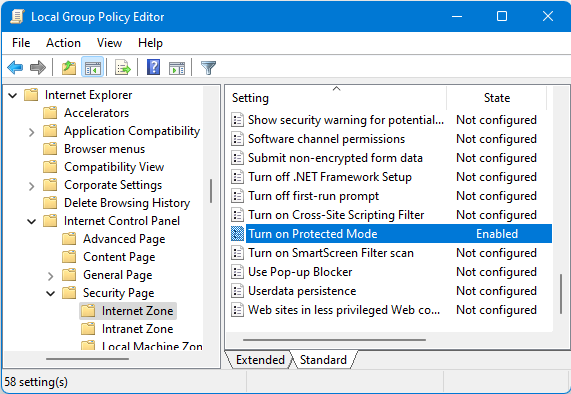
The "Enable Protected Mode" check box no longer exists in the "Internet Properties" dialog of the control panel on Windows 11 or later because Internet Explorer as a standalone application is no longer supported on Windows 11.
To configure the "Protected Mode" settings for each zone on Windows 11, I recommend using "Local Group Policy Editor" with the following steps instead of using the "Internet Properties" dialog.