Roslyn-based analyzer to diagnose static fields and properties initialization.
Get Started
$ dotnet add package SatorImaging.StaticMemberAnalyzerReadme


Roslyn-based analyzer to provide diagnostics of static fields and properties initialization and more.
- Flaky Initialization Analysis detects flaky initialization
- Wrong order of static field and property declaration
- Partial type member reference across files
- Cross-Referencing Problem of static field across type
- Immutable/Read-Only Variable Analysis detects assignment to locals/parameters and writable call-site argument passing
EnumType Analysis to prevent user-level value conversion & moreDisposableAnalysis to detect missing using statementstructparameter-less constructor misuse analysisTSelfgeneric type argument & type constraint analysis- File header comment enforcement
Annotating and underlining field, property or etc with custom message
[!TIP] Find out all diagnostic rules: RULES.md
Flaky Initialization Analysis
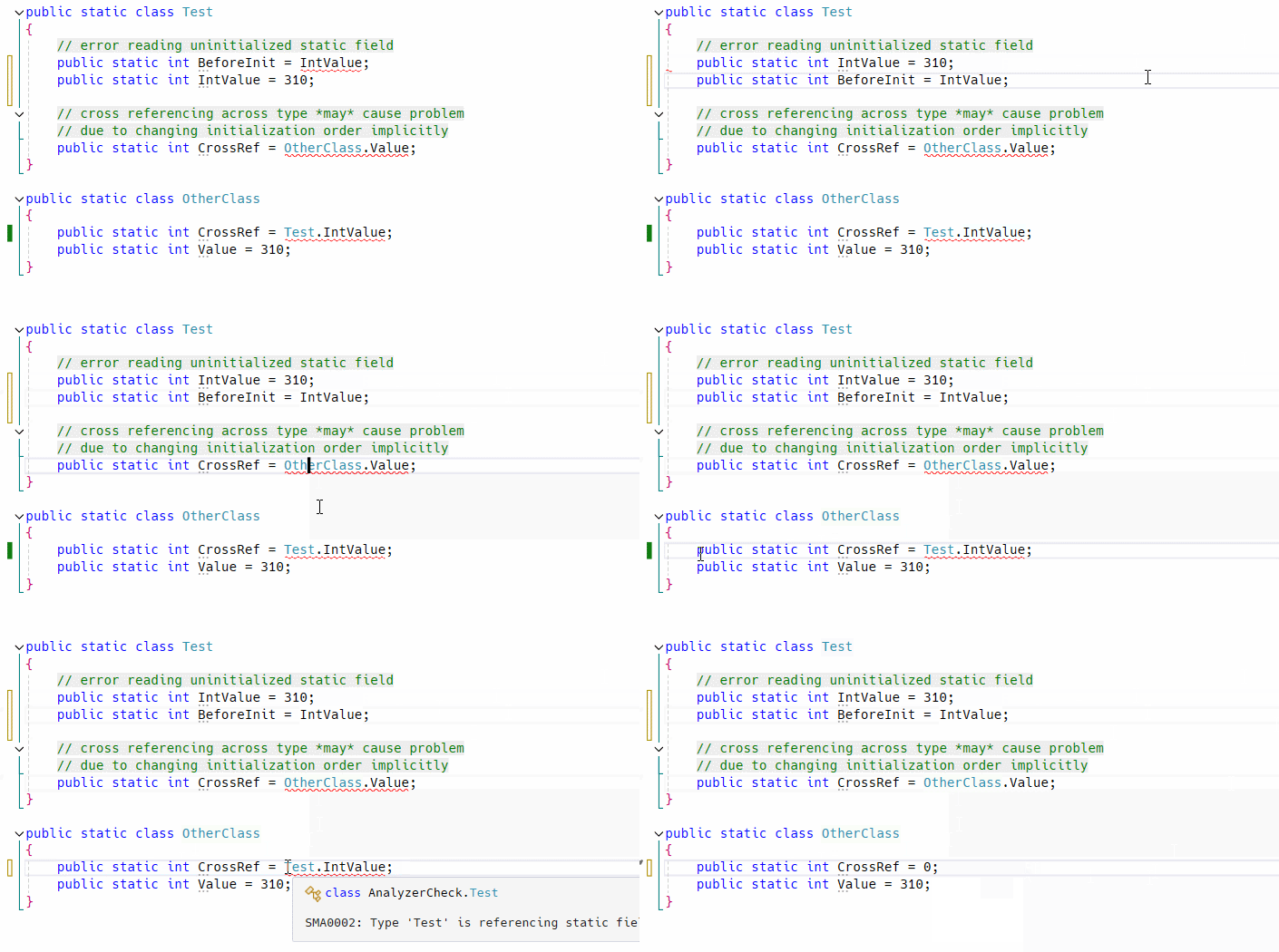
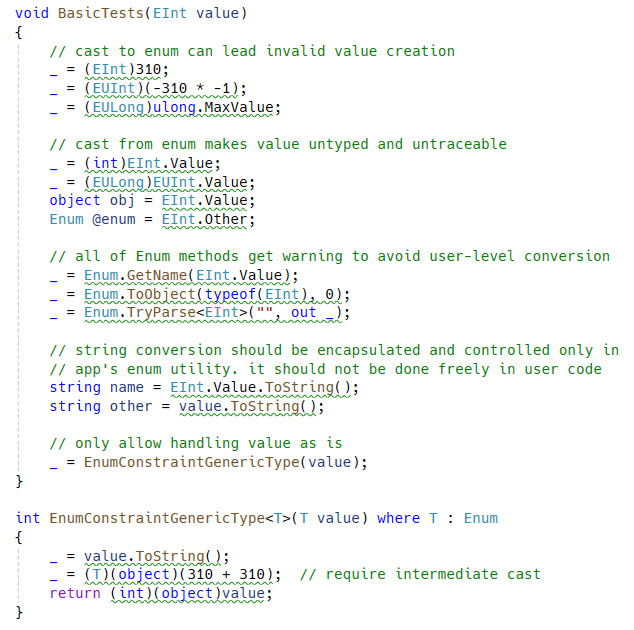
Enum Type Analysis
Restrict both cast from/to integer number! Disallow user-level enum value conversion completely!!
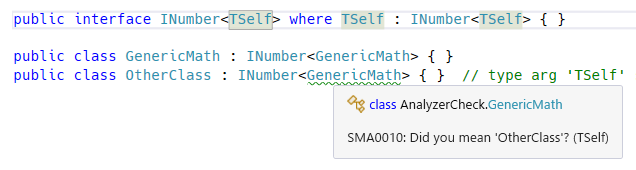
TSelf Type Argument Analysis
Analyze TSelf type argument mismatch for Curiously Recurring Template Pattern (CRTP).
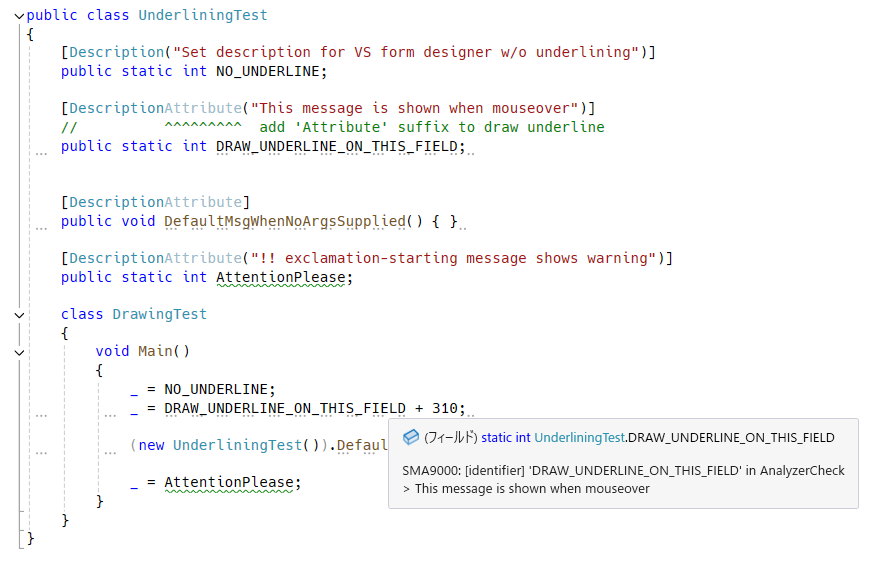
Annotation for Type, Field and Property 💯
[!IMPORTANT] Underlining analyzer is obsolete: to enable it again, set the preprocessor symbol
STMG_ENABLE_UNDERLINING_ANALYZERand rebuild.
There is fancy extra feature to take your attention while coding in Visual Studio. No more need to use Obsolete attribute in case of annotating types, methods, fields and properties.
See the following section for details.
Installation
- NuGet
- https://www.nuget.org/packages/SatorImaging.StaticMemberAnalyzer
-
PM> Install-Package SatorImaging.StaticMemberAnalyzer
Visual Studio 2019 or Earlier
Analyzer is tested on Visual Studio 2022.
You could use this analyzer on older versions of Visual Studio. To do so, update Vsix project file by following instructions written in memo and build project.
Unity Integration
This analyzer can be used with Unity 2020.2 or above. See the following page for detail.
Cross-Referencing Problem
It is a design bug makes all things complex. Not only that but also it causes initialization error only when meet a specific condition.
So it must be fixed even if app works correctly at a moment, to prevent simple but complicated potential bug which is hard to find in large code base by hand. As you know static fields will never report error when initialization failed!!
class A {
    public static int Value = B.Other;
    public static int Other = 310;
}

class B {
    public static int Other = 620;
    public static int Value = A.Other;  // will be '0' not '310'
}

public static class Test
{
    public static void Main()
    {
        System.Console.WriteLine(A.Value);  // 620
        System.Console.WriteLine(A.Other);  // 310
        System.Console.WriteLine(B.Value);  // 0   👈👈👈
        System.Console.WriteLine(B.Other);  // 620

        // when changing class member access order, it works correctly 🤣
        // see the following section for detailed explanation
        //System.Console.WriteLine(B.Value);  // 310  👈 correct!!
        //System.Console.WriteLine(B.Other);  // 620
        //System.Console.WriteLine(A.Value);  // 620
        //System.Console.WriteLine(A.Other);  // 310
    }
}
C# Compiler Initialization Sequence
A.Value = B.Other;- // 'B' initialization is started by member access
B.Other = 620;B.Value = A.Other;// BUG: B.Value will be 0 because reading uninitializedA.Other- // then, assign
B.Othervalue (620) toA.Value
A.Other = 310;// initialized here!! this value is not assigned to B.Value
When reading B value first, initialization order is changed and resulting value is also changed accordingly:
B.Other = 620;B.Value = A.Other;- // 'A' initialization is started by member access
A.Value = B.Other;// correct: B.Other is initialized before reading valueA.Other = 310;
Enum Analyzer and Code Fix Provider
Enum type handling is really headaching. To make enum operation under control, good to avoid user-level enum handling such as converting to integer or string, parse from string and etc.
This analyzer will help centerizing and encapsulating enum handling in app's central enum utility.
Excluding Enum Type from Obfuscation
Helpful annotation and code fix for enum types which prevents modification of string representation by obfuscation tool.
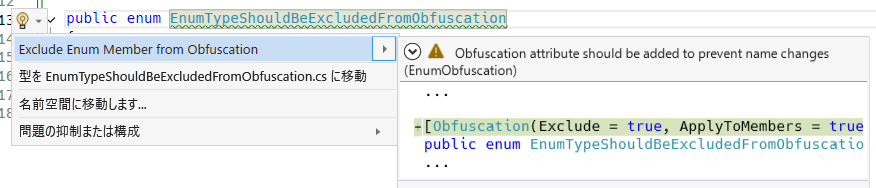
[!NOTE]
Obfuscationattribute is from C# base library and it does NOT provide feature to obfuscate compiled assembly. It just provides configuration option to obfuscation tools which recognizing this attribute.
Kotlin-like Enum Pattern
Analysis to help implementing Kotlin-style enum class.
Here are Enum-like type requirements:
MyEnumLike[]orReadOnlyMemory<MyEnumLike>field(s) exist- analyzer will check field initializer correctness if name is starting with
Entries(case-sensitive) or ending withentries(case-insensitive)
- analyzer will check field initializer correctness if name is starting with
sealedmodifier on typeprivateconstructor onlypublic staticmember calledEntriesexistspublic bool Equalsmethod should not be declared/overridden
public class EnumLike
//           ~~~~~~~~ WARN: no `sealed` modifier on type and public constructor exists
//                          * this warning appears only if type has member called 'Entries'
{
    public static readonly EnumLike A = new("A");
    public static readonly EnumLike B = new("B");

    public static ReadOnlySpan<EnumLike> Entries => EntriesAsMemory.Span;

    // 'Entries' must have all of 'public static readonly' fields in declared order
    static readonly EnumLike[] _entries = new[] { B, A };
    //                                    ~~~~~~~~~~~~~~ wrong order!!

    // 'ReadOnlyMemory<T>' can be used instead of array
    public static readonly ReadOnlyMemory<EnumLike> EntriesAsMemory = new(new[] { A, B });


    /* ===  Kotlin style enum template  === */

    static int AUTO_INCREMENT = 0;  // iota

    public readonly int Ordinal;
    public readonly string Name;

    private EnumLike(string name) { Ordinal = AUTO_INCREMENT++; Name = name; }

    public override string ToString()
    {
        const string SEP = ": ";
        Span<char> span = stackalloc char[Name.Length + 11 + SEP.Length];  // 11 for int.MinValue.ToString().Length

        Ordinal.TryFormat(span, out var written);
        SEP.AsSpan().CopyTo(span.Slice(written));
        written += SEP.Length;
        Name.AsSpan().CopyTo(span.Slice(written));
        written += Name.Length;

        return span.Slice(0, written).ToString();
    }
}
Benefits of Enum-like Types
Benefits
Kotlin-like enum (algebraic data type) can prevent invalid value creation.
var invalid = Activator.CreateInstance(typeof(EnumLike));

if (EnumLike.A == invalid || EnumLike.B == invalid)
{
    // this code path won't be reached
    // each enum like entry is a class instance and ReferenceEquals match required
}
Unfortunately, use in switch statement is a bit weird.
var val = EnumLike.A;

switch (val)
{
    // pattern matching with case guard...!!
    case EnumLike when val == EnumLike.A:
        System.Console.WriteLine(val);
        break;

    case EnumLike when val == EnumLike.B:
        System.Console.WriteLine(val);
        break;
}

// this pattern generates same AOT compiled code
switch (val)
{
    // typeless case guard
    case {} when val == EnumLike.A:
        System.Console.WriteLine(val);
        break;

    case {} when val == EnumLike.B:
        System.Console.WriteLine(val);
        break;
}
Disposable Analyzer
var d = new Disposable();
//      ~~~~~~~~~~~~~~~~ no `using` statement found

d = (new object()) as IDisposable;
//  ~~~~~~~~~~~~~~~~~~~~~~~~~~~~~ cast from/to disposable
Analyzer won't show warning in the following condition:
- instance is created on
returnstatementreturn new Disposable();
- assign instance to field or property
m_field = new Disposable();
- cast between disposable types
var x = myDisposable as IDisposable;
Suppress Disposable Analysis
To suppress analysis for specified types, declare attribute named DisposableAnalyzerSuppressor and add it to assembly.
[assembly: DisposableAnalyzerSuppressor(typeof(Task), typeof(Task<>))]  // Task and Task<T> are ignored by default

[Conditional("DEBUG"), AttributeUsage(AttributeTargets.Assembly, AllowMultiple = true)]
sealed class DisposableAnalyzerSuppressor : Attribute
{
    public DisposableAnalyzerSuppressor(params Type[] _) { }
}
Read-Only Variable Analysis
This analyzer helps keep local values and parameters immutable by flagging write operations.
- Assignment
=??== ref- Deconstruction assignment:
(x, y) = .../(x, var y) = ...- Deconstruction declaration assignment is allowed:
var (x, y) = ...
- Deconstruction declaration assignment is allowed:
- Note: Assignment to
outmethod parameter is always allowed
- Increment and decrement
++x,x++,--x,x--
- Compound assignment
+=,-=,*=,/=,%=&=,|=,^=,<<=,>>=
- Argument handling
- Allowed: Method invocation and object creation (e.g.
Use(Create()),Use(new C())) - Allowed: Anonymous object and array creation (e.g.
Use(new { X = 1 }),Use(new[] { 1, 2 })) - Allowed:
out var x/out T xdeclaration at call site - Allowed: Root local/parameter name starts with
mut_ - Type checks (
stringis treated as readonly struct)- Reference type argument (except string) is always reported
- Struct argument:
- Allowed: Callee parameter has
inmodifier - Allowed: Callee parameter has no modifier and struct is
readonly - Otherwise reported
- Allowed: Callee parameter has
- Allowed: Method invocation and object creation (e.g.
class Demo
{
    readonly struct ReadOnlyS { }
    struct MutableS { }

    static object Create() => new object();
    static void UseRefType(object value) { }
    static void UseIn(in MutableS value) { }
    static void UseReadOnly(ReadOnlyS value) { }
    public int this[string key] => 0;
    public int this[object key] => 0;

    void Test(
        int param,
        int mut_param,
        MutableS s,
        ReadOnlyS rs,
        ref int refValue,
        out int result
    )
    {
        result = 0;  // Allowed: assignment to `out` parameter

        param += 1;      // Reported: parameter assignment
        mut_param += 1;  // Allowed: `mut_` prefix on parameter

        int foo = 0;
        foo = 1;     // Reported: local assignment
        foo++;       // Reported: local increment

        var (x, y) = (42, 310);  // Allowed: var (...) is allowed
        (x, y) = (42, 310);      // Reported: deconstruction assignment
        (x, var z) = (42, 310);  // Reported: mixed deconstruction causes error
                                    //           For Unity compatibility, `var z` also get error

        // Allowed: assignment in for-header
        int i;
        for (i = 0; i < 10; i++)
        {
            i += 0;  // Reported: not in for-header
        }

        // Allowed: assignment in while-header
        int read;
        while ((read = stream.Read(buffer, 0, buffer.Length)) > 0)
        {
            read = 0;  // Reported: not in while-header
        }

        int.TryParse("1", out var parsed);  // Allowed: out declaration at call site
        int.TryParse("1", out parsed);      // Reported: out overwrites variable

        int.TryParse("1", out var mut_parsed);
        int.TryParse("1", out mut_parsed);  // Allowed: `mut_` prefix

        int mut_counter = 0;
        mut_counter = 1;  // Allowed: `mut_` prefix

        string key = "A";
        object keyObj = new object();
        var indexer = new Demo();
        _ = indexer[key];     // Allowed: string is treated readonly-struct
        _ = indexer[keyObj];  // Reported: reference type indexer key
        indexer = new();      // Reported: local assignment (reference type)

        UseIn(s);                  // Allowed: callee parameter is `in`
        UseReadOnly(rs);           // Allowed: readonly struct with no modifier
        UseRefType(Create());      // Allowed: argument value is invocation
        UseRefType(new object());  // Allowed: argument value is object creation
    }
}
[!NOTE] Member access assignments are reported when rooted at local/parameter (e.g.
foo.Bar.Value = 1wherefoois local/parameter), but not when rooted at field.
Annotating / Underlining
[!IMPORTANT] Underlining analyzer is obsolete: to enable it again, set the preprocessor symbol
STMG_ENABLE_UNDERLINING_ANALYZERand rebuild.
There is optional feature to draw underline on selected types, fields, properties, generic type/method arguments and parameters of method, delegate and lambda function.
As of Visual Studio's UX design, Info severity diagnostic underlines are drawn only on a few leading chars, not drawn whole marked area. So for workaround, underline on keyword is dashed.
[!TIP]
!-starting message will add warning annotation on keyword instead of info diagnostic annotation.
How to Use
To avoid dependency to this analyzer, required attribute for underlining is chosen from builtin System.ComponentModel assembly so that syntax is little bit weird.
Analyzer is checking identifier keyword in C# source code, not checking actual C# type. DescriptionAttribute in C# attribute syntax is the only keyword to draw underline. Omitting Attribute or adding namespace are not recognized.
[!TIP]
CategoryAttributecan be used instead ofDescriptionAttribute.By contrast from Description, CategoryAttribute draws underline only on exact type reference and constructors including
base(). Any inherited types, variables, fields and properties don't get underline.
using System.ComponentModel;

[DescriptionAttribute("Draw underline for IDE environment and show this message")]
//          ^^^^^^^^^ `Attribute` suffix is required to draw underline
public class WithUnderline
{
    [DescriptionAttribute]  // parameter-less will draw underline with default message
    public static void Method() { }
}

// C# language spec allows to omit `Attribute` suffix but when omitted, underline won't be drawn
// to avoid conflict with originally designed usage for VS form designer
[Description("No Underline")]
public class NoUnderline { }

// underline won't be drawn when namespace is specified
[System.ComponentModel.DescriptionAttribute("...")]
public static int Underline_Not_Drawn = 0;

// this code will draw underline. 'Trivia' is allowed to being added in attribute syntax
[ /**/  DescriptionAttribute   (   "Underline will be drawn" )   /* hello, world. */   ]
public static int Underline_Drawn = 310;
Verbosity Control
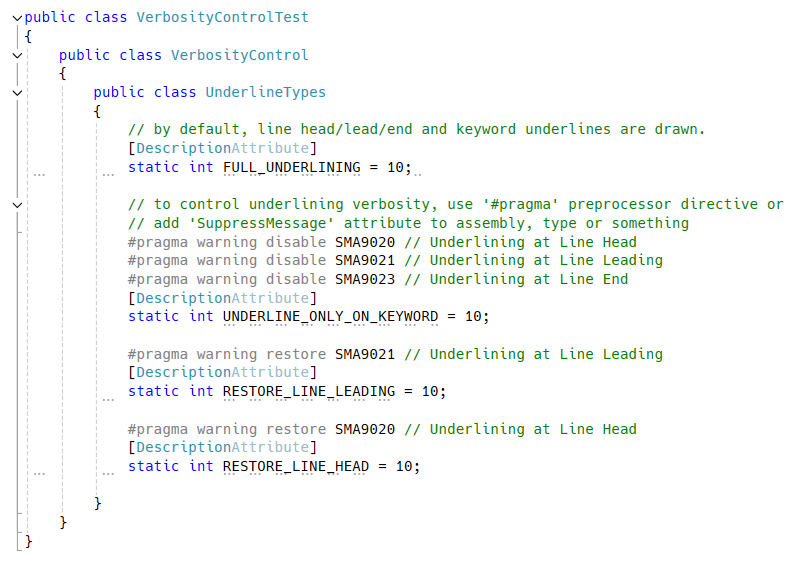
There are 4 types of underline, line head, line leading, line end and keyword.
By default, static field analyzer will draw most verbose underline.
You can omit specific type of underline by using #pragma preprocessor directive or adding SuppressMessage attribute or etc.
Unity Tips
Underlining is achieved by using Description attribute designed for Visual Studio's visual designer, formerly known as form designer.
To remove unnecessary attribute from Unity build, add the following link.xml file in Unity project's Assets folder.
<linker>
    <assembly fullname="System.ComponentModel">
        <type fullname="System.ComponentModel.DescriptionAttribute" preserve="nothing"/>
    </assembly>
</linker>
TODO
Disposable Analyzer
Known Misdetections
- lambda return statement
MethodArg(() => DisposableProperty);MethodArg(() => { return DisposableProperty; });
?:operatorDisposableProperty = condition ? null : disposableList[index];
Enum Analyzer Features
- implicit cast suppressor attribute
[assembly: EnumAnalyzer(SuppressImplicitCast = true)]- DO NOT suppress cast to
objectEnumstringintor other blittable types - (implicit cast operator is designed function in almost cases. it should be suppressed by default?)
- DO NOT suppress cast to
- allow internal only entry for Enum-like types
sealed class MyEnumLike
{
    public static readonly MyEnumLike PublicEntry = new();
    internal static readonly MyEnumLike ForDebuggingPurpose = new();
}