⚠ Deprecated: Legacy
See GitHub Readme for separate packages (https://github.com/salixzs/AspNetCore.Utilities)
Suggested alternative: Salix.AspNetCore.FrontPage
Core functionalities which should exist in each (REST) API implementation with ASP.NET Core 3+ framework. Provides Global Error Handler (JSON object details on unhandled exceptions),HealthCheck customizations (formatter), Simple root page and healthcheck results page and ConfigurationValidation handlers and extensions.
Get Started
$ dotnet add package Salix.AspNetCore.UtilitiesReadme
Salix.AspNetCore.Utilities
A collection of additional functionality to Asp.Net Core framework for building better APIs.
There are few functionality extensions provided in package, allowing to better handle some task implementations when creating REST API in Asp.net Core framework.
These include:
- Global Exception handler (Json error)
- Health check formatter
- ConfigurationValidation handlers
- Home page & Health page (w/o full MVC stack)
Package is built on .Net Standard 2.0. It is tested by using within Asp.Net Core 5 (on .Net 5) API. Sample solution is available in GitHub repository.
Global error handler
Allows exceptions to be returned to API calling parties as JSON structure, adding some additional information on its type and causes (incl. CallStack when API runs in development mode). This allows to get these 400 & 500 Http Status code errors with additional information, somewhat complying to IETF rfc7807 proposed standard. Here is example on how error is returned when exception is thrown somewhere in API:
{
  "type": "ServerError",
  "title": "This is thrown on purpose.",
  "status": 500,
  "requestedUrl": "/api/sample/exception",
  "errorType": 1,
  "exceptionType": "ApplicationException",
  "innerException": null,
  "innerInnerException": null,
  "stackTrace": [
    "at FaultyLogic() in Sample.AspNet5.Logic\\SampleLogic.cs: line 18",
    "at ThrowException() in Sample.AspNet5.Api\\Services\\HomeController.cs: line 110",
    "at Invoke(HttpContext httpContext) in Source\\Salix.ExceptionHandling\\ApiJsonExceptionMiddleware.cs: line 56"
  ],
  "validationErrors": []
}
(Stack trace is not shown when API runs in production (configurable)).
Provided functionalities can handle other types of exceptions differently, like NotImplementedException, DataValidationException and any other specific exception.
See more extensive documentation on how to use this functionality.
Health check formatter
Custom formatter for Asp.Net HealthCheck functionalities, extending it to include additional information, like configuration values and other information which might help immediately pinpoint problem when health check is returning Degraded or Unhealthy responses.
Example response:
{
    "status": "Healthy",
    "checks": [
        {
            "key": "Database",
            "status": "Healthy",
            "description": "Database is OK.",
            "exception": null,
            "data": [
                {
                    "key": "ConnString",
                    "value": "Connection string (shown only in developer mode)"
                }
            ]
        },
        {
            "key": "ExtApi",
            "status": "Healthy",
            "description": "ExtAPI is OK.",
            "exception": null,
            "data": [
                {
                    "key": "ExtApi URL",
                    "value": "https://extapi.com/api"
                },
                {
                    "key": "User",
                    "value": "username from config"
                },
                {
                    "key": "Password",
                    "value": "password from config"
                },
                {
                    "key": "Token",
                    "value": "Secret token from config"
                }
            ]
        }
    ]
}
See more extensive documentation on how to use this functionality.
ConfigurationValidation handlers
Extends configuration class validations, provided by package ConfigurationValidation (Repo).
It implements necessary registration extensions for your configuration classes and three different handlers of validation results.
IStartupFilter
Checks configuration objects during app startup and throws exception (preventing app from starting up).
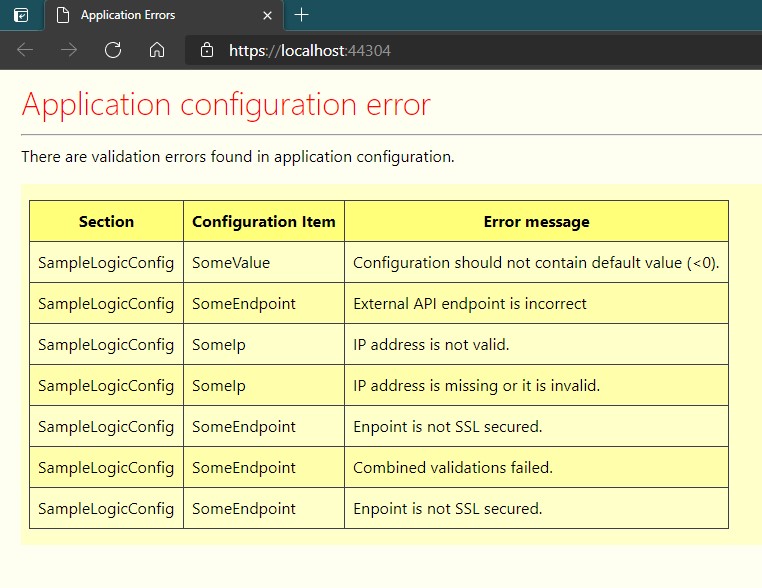
Configuration Error page
Implemented as middleware component, similar to "UseDeveloperErrorPage", which returns "yellow screen of death" for your application when configuration validation failed. Application itself will not work, but you can see in browser (when open app in it) this error page.
HealthCheck
Standard Asp.Net HealthCheck solution to include in application health checking routines.
See more extensive documentation on how to use this functionality.
Root page
Default Asp.Net API provides no visible output when its root URL is open in browser. If there is no default controller for root path, it returns 404 (not found) error.
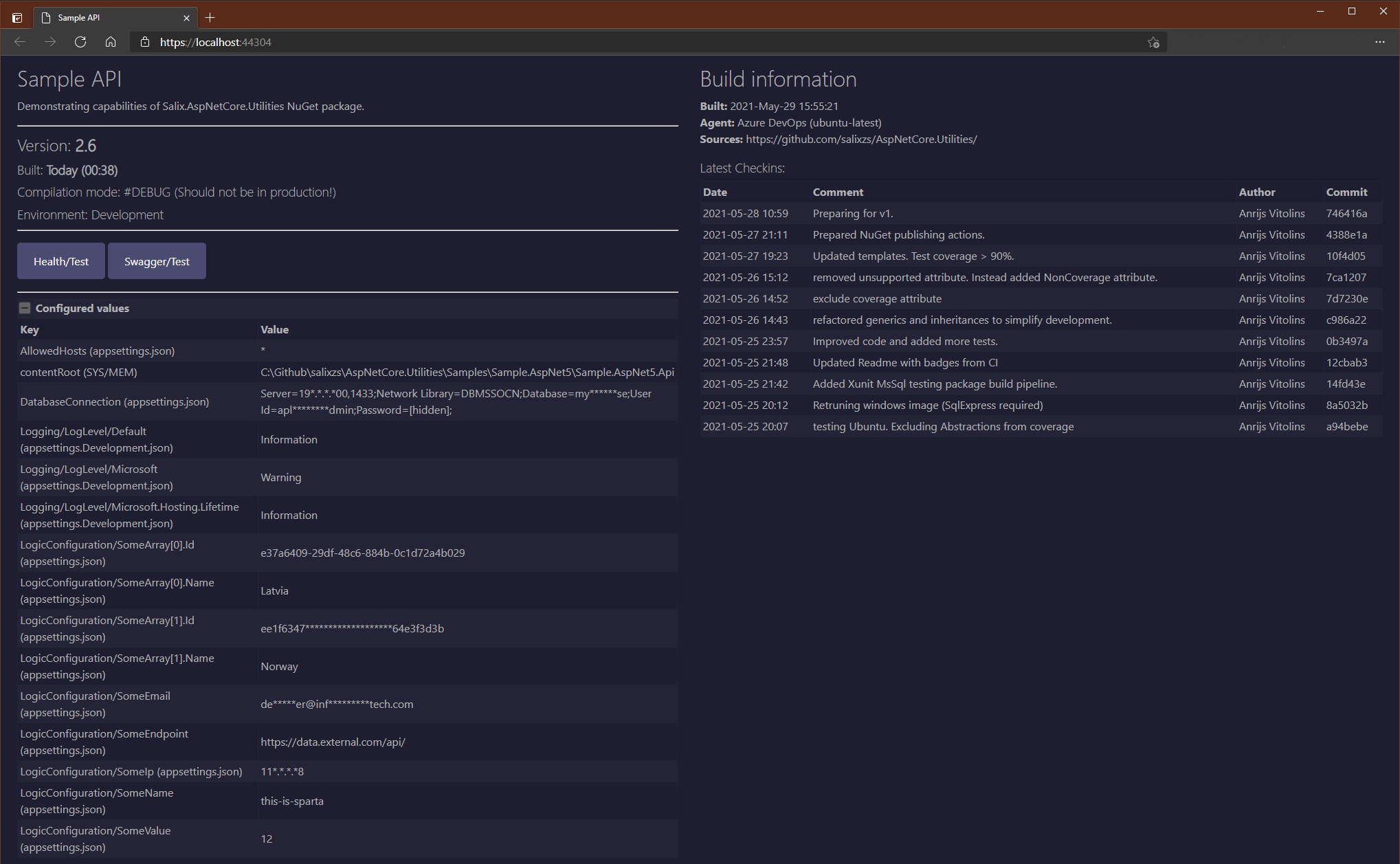
Salix.AspNetCore.Utilites include simple page renderer to show some technical and monitoring/troubleshooting information, which can be used in HomeController Index action.
It does not require full MVC stack (views, razor) to have them, so API stays in controller-only mode.
Here is example of such page from Sample solution with all bells and whistles:
Health check / test page
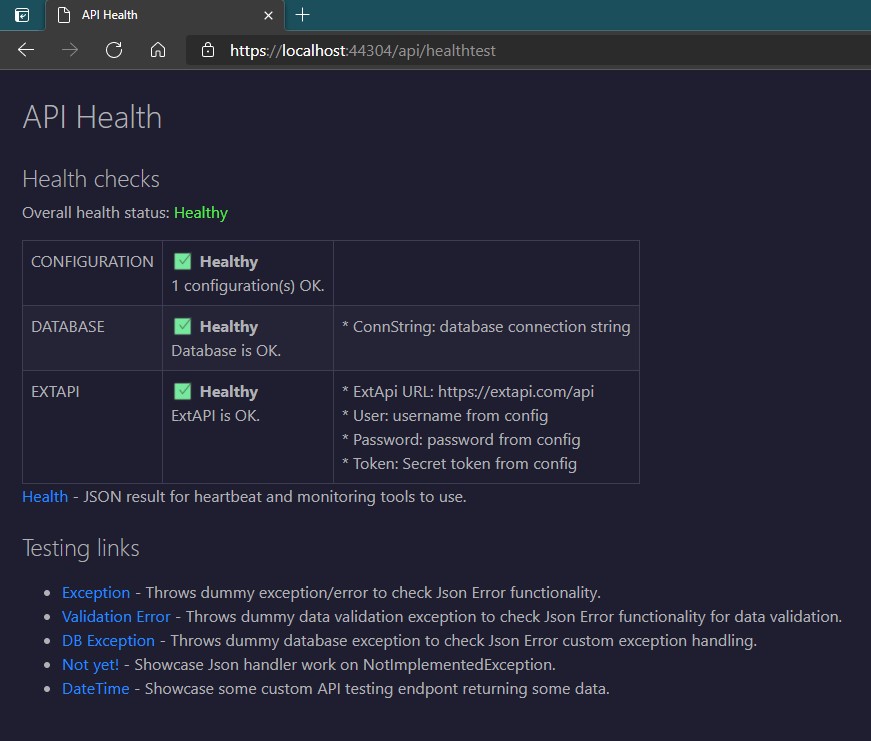
NOTE: This functionality should be implemented only if you have at least one HelathCheck implemented. ASP.NET HealthCheck provides only JSON endpoint for health checking, but looking at HealthCheck Json output can be problematic for human eye to grasp necessary information right away. This page can provide visual colored cues for such overview, something like this:
See more extensive documentation on how to use this functionality.
How to use
You add Salix.AspNetCore.Utilities package to asp.net project use Visual Studio NuGet manager or from command line:
PM> Install-Package Salix.AspNetCore.Utilities
Release notes
Available in this link.