PaulBraetz/RhoMicro.CodeAnalysis.JsonSchemaGeneratorv24.1.0
✓ Verified.NET Std2.0
Generates json schemata from class definitions.
Get Started
$ dotnet add package RhoMicro.CodeAnalysis.JsonSchemaGeneratorReadme

JsonSchemaGenerator
Generate json schemata from class definitions with ease.
Licensing
This source code generator is licensed to you under the MPL-2.0. The code generated by the tool, is however not subject to this license, but rather the licensing scheme of whatever project it is being used in.
Features
- generate bespoke json schemata from C# class definitions
- supported primitive types:
- primitives:
float,double,decimal,sbyte,short,int,long,byte,ushort,uint,ulong,bool,string,object - date types:
DateTime,TimeSpan,TimeOnly,DateOnly,DateTimeOffset - list-like types:
T[],ISet<T>,IReadOnlySet<T>,HashSet<T>,List<T> - map-like types:
IDictionary<TKey, TValue>,IReadOnlyDictionary<TKey, TValue>,Dictionary<TKey, TValue>
- primitives:
- generate nested json schemata for all other types used in properties
Installation
Package Reference:
<ItemGroup>
	<PackageReference Include="RhoMicro.CodeAnalysis.JsonSchemaGenerator" Version="*">
	<IncludeAssets>runtime; build; native; contentfiles; analyzers; buildtransitive</IncludeAssets>
	<PrivateAssets>all</PrivateAssets>
	</PackageReference>
</ItemGroup>
CLI:
dotnet add package RhoMicro.CodeAnalysis.JsonSchemaGenerator
The cli tool extracting generated schemata to directories in the output directory requires dotnet 9 to be installed.
How To Use
The generator is instructed via three attributes:
RhoMicro.CodeAnalysis.JsonSchemaAttributeRhoMicro.CodeAnalysis.JsonSchemaPropertyAttributeRhoMicro.CodeAnalysis.JsonSchemaExcludeAttributeas well as two MSBuild properties:JsonSchemaGeneratorIntermediateOutputPathJsonSchemaGeneratorOutputPath
Only public get/set properties will be considered when examining schema classes.
Attributes
JsonSchemaAttribute
Annotate classes with this attribute to generate a json schema for it.
JsonSchemaPropertyAttribute
Annotate properties of schema classes with this attribute to provide a title and/or description for that property.
JsonSchemaExcludeAttribute
Annotate properties of schema classes with this attribute to exclude them from schema generation.
MSBuild Properties
JsonSchemaGeneratorIntermediateOutputPath
This is the directory in the intermediate (obj) directory that schemata will be stored at.
The default value is JsonSchemata.
JsonSchemaGeneratorOutputPath
This is the directory in the output (bin) directory that schemata from the JsonSchemaGeneratorIntermediateOutputPath of referenced projects will be stored at.
The default value is JsonSchemata.
Examples
Simple Example
For this example, a project named HelloWorld is used.
- Create a class to generate a schema for:
namespace HelloWorld.MyNamespace;

using RhoMicro.CodeAnalysis;

[JsonSchema]
class Foo1
{
    public Int32 Int32Property { get; set; }
}
-
Build your project.
-
Observe the generated schemata in the
JsonSchemaGeneratorIntermediateOutputPathandJsonSchemaGeneratorOutputPath:
{
  "properties": {
    "Int32Property": {
      "type": [
        "integer"
      ]
    }
  },
  "$id": "./HelloWorld/HelloWorld/MyNamespace/Foo1.json",
  "type": [
    "object"
  ],
  "additionalProperties": false
}
/HelloWorld/HelloWorld/MyNamespace/Foo1.json
Note how generated schemata will be saved to a directory corresponding to their namespace and assembly name, hence the HelloWorld/HelloWorld/MyNamespace directory structure.
List-Like Types
The following types will cause array schemata to be generated:
T[]ISet<T>IReadOnlySet<T>HashSet<T>List<T>
For this example, a project named HelloWorld is used.
- Create a class to generate a schema for:
namespace HelloWorld.MyNamespace;

using RhoMicro.CodeAnalysis;

[JsonSchema]
class Foo2
{
    public Int32[] ArrayProperty { get; set; } = [];
    public ISet<Int32> ISetProperty { get; set; } = new HashSet<Int32>();
    public IReadOnlySet<Int32> IReadOnlySetProperty { get; set; } = new HashSet<Int32>();
    public HashSet<Int32> HashSetProperty { get; set; } = [];
    public List<Int32> ListProperty { get; set; } = [];
}
-
Build your project.
-
Observe the generated schemata in the
JsonSchemaGeneratorIntermediateOutputPathandJsonSchemaGeneratorOutputPath:
{
  "properties": {
    "ArrayProperty": {
      "items": {
        "type": [
          "integer"
        ]
      },
      "type": [
        "array"
      ]
    },
    "ISetProperty": {
      "items": {
        "type": [
          "integer"
        ]
      },
      "type": [
        "array"
      ]
    },
    "IReadOnlySetProperty": {
      "items": {
        "type": [
          "integer"
        ]
      },
      "type": [
        "array"
      ]
    },
    "HashSetProperty": {
      "items": {
        "type": [
          "integer"
        ]
      },
      "type": [
        "array"
      ]
    },
    "ListProperty": {
      "items": {
        "type": [
          "integer"
        ]
      },
      "type": [
        "array"
      ]
    }
  },
  "$id": "./HelloWorld/HelloWorld/MyNamespace/Foo2.json",
  "type": [
    "object"
  ],
  "additionalProperties": false
}
./JsonSchemata/HelloWorld/HelloWorld/MyNamespace/Foo2.json
Map-Like Types
The following types will cause object schemata to be generated:
IDictionary<TKey, TValue>IReadOnlyDictionary<TKey, TValue>Dictionary<TKey, TValue>object
For this example, a project named HelloWorld is used.
- Create a class to generate a schema for:
namespace HelloWorld.MyNamespace;

using RhoMicro.CodeAnalysis;

[JsonSchema]
class Foo3
{
    public IDictionary<String, Int32> IDictionaryProperty { get; set; } = new Dictionary<String, Int32>();
    public IReadOnlyDictionary<String, Int32> IReadOnlyDictionaryProperty { get; set; } = new Dictionary<String, Int32>();
    public Dictionary<String, Int32> DictionaryProperty { get; set; } = [];
}
-
Build your project.
-
Observe the generated schemata in the
JsonSchemaGeneratorIntermediateOutputPathandJsonSchemaGeneratorOutputPath:
{
  "properties": {
    "IDictionaryProperty": {
      "type": [
        "object"
      ],
      "additionalProperties": {
        "type": [
          "integer"
        ]
      }
    },
    "IReadOnlyDictionaryProperty": {
      "type": [
        "object"
      ],
      "additionalProperties": {
        "type": [
          "integer"
        ]
      }
    },
    "DictionaryProperty": {
      "type": [
        "object"
      ],
      "additionalProperties": {
        "type": [
          "integer"
        ]
      }
    }
  },
  "$id": "./HelloWorld/HelloWorld/MyNamespace/Foo3.json",
  "type": [
    "object"
  ],
  "additionalProperties": false
}
/HelloWorld/HelloWorld/MyNamespace/Foo3.json
Currently, all Map-Like types are expressed using the object type, irrespective of their TKey argument. This may change in the future to support other key types. The issue is being tracked here: #49
Primitive Types
All C# primitive types are supported:
floatdoubledecimalsbyteshortintlongbyteushortuintulongboolstringobject
For this example, a project named HelloWorld is used.
- Create a class to generate a schema for:
namespace HelloWorld.MyNamespace;

using RhoMicro.CodeAnalysis;

[JsonSchema]
class Foo4
{
    public Single SingleProperty { get; set; }
    public Double DoubleProperty { get; set; }
    public Decimal DecimalProperty { get; set; }
    public SByte SByteProperty { get; set; }
    public Int16 Int16Property { get; set; }
    public Int32 Int32Property { get; set; }
    public Int64 Int64Property { get; set; }
    public Byte ByteProperty { get; set; }
    public UInt16 UInt16Property { get; set; }
    public UInt32 UInt32Property { get; set; }
    public UInt64 UInt64Property { get; set; }
    public Boolean BooleanProperty { get; set; }
    public String StringProperty { get; set; } = String.Empty;
    public Object ObjectProperty { get; set; } = new();
}
-
Build your project.
-
Observe the generated schemata in the
JsonSchemaGeneratorIntermediateOutputPathandJsonSchemaGeneratorOutputPath:
{
  "properties": {
    "SingleProperty": {
      "type": [
        "number"
      ]
    },
    "DoubleProperty": {
      "type": [
        "number"
      ]
    },
    "DecimalProperty": {
      "type": [
        "number"
      ]
    },
    "SByteProperty": {
      "type": [
        "integer"
      ]
    },
    "Int16Property": {
      "type": [
        "integer"
      ]
    },
    "Int32Property": {
      "type": [
        "integer"
      ]
    },
    "Int64Property": {
      "type": [
        "integer"
      ]
    },
    "ByteProperty": {
      "type": [
        "integer"
      ]
    },
    "UInt16Property": {
      "type": [
        "integer"
      ]
    },
    "UInt32Property": {
      "type": [
        "integer"
      ]
    },
    "UInt64Property": {
      "type": [
        "integer"
      ]
    },
    "BooleanProperty": {
      "type": [
        "boolean"
      ]
    },
    "StringProperty": {
      "type": [
        "string"
      ]
    },
    "ObjectProperty": {
      "type": [
        "object"
      ],
      "additionalProperties": false
    }
  },
  "$id": "./HelloWorld/HelloWorld/MyNamespace/Foo4.json",
  "type": [
    "object"
  ],
  "additionalProperties": false
}
/HelloWorld/HelloWorld/MyNamespace/Foo4.json
Notice that integral types are expressed using the integer type, while floating- and fixed-point numbers are expressed using the number type.
Date Types
The following date types cause string schemata to be generated:
DateTimeTimeSpanTimeOnlyDateOnlyDateTimeOffset
For this example, a project named HelloWorld is used.
- Create a class to generate a schema for:
namespace HelloWorld.MyNamespace;

using RhoMicro.CodeAnalysis;

[JsonSchema]
class Foo5
{
    public DateTime DateTimeProperty { get; set; }
    public TimeSpan TimeSpanProperty { get; set; }
    public TimeOnly TimeOnlyProperty { get; set; }
    public DateOnly DateOnlyProperty { get; set; }
    public DateTimeOffset DateTimeOffsetProperty { get; set; }
}
-
Build your project.
-
Observe the generated schemata in the
JsonSchemaGeneratorIntermediateOutputPathandJsonSchemaGeneratorOutputPath:
{
  "properties": {
    "DateTimeProperty": {
      "type": [
        "string"
      ]
    },
    "TimeSpanProperty": {
      "type": [
        "string"
      ]
    },
    "TimeOnlyProperty": {
      "type": [
        "string"
      ]
    },
    "DateOnlyProperty": {
      "type": [
        "string"
      ]
    },
    "DateTimeOffsetProperty": {
      "type": [
        "string"
      ]
    }
  },
  "$id": "./HelloWorld/HelloWorld/MyNamespace/Foo5.json",
  "type": [
    "object"
  ],
  "additionalProperties": false
}
/HelloWorld/HelloWorld/MyNamespace/Foo5.json
Nullable Value Types
Nullable value types cause combined schemata to be generated.
For this example, a project named HelloWorld is used.
- Create a class to generate a schema for:
namespace HelloWorld.MyNamespace;

using RhoMicro.CodeAnalysis;

[JsonSchema]
class Foo6
{
    public Int32? NullableInt32Property { get; set; }
}
-
Build your project.
-
Observe the generated schemata in the
JsonSchemaGeneratorIntermediateOutputPathandJsonSchemaGeneratorOutputPath:
{
  "properties": {
    "NullableInt32Property": {
      "type": [
        "null",
        "integer"
      ]
    }
  },
  "$id": "./HelloWorld/HelloWorld/MyNamespace/Foo6.json",
  "type": [
    "object"
  ],
  "additionalProperties": false
}
/HelloWorld/HelloWorld/MyNamespace/Foo6.json
Nullable Reference Types
Nullable reference types cause combined schemata to be generated.
For this example, a project named HelloWorld is used.
- Create a class to generate a schema for:
namespace HelloWorld.MyNamespace;

using RhoMicro.CodeAnalysis;

[JsonSchema]
class Foo7
{
    public Object? NullableObjectProperty { get; set; }
}
-
Build your project.
-
Observe the generated schemata in the
JsonSchemaGeneratorIntermediateOutputPathandJsonSchemaGeneratorOutputPath:
{
  "properties": {
    "NullableObjectProperty": {
      "type": [
        "null",
        "object"
      ],
      "additionalProperties": false
    }
  },
  "$id": "./HelloWorld/HelloWorld/MyNamespace/Foo7.json",
  "type": [
    "object"
  ],
  "additionalProperties": false
}
/HelloWorld/HelloWorld/MyNamespace/Foo7.json
Required Properties
Properties annotated with the required keyword are included in the required properties list.
For this example, a project named HelloWorld is used.
- Create a class to generate a schema for:
[JsonSchema]
class Foo8
{
    public required Object RequiredObjectProperty { get; set; }
}
-
Build your project.
-
Observe the generated schemata in the
JsonSchemaGeneratorIntermediateOutputPathandJsonSchemaGeneratorOutputPath:
{
  "properties": {
    "RequiredObjectProperty": {
      "type": [
        "object"
      ],
      "additionalProperties": false
    }
  },
  "required": [
    "RequiredObjectProperty"
  ],
  "$id": "./HelloWorld/HelloWorld/MyNamespace/Foo8.json",
  "type": [
    "object"
  ],
  "additionalProperties": false
}
/HelloWorld/HelloWorld/MyNamespace/Foo8.json
Enum Properties
Enum properties cause all enum names and values, as well as their underlying type to be expressed in the genrated schema.
For this example, a project named HelloWorld is used.
- Create a class to generate a schema for:
namespace HelloWorld.MyNamespace;

using RhoMicro.CodeAnalysis;

enum MyEnum
{
    None,
    First,
    Second = 42
}

[JsonSchema]
class Foo9
{
    public MyEnum EnumProperty { get; set; }
}
-
Build your project.
-
Observe the generated schemata in the
JsonSchemaGeneratorIntermediateOutputPathandJsonSchemaGeneratorOutputPath:
{
  "properties": {
    "EnumProperty": {
      "anyOf": [
        {
          "type": [
            "integer"
          ]
        },
        {
          "enum": [
            "None",
            "First",
            "Second",
            0,
            1,
            42
          ]
        }
      ]
    }
  },
  "$id": "./HelloWorld/HelloWorld/MyNamespace/Foo9.json",
  "type": [
    "object"
  ],
  "additionalProperties": false
}
/HelloWorld/HelloWorld/MyNamespace/Foo9.json
Schema References
Referencing another class annotated with the JsonSchemaAttribute will cause a $ref schema to be generated.
For this example, a project named HelloWorld is used.
- Create a classes to generate a schema for:
namespace HelloWorld.MyNamespace;

using RhoMicro.CodeAnalysis;

[JsonSchema]
class Foo11
{
    public Foo10 SchemaReferenceProperty { get; set; } = new();
}

[JsonSchema]
class Foo10;
-
Build your project.
-
Observe the generated schemata in the
JsonSchemaGeneratorIntermediateOutputPathandJsonSchemaGeneratorOutputPath:
{
  "$id": "./HelloWorld/HelloWorld/MyNamespace/Foo10.json",
  "type": [
    "object"
  ],
  "additionalProperties": false
}
/HelloWorld/HelloWorld/MyNamespace/Foo10.json
{
  "properties": {
    "SchemaReferenceProperty": {
      "$ref": "../../../HelloWorld/HelloWorld/MyNamespace/Foo10.json"
    }
  },
  "$id": "./HelloWorld/HelloWorld/MyNamespace/Foo11.json",
  "type": [
    "object"
  ],
  "additionalProperties": false
}
/HelloWorld/HelloWorld/MyNamespace/Foo11.json
POCO References
Referencing another class that is neither a map-like, list-like, primitive, date nor schema (annotated) type will cause a nested schema to be generated for that class.
For this example, a project named HelloWorld is used.
- Create a class to generate a schema for:
namespace HelloWorld.MyNamespace;

using RhoMicro.CodeAnalysis;

[JsonSchema]
class Foo13
{
    public Foo12 PocoReferenceProperty { get; set; } = new();
}

class Foo12;
-
Build your project.
-
Observe the generated schemata in the
JsonSchemaGeneratorIntermediateOutputPathandJsonSchemaGeneratorOutputPath:
{
  "properties": {
    "PocoReferenceProperty": {
      "type": [
        "object"
      ],
      "additionalProperties": false
    }
  },
  "$id": "./HelloWorld/HelloWorld/MyNamespace/Foo13.json",
  "type": [
    "object"
  ],
  "additionalProperties": false
}
/HelloWorld/HelloWorld/MyNamespace/Foo13.json
Warning: Currently, a stack overflow will be caused when defining circular references in POCO schemata:
class Foo12
{
    public Foo12? Foo { get; set; }
}
This issue is being tracked here: #48
Appsettings
This generator may be used to supply the schemata for classes bound against json configuration files via the options pattern.
For this setup, a helper schema appsettings.schema.json is used to define which sections of the configuration should be bound against which schema. This helper schema is managed in two variations: one for development and one for release. The development helper schema appsettings.schema.json references the generated schemata relative to the project directory. The release schema appsettings.release.schema.json references the generated schemata relative to the output directory. Upon building the project, the release schema is copied to the output directory under the name appsettings.schema.json.
For this example, a project named HelloWorld is used.
- Create a class to generate a schema for:
namespace HelloWorld.MyNamespace;

using RhoMicro.CodeAnalysis;

[JsonSchema]
class Foo14
{
    public Double DoubleProperty { get; set; }
    public required String[] StringArrayProperty { get; set; }
}
- Create an
appsettings.schema.jsonfile:
{
    "properties": {
        "Foo": {
            "$ref": "./bin/Debug/net9.0/JsonSchemata/HelloWorld/HelloWorld/MyNamespace/Foo14.json"
        }
    }
}
- Create an
appsettings.schema.release.jsonfile:
{
    "properties": {
        "Foo": {
            "$ref": "./JsonSchemata/HelloWorld/HelloWorld/MyNamespace/Foo14.json"
        }
    }
}
- Create an
appsettings.jsonfile:
{
  "$schema": "./appsettings.schema.json"
}
- Add tasks for copying the
appsettings.jsonandappsettings.release.jsonfiles to the output directory:
<ItemGroup>
    <None Update="appsettings.json">
        <CopyToOutputDirectory>PreserveNewest</CopyToOutputDirectory>
    </None>
</ItemGroup>

<Target Name="CopyAppsettingsJsonSchema" AfterTargets="Build">
    <Copy SourceFiles="appsettings.schema.release.json" DestinationFiles="$(TargetDir)\appsettings.schema.json" />
</Target>
-
Build your project.
-
Observe the generated schemata in the
JsonSchemaGeneratorIntermediateOutputPathandJsonSchemaGeneratorOutputPath:
{
  "properties": {
    "DoubleProperty": {
      "type": [
        "number"
      ]
    },
    "StringArrayProperty": {
      "items": {
        "type": [
          "string"
        ]
      },
      "type": [
        "array"
      ]
    }
  },
  "required": [
    "StringArrayProperty"
  ],
  "$id": "./HelloWorld/HelloWorld/MyNamespace/Foo14.json",
  "type": [
    "object"
  ],
  "additionalProperties": false
}
/HelloWorld/HelloWorld/MyNamespace/Foo14.json
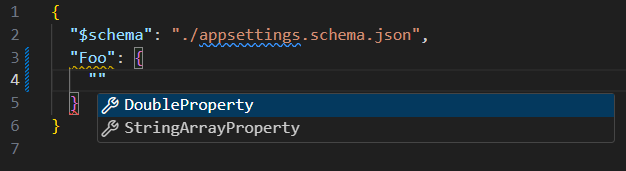
- Observe intellisense being available for the
appsettings.jsonfile:
- Observe schema validation being available for the
appsettings.jsonfile:

Once the project is built, the generated schema will be referenced by the appsettings.schema.json schema and available in the appsettings.json file in the project directory. Also, the appsettings.release.schema.json file will have been copied
to the output directory as appsettings.schema.json and reference the schemata as well, making them available to the appsettings.json file in that directory.
Reference Schemata From Other Projects
References to schema classes from other projects will cause $ref schemata to be generated.
For this example, two projects named HelloWorld and Library are used, where the HelloWorld project is referencing the Library project.
- Create a consuming class to generate a schema for:
namespace HelloWorld.MyNamespace;

using RhoMicro.CodeAnalysis;

[JsonSchema]
class Foo15
{
    public required Library.LibraryNamespace.Foo FooProperty { get; set; }
}
- Create a class to be consumed and generate a schema for:
namespace Library.LibraryNamespace;

using RhoMicro.CodeAnalysis;

[JsonSchema]
public class Foo
{
    public Int32 Int32Property { get; set; }
}
-
Build the project.
-
Observe the generated schemata in the
JsonSchemaGeneratorIntermediateOutputPathandJsonSchemaGeneratorOutputPath:
{
  "properties": {
    "FooProperty": {
      "$ref": "../../../Library/Library/LibraryNamespace/Foo.json"
    }
  },
  "required": [
    "FooProperty"
  ],
  "$id": "./HelloWorld/HelloWorld/MyNamespace/Foo15.json",
  "type": [
    "object"
  ],
  "additionalProperties": false
}
/HelloWorld/HelloWorld/MyNamespace/Foo15.json
{
  "properties": {
    "Int32Property": {
      "type": [
        "integer"
      ]
    }
  },
  "$id": "./Library/Library/LibraryNamespace/Foo.json",
  "type": [
    "object"
  ],
  "additionalProperties": false
}
/Library/Library/LibraryNamespace/Foo.json
Contributions
Thanks to wasabii for his help with the msbuild integration.