Helper library for all your Apple PassKit (Apple Wallet, Apple Passbook) needs: create passes, sign pass packages, receive webhooks into your aspnetcore app and send push updates to user devices. Apple Developer Account required!
Get Started
$ dotnet add package PassKitHelperReadme
PassKit Helper
Helper library for all your Apple PassKit (Apple Wallet, Apple Passbook) needs: create passes, sign pass packages, receive [de]install notifications and send pass updates.
Attention: Apple Developer Account required!




Features
- Create pass packages (
*.pkpassfiles):- With Fluent-styled
PassInfoBuilderandPassPackageBuilder - Using
byte[]and/orStreamas content images - Using
byte[]orStreamorX509Certificate2as certificates - Receive
MemoryStreamas result (save it to file or write to HttpResponse)
- With Fluent-styled
- Receive notifications from Apple about pass [de]installations and send updates:
- Add
UsePassKitMiddlewareinto yourStartup.Configure() - Implement
IPassKitServicefor real processing.
- Add
Get your own PKCS12 certificate file (using OpenSSL)
- Join Apple Developer Program (https://developer.apple.com/account/)
- Create certificate signing request:
- Obtain your copy of OpenSSL (see https://www.openssl.org/ and/or https://wiki.openssl.org/index.php/Binaries)
- Run:
openssl req -new -newkey rsa:2048 -nodes -keyout pass.key -out pass.csrand answer questions it asks.
- Obtain certificate:
- Go to https://developer.apple.com/account/resources/certificates/list and create new certificate, using
pass.csrfile from previous step. - Download certificate (
pass.cer)
- Go to https://developer.apple.com/account/resources/certificates/list and create new certificate, using
- Convert key and certificate into X509 file:
- Run
openssl x509 -in pass.cer -inform der -outform pem -out pass.cer.pemto convert certificate from DER to PEM format - Run
openssl pkcs12 -export -out pass.pfx -inkey pass.key -in pass.cer.pemto combine certificate and key files into singlepass.pfxfile. Protect it with password (openssl will ask) to prevent unauthorized usage. - Move
pass.pfxto your production server, delete all otherpass.*files.
- Run
Samples
1. Configure to create passes
For console app
var options = new PassKitOptions()
{
    PassCertificate = new X509Certificate2(File.ReadAllBytes("pass.pfx")),
    ConfigureNewPass =
        p => p.Standard
                .PassTypeIdentifier("your-pass-type-identifier")
                .TeamIdentifier("your-team-identifier")
                // Add more "defaults" here if needed
};

IPassKitHelper passKitHelper = new PassKitHelper(options);
For web app
public void ConfigureServices(IServiceCollection services)
{
    services.AddPassKitHelper(options =>
    {
        options.PassCertificate = new X509Certificate2(File.ReadAllBytes("pass.pfx"));
        options.ConfigureNewPass =
            p => p.Standard
                    .PassTypeIdentifier("your-pass-type-identifier")
                    .TeamIdentifier("your-team-identifier")
                    // Add more "defaults" here if needed
    });
}
2. Create pass and pass package file
Check Apple's PassKit Package Format Reference for detailed description of all fields and valid values.
Also, check Pass Design and Creation for accepted image types and sizes.
var pass = passKitHelper.CreateNewPass()
    // This pass already have `PassTypeIdentifier`, `TeamIdentifier`
    //   and all other values you configured in options.
    .Standard
        .SerialNumber("PassKitHelper")
        .OrganizationName("PassKit")
        .Description("PassKitHelper demo pass")
    .VisualAppearance
        .Barcodes("1234567890128", BarcodeFormat.Code128)
        .LogoText("PassKit Helper demo pass")
        .ForegroundColor("rgb(44, 62, 80)")
        .BackgroundColor("rgb(149, 165, 166)")
        .LabelColor("rgb(236, 240, 241)")
    .StoreCard
        .PrimaryFields
            .Add("version")
                .Label("Library version")
                .Value(libraryVersion)
        .AuxiliaryFields
            .Add("github")
                .Label("GitHub link")
                .Value("https://github.com/justdmitry/PassKitHelper");

var passPackage = passKitHelper.CreateNewPassPackage(pass)
    .Icon(await File.ReadAllBytesAsync("images/icon.png"))
    .Icon2X(await File.ReadAllBytesAsync("images/icon@2x.png"))
    .Icon3X(await File.ReadAllBytesAsync("images/icon@3x.png"))
    .Logo(await File.ReadAllBytesAsync("images/logo.jpg"))
    .Strip(await File.ReadAllBytesAsync("images/strip.jpg"))
    .Strip2X(await File.ReadAllBytesAsync("images/strip@2x.jpg"))
    .Strip3X(await File.ReadAllBytesAsync("images/strip@3x.jpg"));

MemoryStream packageFile = await passPackage.SignAndBuildAsync();

// Now you have to "deliver" package file to user using any channel you have
//   (save as attachment in email, download from your webapp etc)
await File.WriteAllBytesAsync("Sample.pkpass", packageFile.ToArray());
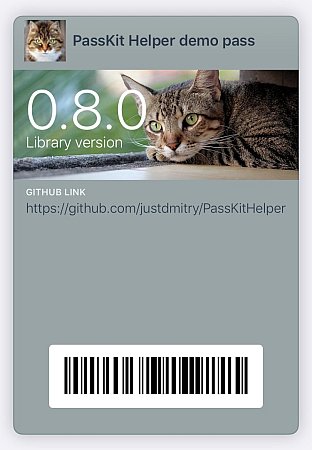
Code above will create this beautiful pass:
3. Implementing WebService for interaction
Apple's server can call your endpoint/server to notify about user installed/deinstalled your pass, to fetch updated version of pass (when user 'pulls down' pass in Wallet). You will be able to send pushes when you want to update pass in user's wallet. Check Apple's PassKit Web Service Reference for technical details.
3.1. Implement IPassKitService
public class PassKitService : IPassKitService
{
    public Task<int> RegisterDeviceAsync(…) {…}

    public Task<int> UnregisterDeviceAsync(…) {…}

    public Task<(int Status, string[]? Passes, string? Tag)> GetAssociatedPassesAsync(…) {…}

    public Task<(int StatusCode, MemoryStream? PassData)> GetPassAsync(…) {…}

    public Task ProcessLogsAsync(…) {…}
}
3.2. Register in Startup
public void ConfigureServices(IServiceCollection services)
{
    ...
    services.AddSingleton<IPassService, PassService>();
}

public void Configure(IApplicationBuilder app)
{
    ...
    app.UsePassKitMiddleware("/callbacks/passkit");
    ...
}
3.3 Add information inside your passes
You need publicly-accessible url/hostname for your server, and it must be secured with https/ssl.
Add this information into your passes:
var pass = passKitHelper.CreateNewPass()
     // your
     // original
     // pass content
     // goes here
   .WebService
       .AuthenticationToken("some-random-secret-string")
       .WebServiceURL("https://you.server.com/callbacks/passkit")
AuthenticationToken is some "secret" string that you use to differentiate legal pass owners and malicious hackers.
WebServiceURL is hostname of your server and path that equal to one in UsePassKitMiddleware in previous step.
3.4. Send push updates
When users install your pass package to their iOS and Mac devices - Apple server call your RegisterDeviceAsync. Save pushToken value in database, and when you need to update pass on user device - call IPassKitHelper.SendPushNotificationAsync(pushToken).
Installation
Use NuGet package PassKitHelper.
Dependencies
For netstandard2.0:
- Microsoft.AspNetCore.Http.Abstractions, v2.1.1
- Microsoft.Extensions.Http, v2.1.1
- Newtonsoft.Json, v13.0.1
- System.Security.Cryptography.Pkcs, v4.7.0
- System.Text.Encodings.Web, v4.7.2
For net6.0 / net8.0 / net9.0:
- Microsoft.Extensions.Http, v6.0.1 / v8.0.1 / v9.0.0
- System.Security.Cryptography.Pkcs, v6.0.5 / v8.0.1 / v9.0.0
- System.Text.Json, v6.0.11 / v8.0.5 / v9.0.0
Dvelopment & Testing
Tests can be run with dotnet test.
Credits
- Thanks for inspiration to Tomas McGuinness and his dotnet-passbook package.
- Thanks to maxpixel.net for sample kitten images.