MsSqlServer repository for Ogle
Get Started
$ dotnet add package Ogle.Repository.MsSqlServerReadme
Ogle
Use Ogle with your asp.net core appplication to view logs or analyze custom request metrics to profile your application's health and performance. Ogle searches log files saved on your web server or runs a ditributed search on all of your application's web servers in parallel. The log files do not need to be uploaded to an external log parsing service. Each web application node can save its log files locally.
Ogle is suitable for applications written in .NET 6
Main features
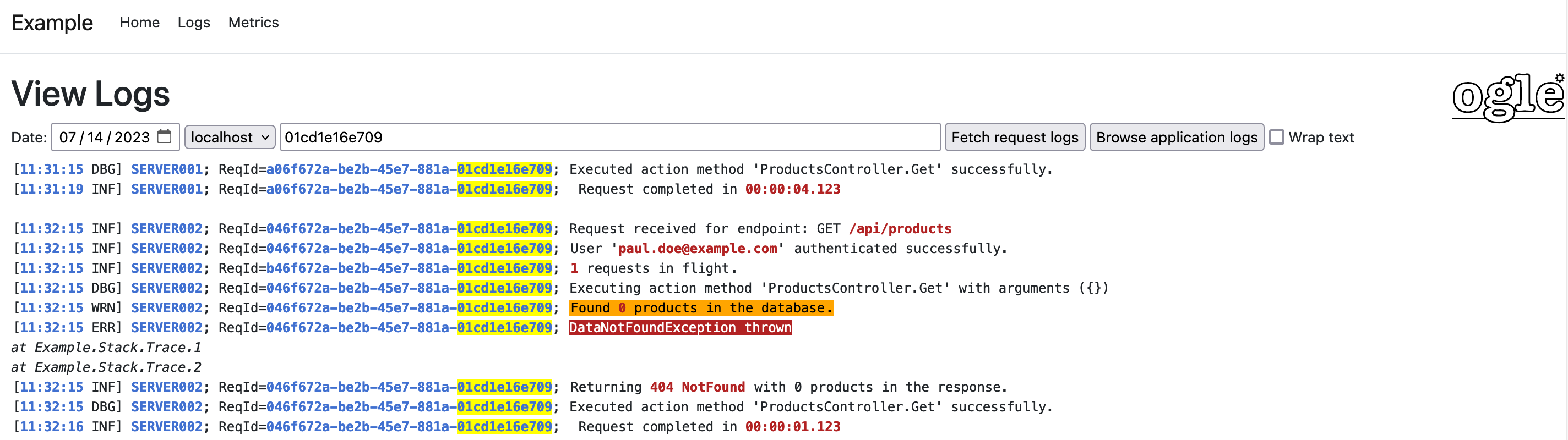
- View log details for a particular request id or a search term
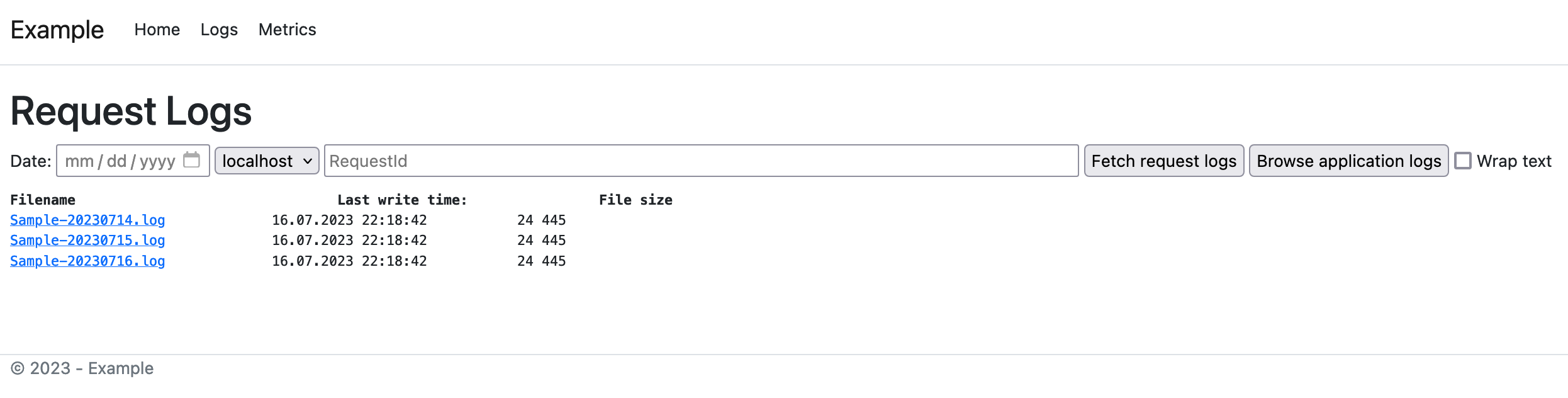
- Browse and download log files on a given server
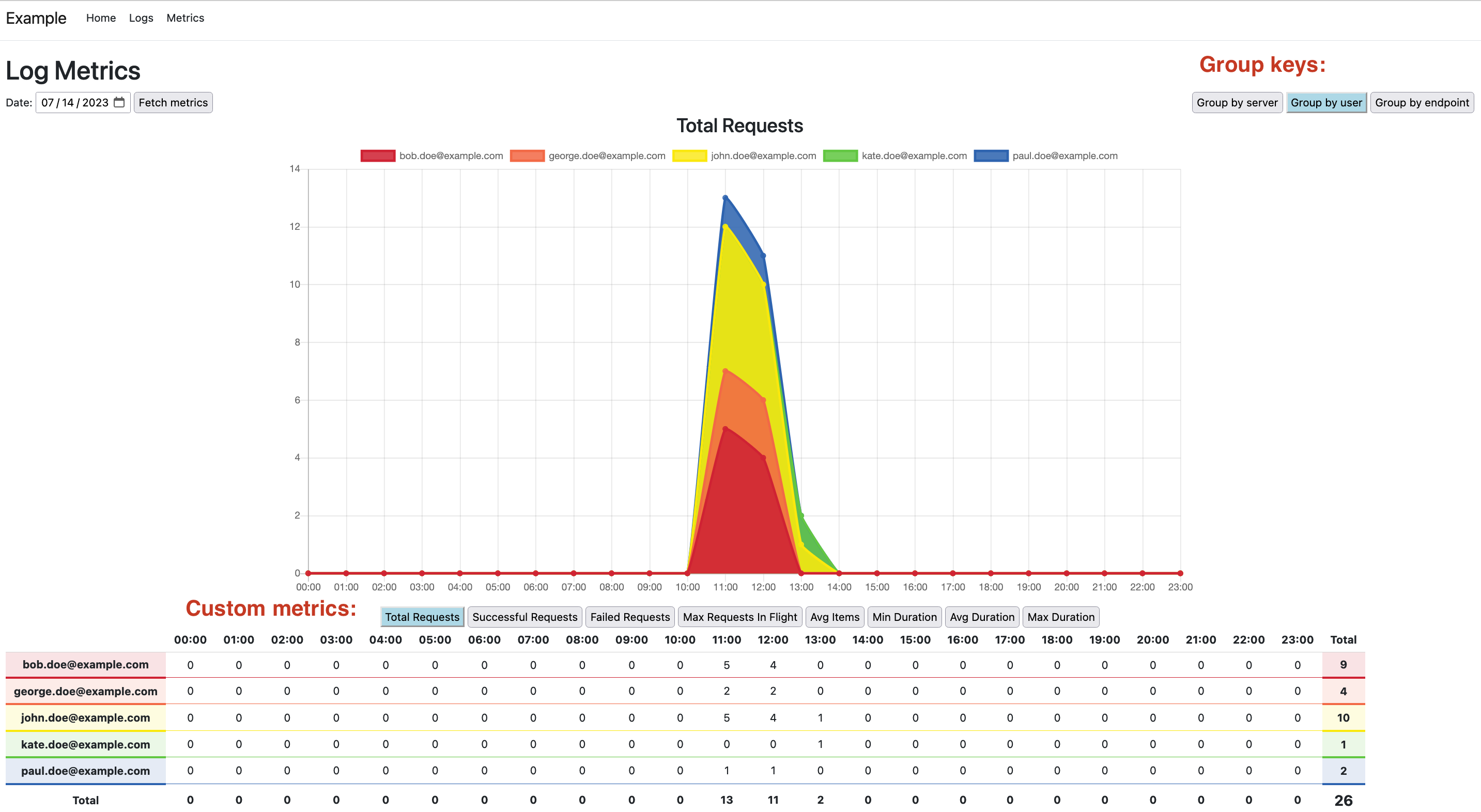
- Monitor your app's performance and health via log metrics page
Getting Started
- Add
OgleNuGet package to your ASP.NET Core web project - Add Ogle section to your appsettings.json file
"Ogle": {
    "LogFolder": "logs",    //set path to the log folder
    "LogFilePattern": "Sample-{0:yyyyMMdd}.log",    //set log file name pattern
    "RecursiveLogFileEnumeration": true, //set to also scan LogFolder subfolders as well as the base folder
    "LogIndexFolder": "logs/index", //optionally set path to the full-text index folder
    "UseResponseCompression": true, //if set then response from a call to DownloadLog endpoint will be compressed
    "Layout": "_Layout",    //optionally make Ogle pages use your website's layout cshtml file
    "AllowedSearchPattern": "\\S{5,}",  //regex pattern used for validation of the search term
    "MinFulltextTokenLength": 6,    //minimal length of full-text tokens that gets indexed (optional, default=5)
    "MaxFulltextTokenLength": 32,   //maximal length of full-text tokens that gets indexed (optional)
    "FulltextTokenSeparators": " \t.:;'`\"()[]{}=+*\\/",    //full-text token separator characters (optional, default=any character except for letters and digits)
    "MaxFulltextResults": 1, //maximum results to return from full-text query (optional, default=5)
    "MaxLogContentLength": 1048576, //limit log search output to 1MB (optional)
    "LogReaderBackBufferCapacity": 128, //set back buffer capacity (optional, default=64)
    "HttpPort": 8080,   //set application HTTP port (optional, default=80)
    "HttpsPort": 4430,  //set application HTTPS port (optional, default=443)
    "IndexActionRedirectUrl": "/ogle/metrics", //url to redirect /ogle/ to (optional, default=/ogle/Logs)
    "Hostnames": [
        "localhost"     //add all the hosts where your application is running
    ]
}
- Define
LogGroupKey,LogRecordandLogMetricsclasses (refer to the Example project for details)- LogRecord defines the properties that you are interested in harvesting in each request. For example: Number of purchased items, total request time or number of requests in flight
- LogGroupKey defines the properties to group your log metrics by. For example: Hostname, endpoint, username or time bucket.
- LogMetrics defines the aggregate metrics that you want to view. For example: Total requests, Failed requests, Maximum requests in flight etc. These metrics are groupped by the LogGroupKey properties.
- Both LogRecord and LogMetrics must inherit from LogGroupKey in order to contain its properties
- LogGroupKey must override GetHashCode and Equals methods to ensure groupping of LogRecords works as expected
- In your startup class register Ogle and define all three classes from above as well as the mapping between LogRecord and LogMetrics via a custom
GroupFunction.
var builder = WebApplication.CreateBuilder(args);

builder.WebHost.UseStaticWebAssets();   //this will include static files bundled inside Ogle in non development environments
builder.Services.AddOgle(builder.Configuration.GetSection("Ogle"), options =>
{
    //define type of your log record class
    options.RecordType = typeof(LogRecord);
    //define type of your group key class
    options.GroupKeyType = typeof(LogGroupKey);
    //define type of your log metrics class
    options.MetricsType = typeof(LogMetrics);
    //define log records to log metrics mapping function
    options.GroupFunction = input => input.Select(i =>
        var g = (IGrouping<LogGroupKey,LogRecord>)i;

        return new LogMetrics
        {
            //define mappings for keys to group by
            ServerName = g.Key.ServerName,
            Endpoint = g.Key.Endpoint,
            Timestamp = g.Key.Timestamp,
            //define mappings for individual metrics
            TotalRequests = g.Count(),
            SuccessfulRequests = g.Count(j => j.Succeeded),
            MaxRequestsInFlight = g.Max(j => j.RequestsInFlight)
            //etc.
        };
    );
});
builder.Services.AddControllers(options =>
{
    //optionally define a custom route prefix for Ogle controller
    //options.UseOgleRoutePrefix("/custom-prefix");

    //optionally define a custom authorization policy for a the whole controller
    //options.AddOgleAuthorizationPolicy("AdminPolicy");

    //optionally define a custom authorization policy for specific actions
    //options.AddOgleAuthorizationPolicy("SaveMetricsFromAllServers", "AdminPolicy");
    //options.AddOgleAuthorizationPolicy("CreateIndexOnAllServers", "AdminPolicy");
    //options.AddOgleAuthorizationPolicy("DeleteIndexOnAllServers", "AdminPolicy");
});
- Ogle adds two new endpoints to your application.
- To search and download logs navigate to
/ogle/logs - To view log metrics navigate to
/ogle/metrics - By default navigating to
/ogle/redirects to/ogle/logs
Call to fetch metrics for a given day will be distributed to all web application nodes, which will parse the logs and return the metrics which will then be displayed on the chart and in the table below.
Full-text indexing
- If you opt in to using full-text log search then you need to define
LogIndexFolderin your settings file. Full-text index improves search speed at the expense of additional disc space. - To create or update an index call
/ogle/CreateIndexOnAllServers?date=yyyy-MM-dd - To recreate an index call
/ogle/CreateIndexOnAllServers?date=yyyy-MM-dd&overwriteExisting=true - To delete an existing full-text index call
/ogle/DeleteIndexOnAllServers?date=yyyy-MM-dd
The date parameter is optional and defaults to the previous day.
Ogle Repository
Parsing request metrics from the logs is a time consuming task - to shorten metrics response times register one of Ogle Repository NuGet packages.
- Ogle.Repository.File
- Ogle.Repository.MsSqlServer
- Ogle.Repository.MySql
- Ogle.Repository.PostgreSql
- Ogle.Repository.Sqlite
Example repository setting in appsettings.json:
    "Ogle": {
        "RepositorySettings": {
            "ConnectionString": "Data Source=sqlite.db",
            "TableName": "RequestMetrics",
            "DetailedTableName": "RequestMetricsDetails",
            "AutoCreateTable": true
        }
    }
Example repository registration:
var builder = WebApplication.CreateBuilder(args);
var configurationSection = builder.Configuration.GetSection("Ogle:RepositorySettings");

builder.Services.AddOgleSqliteRepository<LogMetrics>(configurationSection);
To save metrics for a given day to a file or database call
/ogle/SaveMetricsFromAllServers?date=yyyy-MM-dd
The date parameter is optional and defaults to the previous day.
The endpoint will distribute the request to all web application nodes, the metrics will be collated and saved. The endpoint will respond with a number of metrics saved. Consequtive calls for the same date will overwrite any potential previous data saved for the same date before.
After data is saved, subsequent api calls for log metrics for that date will be read from the repository rather than being calculated on-the-fly from the logs.
Refer to the Example project for details