<!-- using the raw image URL so it displays correctly on nuget.org -->
OpenAPI.NET
Package
Nuget
Models and Writers
Readers
Hidi
The OpenAPI.NET SDK contains a useful object model for OpenAPI documents in .NET along with common serializers to extract raw OpenAPI JSON and YAML documents from the model.
See more information on the OpenAPI specification and its history here: <a href="https://www.openapis.org">OpenAPI Initiative</a>
Project Objectives
Provide a single shared object model in .NET for OpenAPI descriptions.
Include the most primitive Reader for ingesting OpenAPI JSON and YAML documents in both V2 and V3 formats.
Provide OpenAPI description writers for both V2 and V3 specification formats.
Enable developers to create Readers that translate different data formats into OpenAPI descriptions.
The OpenAPI.NET project holds the base object model for representing OpenAPI documents as .NET objects. Some developers have found the need to write processors that convert other data formats into this OpenAPI.NET object model. We'd like to curate that list of processors in this section of the readme.
The base JSON and YAML processors are built into this project. Below is the list of the other supported processor projects.
C# Comment / Annotation Processor : Converts standard .NET annotations ( /// comments ) emitted from your build (MSBuild.exe) into OpenAPI.NET document object.
OData CSDL Processor : Converts the XML representation of the Entity Data Model (EDM) describing an OData Service into OpenAPI.NET document object.
Example Usage
Creating an OpenAPI Document
var document = new OpenApiDocument
{
    Info = new OpenApiInfo
    {
        Version = "1.0.0",
        Title = "Swagger Petstore (Simple)",
    },
    Servers = new List<OpenApiServer>
    {
        new OpenApiServer { Url = "http://petstore.swagger.io/api" }
    },
    Paths = new OpenApiPaths
    {
        ["/pets"] = new OpenApiPathItem
        {
            Operations = new Dictionary<HttpMethod, OpenApiOperation>
            {
                [HttpMethod.Get] = new OpenApiOperation
                {
                    Description = "Returns all pets from the system that the user has access to",
                    Responses = new OpenApiResponses
                    {
                        ["200"] = new OpenApiResponse
                        {
                            Description = "OK"
                        }
                    }
                }
            }
        }
    }
};
Reading and writing an OpenAPI description
var httpClient = new HttpClient
{
    BaseAddress = new Uri("https://raw.githubusercontent.com/OAI/OpenAPI-Specification/")
};

var stream = await httpClient.GetStreamAsync("main/examples/v3.0/petstore.yaml");

// Read V3 as YAML
var openApiDocument = new OpenApiStreamReader().Read(stream, out var diagnostic);

// Write V2 as JSON
var outputString = openApiDocument.Serialize(OpenApiSpecVersion.OpenApi2_0, OpenApiFormat.Json);
Validating/Testing OpenAPI descriptions
In order to test the validity of an OpenApi document, we avail the following tools:
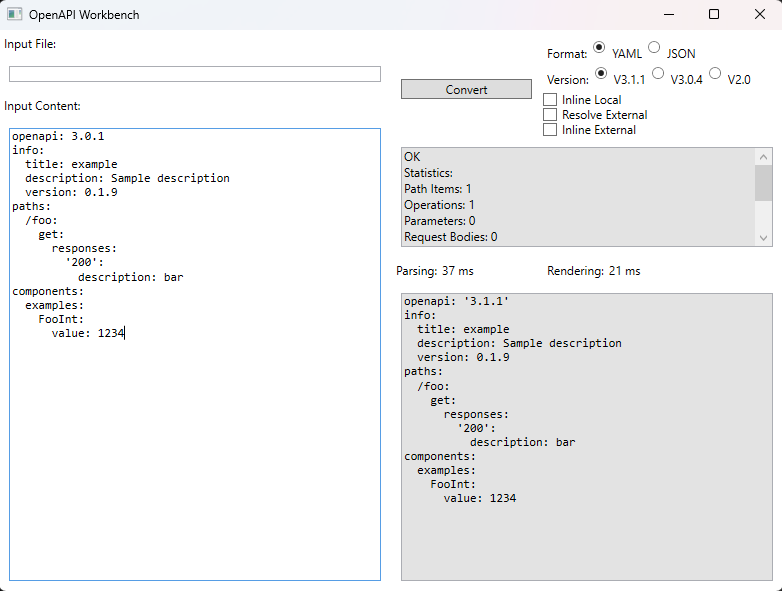
A workbench tool consisting of a GUI where you can test and convert OpenAPI descriptions in both JSON and YAML from v2-->v3 and vice versa.
Installation guidelines:
Clone the repo locally by running this command:
git clone https://github.com/microsoft/OpenAPI.NET.git
Open the solution file (.sln) in the root of the project with Visual Studio
Navigate to the src/Microsoft.OpenApi.Workbench directory and set it as the startup project
Run the project and you'll see a GUI pop up resembling the one below:
Copy and paste your OpenAPI descriptions in the Input Content window or paste the path to the descriptions file in the Input File textbox and click on Convert to render the results.
Contributing
This project welcomes contributions and suggestions. Most contributions require you to agree to a
Contributor License Agreement (CLA) declaring that you have the right to, and actually do, grant us
the rights to use your contribution. For details, visit https://cla.microsoft.com.
When you submit a pull request, a CLA-bot will automatically determine whether you need to provide
a CLA and decorate the PR appropriately (e.g., label, comment). Simply follow the instructions
provided by the bot. You will only need to do this once across all repos using our CLA.