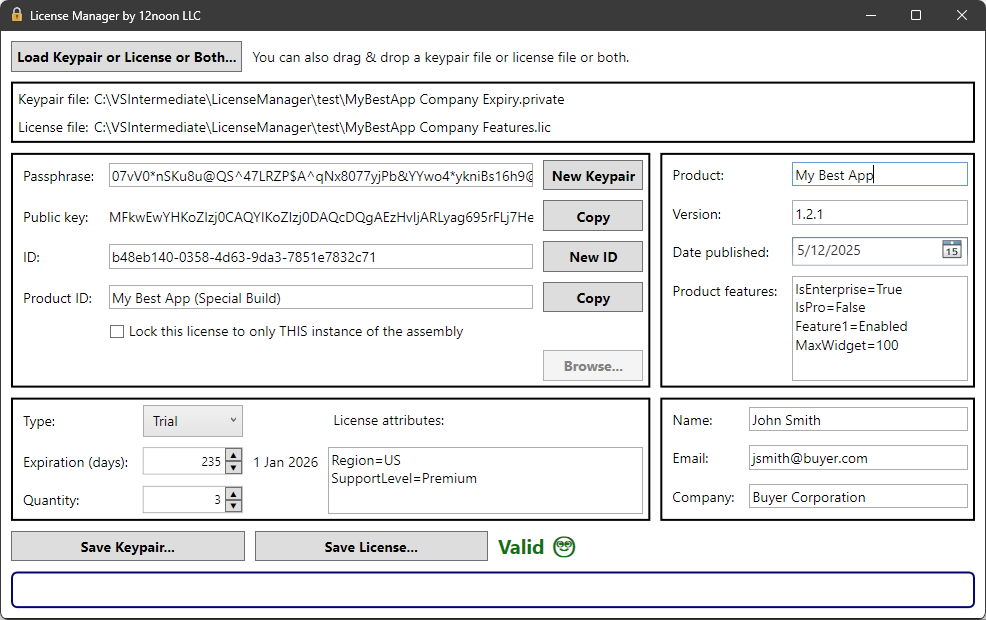
This NuGet package enables a .NET application to use a simplified API for validating a license. It is forked from the Standard.Licensing project and fixes some of its issues. It is also an optional companion to the 12noon License Manager X application.
This project ensures that software licenses are securely generated and validated,
providing a robust mechanism for software protection.
License Manager X is a graphical front-end application designed to create and manage
licenses for software applications using .NET.
It leverages the Standard.Licensing
project to handle license generation and validation.
In addition to this Windows application, License Manager X can also be used
from a command line to support scripting, etc.
Your application will need to either:
Use the LicenseManager_12noon.Client NuGet package, which has an improved API to validate licenses for your .NET application.
Use the original Standard.Licensing NuGet package on which it is based.
You can switch at any time--you are not locked in to one or the other.
Note that the LicenseManager_12noon.Client NuGet package includes the fixes in the
Standard.Licensing.12noon NuGet package
for the property.
When/If
is accepted into the original project,
the package will be deprecated.
You can download the License Manager X application from the Microsoft Store.
Features
Key Management
Property
Usage
Passphrase
Secret used to generate public/private keypair and to create a license
Public key
Used by the licensed application to validate the license
ID
License ID (You can use it any way you want or not at all)
Product ID
Used by the licensed application to verify the executable and public key.
Lock to assembly
This ensures the license is associated ONLY with THIS build of the licensed application.
The application maintains the private key in the .private file but does not display it.
Product
Property
Usage
Name
The product name
Version
The product version
Date published
The date the product was published
These values can be displayed by the licensed application.
The publish date can represent any date you want.
Product Features
You can add custom product features to your license by specifying them in the key=value format.
These features allow you to define additional metadata or functionality for your product.
In the Product features field, enter your custom feature in the key=value format.
Add as many features as needed, each on a new line.
Save the license file to apply the changes.
For example:
Key=Value
Feature1=Enabled
Feature2=False
MaxWidgets=100
The licensed application can then read and use these features as needed.
License
Property
Usage
Type
Standard or trial license
Expiration Date
The date on which the license expires. DateTime.MaxDate.Date means no expiry.
Expiration
The number of days until the license expires. Zero means no expiry.
Quantity
Minimum value is one (1)
The licensed application can check the type to permit only certain features.
If the expiration is set to zero, there is no expiry.
The quantity is not enforced.
License Attributes
License attributes can also be added using the key=value format.
These attributes allow you to define additional properties for the license.
In the License attributes field, enter your custom attribute in the key=value format.
Add as many attributes as needed, each on a new line.
Save the license file to apply the changes.
For example:
Key=Value
Region=US
SupportLevel=Premium
The licensed application can access these attributes to enforce specific behaviors or display relevant information.
Licensee
This information can be displayed by the licensed application.
Property
Usage
Name
Name of the licensee
Email
Email of the licensee
Company
Company of the licensee (optional)
Usage
Create a New License
Note that the public key and product ID are passed by the licensed application
to validate the license, so you only want to create a new keypair or change the
product ID if you want to change them in the licensed application, rebuild it,
and create new licenses for anyone who will use the new build.
Create a keypair by entering a value for Passphrase and pressing Create Keypair button.
Enter a Product ID.
Optionally, lock the license to a specific build of the licensed application. Technically, this
could be any file, but one that is unique to a specific build (e.g., an EXE or DLL) is most useful.
Fill in the product information, license information, and licensee information.
Press the Save Keypair... button. This will prompt you for where to save the .private file.
Press the Save License... button. This will prompt you for where to save the .lic file.
The .private file contains all of the information used to create the license, including the secrets.
Do keep the .private file somewhere safe.
Do NOT add the .private file to source control.
You will need it to create more licenses for your licensed application
(unless you want to update the application to use a new public key).
Create a License Based on an Existing License
Press the Load Keypair or License or Both... button to select a .private or
.lic file (or both of them). Alternatively, you can drag/drop a .private and/or .lic file.
After loading both files, License Manager X will validate the license file.
If the license is invalid (e.g., it expired or the assembly has changed), you can create a new (valid) license.
Now you can update the product, license, or licensee information as needed.
Press the Save Keypair... button to save the keypair file. This will
prompt you for where to save the .private file.
Press the Save License... button to create a new license. This will
prompt you for where to save the .lic file.
Command Line Interface
The License Manager X application includes a built-in command line interface. The same executable
can run in both GUI mode (when launched without arguments) and CLI mode (when arguments are provided).
Once you have created a .private file using the GUI, you can use the
command line interface to generate new license files more efficiently.
Usage
lmx is the Windows app execution alias for License Manager X. You can manage this in Windows Settings.
You must specify at least one of these switches. They may be used together.
If you do not specify one of these, it only displays the properties from the keypair file.
--license, -l <path> - Path to the new .lic file (will not overwrite unless --force)
--save, -s - Save the modified properties to the .private file
Optional Arguments
--force, -f - Overwrite the license file if it already exists
--product-version, -v <version> - Product version
--product-publish-date, -pd <date> - Product publish date (YYYY-MM-DD)
--product-features, -pf <pairs> - Product features as key=value pairs
--expiration-days, -dy <days> - Expiration in days (0 = no expiry)
--expiration-date, -dt <date> - Expiration date (YYYY-MM-DD format)
--license-attributes, -la <pairs> - License attributes as key=value pairs
--lock <path> - Lock license to a specific file (e.g., EXE or DLL)
--help, -h - Show help
Examples
REM Display properties from .private file
lmx -p my.private

REM Create a standard license using default settings from .private file
lmx -p my.private -l customer.lic

REM Create a 30-day trial license
lmx -p my.private -l trial.lic --type Trial --expiration-days 30

REM Create an enterprise license with custom quantity and version
lmx -p my.private -l enterprise.lic --quantity 100 --product-version 2.1.0

REM Create a license locked to a specific executable
lmx -p my.private -l locked.lic --lock C:\MyApp\MyApp.exe

REM Create a license with custom product features
lmx -p my.private -l featured.lic --product-features "Color=Blue Bird=Heron MaxUsers=50"

REM Create a license with custom attributes
lmx -p my.private -l attributed.lic --license-attributes "Department=Engineering Location=Seattle"

REM Combine multiple options
lmx -p my.private -l full.lic --type Trial --expiration-days 30 --lock C:\MyApp\MyApp.exe --product-features "Edition=Pro" --license-attributes "CustomerTier=Gold"
Key=Value Format
For --product-features and --license-attributes, use space-separated key=value pairs:
Format: "key1=value1 key2=value2 key3=value3"
Keys cannot be empty
Values can be empty: "Key=" or Key
Spaces in values are not supported (use quotes around individual pairs if needed)
Security Notes
The CLI cannot override these protected properties from the .private file:
Passphrase
Public or private keys
Product name
Customer name, email, or company
Reserved Names:
Product features cannot use: Product, Version, Publish Date
License attributes cannot use: Product Identity, Assembly Identity, Expiration Days
If the license file already exists, it will not be overwritten and an error will be displayed.
The Licensed Application
Install the LicenseManager_12noon.Client NuGet package in your application.
The licensed application must pass the Product ID and the Public Key to the license validation API.
const string PRODUCT_ID = "My Product ID";	// Copied from the License Manager X application
const string PUBLIC_KEY = "The Public Key";	// Copied from the License Manager X application
LicenseFile license = new();
bool isValid = license.IsLicenseValid(PRODUCT_ID, PUBLIC_KEY, out string messages);
if (!isValid)
{
	// INVALID
	MessageBox.Show("The license is invalid. " + messages);
	return;
}

// VALID
if (license.StandardOrTrial == LicenseType.Trial)
{
	// Example: LIMIT FEATURES FOR TRIAL
}
If the license is valid, you can use any of the properties (e.g., for display or to limit features).
Alternatively, you can use the Standard.Licensing NuGet package to validate the license in your application.
Note: Of course, the hash of Product ID and Public Key will not prevent a determined
hacker from working around the license. However, it will prevent a simple text substitution
of the public key.
You could also do something more involved, such as prompting the licensee the first
time they run the application to enter some secret text (e.g., a password or GUID)
and storing a hash of it and the public key in protected storage.
Then the application could use the hash as the Product ID.
Of course, the licensee would have to keep that text as secret as they
should keep the license file.
Example Application
The LicenseManagerX_Example project is an example application to demonstrate how to
use the NuGet client library to validate a license and access the license's information.