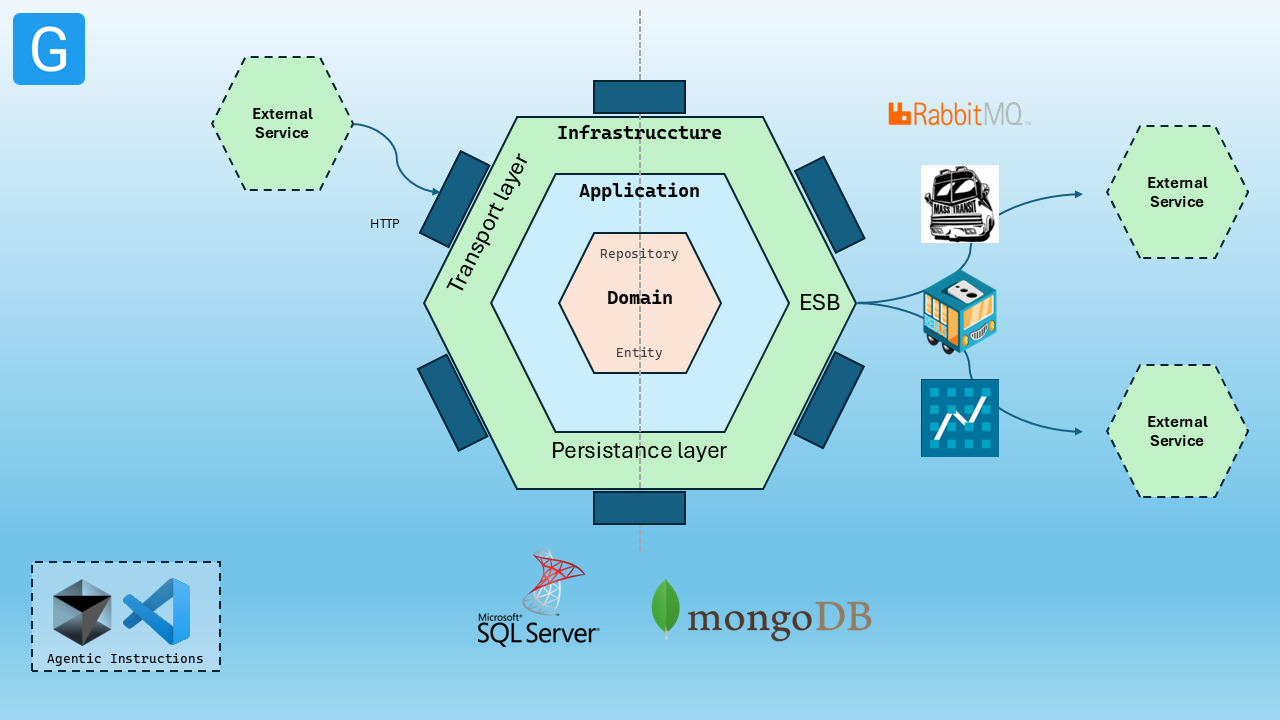
A .NET template following the Clean Architecture Style, DDD and Separation of Concerns in Domain, Application, Infrastructure and UI. Separated host for WebApi and ServiceBus. Docker compose debugging support provided as well.
A comprehensive .NET 10 project template that follows Clean Architecture principles and Domain-Driven Design (DDD). This template helps you rapidly scaffold microservices applications with built-in support for multiple databases, message brokers, and enterprise patterns.
✨ Features
🏗️ Clean Architecture - Domain, Application, Infrastructure, and Presentation layers
🎯 Domain-Driven Design - Rich domain models with proper separation of concerns
📨 CQRS Pattern - Command Query Responsibility Segregation with MediatR
🚌 Message Brokers - Support for RabbitMQ, Azure Service Bus, and more
# Install the latest version
dotnet new install Genocs.CleanArchitecture.Template

# Or install a specific version
dotnet new install Genocs.CleanArchitecture.Template::5.0.0

# View all available options
dotnet new cleanarchitecture --help

# Example with custom options
dotnet new cleanarchitecture \
  --name "CompanyName.ServiceName" \
  --database inmemory \
  --service-bus rebus \
  --use-cases full
🏗️ Architecture Overview
The template generates a solution with the following structure:
src/
├── AcceptanceTests/ # Acceptance Tests
├── Application/ # Use cases and application services
├── Contracts/ # API and ServiceBus contracts and commansd, events and messages
├── Contracts.NServiceBus/ # API and ServiceBus contracts and commansd, events and messages, used by NServiceBus
├── Domain/ # Core business logic and entities
├── Infrastructure/ # Data access and external services
├── IntegrationTests/ # Integration Tests
├── UnitTests/ # Unit Tests
├── WebApi/ # REST API controllers and middleware
├── Worker/ # Background services and message handlers
└── Contracts/ # API contracts and events
Key Components
Domain Layer: Entities, value objects, domain services
Presentation Layer: Controllers, middleware, API documentation
How to build and install the template locally
To build the package run the following commands:
# To clone the repository
git clone https://github.com/Genocs/clean-architecture-template
cd clean-architecture-template

# To pack and install the template
dotnet pack ./src/Package.Template.csproj -p:PackageVersion=5.0.0 --configuration Release --output ./out

dotnet new install ./out/Genocs.CleanArchitecture.Template.5.0.0.nupkg

# To verify the installation and see available options
dotnet new cleanarchitecture --help

# To uninstall the template
dotnet new uninstall Genocs.CleanArchitecture.Template

# Example of creating a new project with InMemory database and Rebus as service bus
dotnet new cleanarchitecture --name {CompanyName.ServiceName} -da inmemory -sb rebus
# How to get the list of installed templates
dotnet new -u

# How to get the list of templates
dotnet new list
🔧 Development Workflow
Local Development
# Start infrastructure services
docker-compose -f ./infrastructure/docker/docker-compose-infrastructure.yml up -d

# Run the API
dotnet run --project src/WebApi/Host.csproj

# Run the Worker
dotnet run --project src/Worker/Host.csproj

# Run all tests
dotnet test

# Run specific test projects
dotnet test src/UnitTests
dotnet test src/IntegrationTests
dotnet test src/AcceptanceTests

# Stop infrastructure services
docker-compose -f ./infrastructure/docker/docker-compose-infrastructure.yml down


# Build Docker WebApi image
docker build -t genocs/clean-architecture-template -f ./src/WebApi/Dockerfile .

# Run Docker WebApi container
docker run -d -p 8080:80 --name clean-architecture-template genocs/clean-architecture-template

# Stop and remove Docker WebApi container
docker stop clean-architecture-template
docker rm clean-architecture-template