Effective .NET library designed for working with and managing configs; has many useful features. This module provides a flexible framework that is pretty easy to use and straightforward. On the other hand, it has many functional attributes for making a tremendous and powerful config like BindabaleMember, Comment, Encryption, Required, Ordering, CustomName, Ignoring, CustomParser, etc.
Get Started
$ dotnet add package G9ConfigManagementReadme
 G9ConfigManagement



G9ConfigManagement
Effective .NET library designed for working with and managing configs; has many useful features. This module provides a flexible framework that is pretty easy to use and straightforward. On the other hand, it has many functional attributes for making a tremendous and powerful config like BindabaleMember, Comment, Encryption, Required, Ordering, CustomName, Ignoring, CustomParser, etc.
❇️Guide
Implementation
In the first step of implementation, you need to have your desired structure for config like the below.
The desired config structure must be derived from the abstract class 'G9AConfigStructure' and would pass to the derived abstract class as a generic type.
using System;
using G9ConfigManagement.Abstract;
using G9ConfigManagement.Attributes;
using G9ConfigManagement.DataType;

public class SampleConfig : G9AConfigStructure<SampleConfig>
{
    // Custom attribute for setting the order of a member in the config file.
    [G9AttrOrder(4)]
    // Custom attribute for setting the desired comment for config member.
    [G9AttrComment("My custom comment.")]
    public string ApplicationName { set; get; } = "My Custom Application";

    // Custom attribute for ignoring a member.
    [G9AttrIgnore]
    public string User = "MyUser";

    [G9AttrOrder(1)]
    // Custom attribute for setting a member as a required member.
    [G9AttrRequired]
    // Custom attribute for encrypting a member.
    [G9AttrEncryption("G9-KaPSgV9Yp6s3v", "H@McQfTjWnZr4u7x")]

    public string ConnectionString =
        "Server=myServerName\\myInstanceName;Database=myDataBase;User Id=myUsername;Password=myPassword;";

    [G9AttrOrder(2)]
    // Custom attribute for setting a custom name for a member.
    [G9AttrCustomName("MyCustomBindableMember")]
    // This data type creates a bindable member with the desired value type.
    // The specified generic type is the desired value type for the bindable member,
    // and the constructor parameter sets the default value of that (which is optional).
    public G9DtBindableMember<string> CustomBindableMember
        = new G9DtBindableMember<string>("My bindable value");

    [G9AttrOrder(3)]
    // Custom attribute for specifying the method of storing value for an Enum member.
    // By default, an Enum member saves as a number.
    [G9AttrStoreEnumAsString]
    public ConsoleColor Color = ConsoleColor.DarkMagenta;

    // The abstract class 'G9AConfigStructure' forces you to implement this.
    // This structure specified the version of config that can't be null or without initialization.
    public override G9DtConfigVersion ConfigVersion { set; get; } = new(1, 0, 0, 0);
}
Easy To Use and Straightforward
After implementing the custom structure like the above sample, you don't need to do any particular thing to use the config! You must only use the method 'GetConfig()' like the below sample, and everything performs automatically.
Indeed, this static method was added by the derived abstract class to your desired config structure.
var config = SampleConfig.GetConfig();
Console.WriteLine(config.ApplicationName); // My Custom Application
Console.WriteLine(config.CustomBindableMember); // Bindable Member
Console.WriteLine(config.Color); // DarkMagenta
// ...
After the first use of the method "GetConfig()." The config file would be created in the app path automatically with a similar structure to the below:
{
  "ConnectionString": "cXgv/MI9Il0RQK50yO93tEngSsM6pkgXR1aQ6QubS2Myf0qB6BdRSCnynbJgj4XrK3Yj2YGtih8EPiLeE067fbn2IGiikd7ylqCjAhLPGXAZdv1rw/9Nb5UOM2o0bYfW",
  "MyCustomBindableMember": "My bindable value",
  "Color": "DarkMagenta",
  /* My custom comment. */
  "ApplicationName": "My Custom Application",
  "ConfigVersion": "1.0.0.0"
}
As expected:
- A member with the name "ConnectionString" was encrypted automatically using the attribute "G9AttrEncryption".
- The attribute "G9AttrEncryption" writes the value of a member in the config with encryption, and on the reading time, it decrypts the member value. The whole process of writing and reading, encryption and decryption, performs automatically.
- A member in the config structure with the name "CustomBindableMember" used the attribute "G9AttrCustomName" and passed the "MyCustomBindableMember" as a parameter. So, its name in the config file is changed to "MyCustomBindableMember".
- The member "ApplicationName" has the attribute "G9AttrComment" that the value "My custom comment" passed for that as a parameter. As a result, the specified comment appears above the desired member in the config file.
- The member "User" is ignored by using the attribute "G9AttrIgnore", and it wouldn't be in the config file.
- Some members have set their order in the config file using the attribute "G9AttrOrder", which has a numeric parameter for specifying the order. So, they would be located in the config file according to specified ordering.
- In the end, the config version appeared in the config file, which is essential for managing the config process because the core can control the different versions of a specific config.
- ⚠️If you manually change it, the config core recognizes a conflict between the hard code config version and the file's config version. So, the core would remake it according to settings.
Bindabale Member
By paying attention to the above structure for the config, you can assign a custom event to a bindable member in the below way.
var config = SampleConfig.GetConfig();
config.CustomBindableMember.OnChangeValue +=
    // The first parameter specifies the new value, and the second one specifies the old value.
    (newValue, oldValue) =>
    {
        // Do anything
        Console.WriteLine($"Old Value: {oldValue} | New Value: {newValue}");
    };

    // The value of a bindable member is accessible as below:
    Console.WriteLine(config.CustomBindableMember.CurrentValue); // My bindable value

    // Also, after initialization, you can change it manually as below:
    // Note: using this method would lead to calling all assigned events.
    config.CustomBindableMember.SetNewValue("New Value");
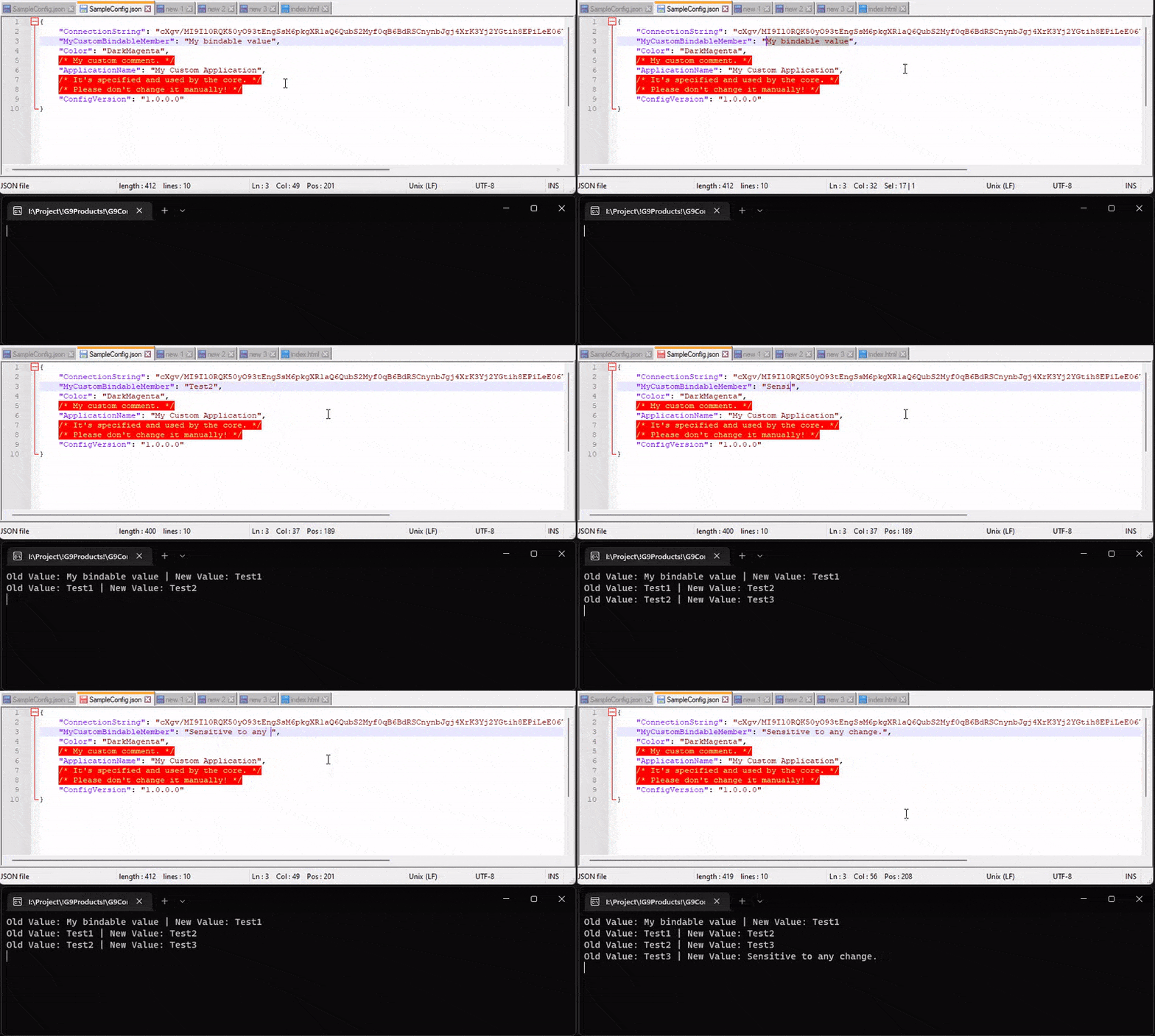
After event assignment, any manual change by method "SetNewValue" or any change in the config file that has been effective on this member recognizes automatically. Then all events that are assigned to this member would call automatically. A sample of the file change is shown below:
Set Instance for Initialization
You can set a custom instance for making the first config file:
// Setting custom instance for initialization
SampleConfig.SetInstanceForInitialization(new SampleConfig
{
    ApplicationName = "My App",
    Color = ConsoleColor.Green
});

// Using
var config = SampleConfig.GetConfig();
- ⚠️Make sure you set your custom instance before using method "GetConfig".
- Pay attention. If the config file has been created and existed, the core wouldn't use the custom specified instance. For this reason, you must set it before using the method "GetConfig".
- Of course, you can remake your config file in other methods, which will be explained in the next steps. But, the primary use of this method is that it is used automatically just for the first creation of a config file when no config file exists.
- On the one hand, you can specify the first config instance by setting values of the config structure itself, like the first structure in this guide. So, using this method isn't mandatory.
Set Config Settings
Config settings consist of essential options for handling, which can be set manually. In the following it is explained entirely:
// Setting custom settings for config
SampleConfig.SetConfigSettings(new G9DtConfigSettings(
    // A vital setting that specifies how the core must react when a change
    // in the version occurs between the config structure and config file.
    changeVersionReaction: G9EChangeVersionReaction.MergeThenOverwrite,
    // Specifies the config file name
    // By default, it used its structure name if not set.
    configFileName: "MyConfig",
    // Specifies the extension of the config file.
    // By default, it is "json".
    configFileExtension: "ini",
    // Specifies the location of the config file.
    // By default, it is "AppContext.BaseDirectory" that specifies the application directory.
    configFileLocation: AppContext.BaseDirectory,
    // Specifies that if the specified location of the config file
    // does not exist, the core must create it or not.
    // By default it is true.
    enableAutomatedCreatingPath: true
));

// Using
var config = SampleConfig.GetConfig();
- ⚠️Make sure you set your custom settings before using the method "GetConfig".
- Pay attention. Better the setting is set before any use of config. Because maybe it leads to some unexpected problems like creating several config files.
- By default, the parameter changeVersionReaction is set to "MergeThenOverwrite," meaning if a change in the version occurs, the core must merge old config data (which is read from the old config file) to the new structure and then overwrite the new file. This process leads to saving the old data in the previous config version as much as possible. Indeed, the members that have the same name and type in the old and new structure will pair their data.
- Also, it can be set to "ForceOverwrite," meaning if a change occurs, the core overwrites the config file with the new structure without paying attention to the old values.
Other Useful Methods
Some helpful static methods are shown below:
// Method to remake and restore the config by default initialized value.
// In this case, the config file is remade, and the config data is restored to the first structure.
SampleConfig.RemakeAndRestoreByDefaultValue();

// Method to remake and restore the config by custom initialized value.
// In this case, the created config file is remade, and the config data restore by the new specified value.
SampleConfig.RemakeAndRestoreByCustomValue(new SampleConfig());

// Method to restore a config structure to the default value that would be gotten from the config file.
SampleConfig.RestoreByConfigFile();
Attributes
-
G9AttrComment
- This attribute enables you to write several comments (notes) for each member.
- Note: This attribute can use several times for a member.
- This attribute enables you to write several comments (notes) for each member.
-
G9AttrStoreEnumAsString
- This attribute enables you to store an Enum object as a string value (By default, an Enum object storing as a number).
-
G9AttrCustomName
- This attribute enables you to choose a custom name for a member for storing.
- Note: At parsing time (JSON to object), the parser can recognize and pair the member automatically.
- This attribute enables you to choose a custom name for a member for storing.
-
G9AttrRequired
- With this attribute, you can set a member in your config structure as a requirable member that must have a value for any time.
- Suppose a member with this attribute doesn't have a value. Expected, when using the config structure, an exception would be thrown.
public class Sample
{
    [G9AttrRequired]
    public int Essential = 3;
}
- With this attribute, you can set a member in your config structure as a requirable member that must have a value for any time.
-
G9AttrOrder
- This attribute enables you to specify the order of members of an object when they want to be written to a JSON structure.
public class Sample
{
    [G9AttrOrder(3)]
    public int C = 3;
    [G9AttrOrder(2)]
    public int B = 2;
    [G9AttrOrder(1)]
    public int A = 1;
}
// Expected result:
// {
//  "A": 1,
//  "B": 2,
//  "C": 3,
// }
- This attribute enables you to specify the order of members of an object when they want to be written to a JSON structure.
-
G9AttrIgnore
- This attribute enables you to ignore a member for storing in the config file.
-
G9AttrCustomParser
- This attribute enables you to implement the custom parsing process for (String to Json, Json to String, Both of them).
- It's useful when you need to use a custom structure in your config and want to store it with a desired format in the config file for any reason.
// A class that consists of custom parser methods. public class CustomParser { // Custom parser for parsing the object to string. // Note: The specified method must have two parameters (the first parameter is 'string' and the second one is 'G9IMemberGetter'); // in continuation, it must return an object value that is parsed from the string value. public string ObjectToString(object objectForParsing, G9IMemberGetter accessToObjectMember) { if (accessToObjectMember.MemberType == typeof(CustomChildObject)) return ((CustomChildObject)objectForParsing).Number1 + "-" + ((CustomChildObject)objectForParsing).Number2 + "-" + ((CustomChildObject)objectForParsing).Number3; return default; } // Custom parser for parsing the string to object. // Note: The specified method must have two parameters (the first parameter is 'object' and the second one is 'G9IMemberGetter'); // in continuation, it must return a string value that is parsed from the object value. public object StringToObject(string stringForParsing, G9IMemberGetter accessToObjectMember) { if (accessToObjectMember.MemberType != typeof(CustomChildObject)) return default; var numberData = stringForParsing.Split('-').Select(int.Parse).ToArray(); return new CustomChildObject { Number1 = numberData[0], Number2 = numberData[1], Number3 = numberData[2] }; } } // Custom object public class CustomObject { // This attribute has several overloads. // The popular way (used below), for use, must specify the type of custom parse class in the first parameter, // the second parameter specifies the string to object method name, and the last one specifies the object to string method name. [G9AttrCustomParser(typeof(CustomParser), nameof(CustomParser.StringToObject), nameof(CustomParser.ObjectToString))] public CustomChildObject CustomChild = new(); } // Custom child object public class CustomChildObject { public int Number1 = 9; public int Number2 = 8; public int Number3 = 7; }- Note: The second parameter, 'G9IMemberGetter' in both parser methods, consists of helpful information about a member (field or property) in an object.
- This attribute enables you to implement the custom parsing process for (String to Json, Json to String, Both of them).
-
G9AttrEncryption
- This attribute enables you to add automated encrypting and decrypting processes for a member value.
- Note: The specified member must have a convertible value to the string type.
- Note: The priority of executing this attribute is higher than the others.
- Note: If your member data type is complex, or you need to implement the custom encryption process, you can implement a custom (encryption/decryption) process with the attribute 'G9AttrCustomParser'.
- Note: If you need to change an encrypted member in the config file, you can use this part of the library "G9AssemblyManagement".
// A class that consists of members with the attribute 'G9AttrEncryption'.
// This attribute has several overloads.
public class G9DtSampleClassForEncryptionDecryption
{
    // With standard keys and default config
    [G9AttrEncryption("G-JaNdRgUkXp2s5v", "3t6w9z$C&F)J@NcR")]
    public string User = "G9TM";

    // With custom nonstandard keys and custom config
    [G9AttrEncryption("MyCustomKey", "MyCustomIV", PaddingMode.ANSIX923, CipherMode.CFB, enableAutoFixKeySize: true)]
    public string Password = "1990";

    // With custom nonstandard keys and custom config
    [G9AttrEncryption("MyCustomKey", "MyCustomIV", PaddingMode.ISO10126, CipherMode.ECB, enableAutoFixKeySize: true)]
    public DateTime Expire = DateTime.Now;
}

// Result
//{
//  "User": "fESJe1TvMr00Q7BKTwVadg==",
//  "Password": "sWNkdxQ=",
//  "Expire": "C/WjS9oA+FRLw3myST4EowLiM22tTidXoG7hgJy3ZHo="
//}
Advanced
Defining the advanced parser for a specified type
Important note: The difference between the below structure and the attribute "G9AttrCustomParser" is that the mentioned attribute must be used on the desired member in a structure. But, by using this structure, if the parser finds the specified type in this structure, it automatically uses it (like the dependency injection process).
The abstract class 'G9ACustomTypeParser<>' enables you to define a custom parser for a specified type (Any type like a built-in .NET type or custom definition type).
This abstract class is a generic one where the generic parameter type specifies the type for parsing.
In addition, this abstract class has two abstract methods for parsing the string to object and wise versa that must implement by the programmer.
Furthermore, each class inherits by this abstract class is automatically used by JSON core (like a dependency injection process).
// Sample Class
public class ClassA
{
    public string A = "G9";
    public int B = 9;
}

// Custom parser structure for ClassA
// The target type must be specified in generic parameter 'G9ACustomTypeParser<ClassA>'
public class CustomParserStructureForClassA : G9ACustomTypeParser<ClassA>
{
  // Method to parse specified object (ClassA) to string.
  public override string ObjectToString(ClassA objectForParsing, G9IMemberGetter accessToObjectMember, Action<string> addCustomComment)
  {
      addCustomComment("My custom comment 1");
      addCustomComment("My custom comment 2");
      addCustomComment("My custom comment 3");
      return objectForParsing.A + "TM-" + (objectForParsing.B - 3);
  }
  // Method to parse string to specified object (ClassA).
  public override ClassA StringToObject(string stringForParsing, G9IMemberGetter accessToObjectMember)
  {
      var data = stringForParsing.Split("-");
      return new ClassA()
      {
          A = data[0],
          B = int.Parse(data[1])
      };
  }
}
- Note: The JSON core creates an instance from "CustomParserStructureForClassA" automatically. So, this class must not have a constructor with a parameter; otherwise, an exception is thrown.
- Note: Each type can have just one parser. An exception is thrown if you define a parser more than one for a type.
- Note: The second parameter, "G9IMemberGetter" in both methods, consists of helpful information about a member (field or property) in an object. If the object wasn't a member of another object (like the above example), these parameters have a null value.
- Note: The third parameter, "addCustomComment", is a callback action that sets a comment for the specified member if needed. Using that leads to making a comment before this member in the string structure. Using that is optional; it can be used several times or not used at all.
- Notice: This parser type uses a created instance for all members with the specified type in an object. Its meaning is if you use some things in the body of the class (out of methods) like fields and properties, those things are used for all members with the specified type, and maybe a conflict occurs during parse time. To prevent this type of conflict, you must use another abstract class called 'G9ACustomTypeParserUnique<>'. For this type, per each member, a new instance is created and, after use, deleted (don't use it unless in mandatory condition because it has a bad performance in terms of memory usage and speed).
Defining the advanced parser for a specified (generic) type
Important note: The difference between the below structure and the attribute "G9AttrCustomParser" is that the mentioned attribute must be used on the desired member in a structure. But, by using this structure, if the parser finds the specified type in this structure, it automatically uses it (like the dependency injection process).
The abstract class 'G9ACustomGenericTypeParser' enables you to define a custom parser for a specified generic type.
Many parts of this structure are like the previous structure, with this difference that the target type for reacting (that is generic type) specified by inherited abstract class constructor.
In addition, in this case, the parser methods receive and return generic objects as the object type (not generic type) that, like the below example or in your own way (with the reflections), you can handle them.
// Sample Class
public class ClassB<TType>
{
    public string A = "G9";
    public TType B;
}

// Custom parser structure for generic ClassB<>
public class CustomParserStructureForClassB : G9ACustomGenericTypeParser
{
  public CustomParserStructureForClassB()
    // The target type in this case must be specified in inherited constructor like this
    : base(typeof(ClassB<>))
  {
  }
  // Method to parse specified generic object (ClassB<>) to string.
  // The second parameter 'genericTypes', Specifies the type of generic parameters for target type.
  public override string ObjectToString(object objectForParsing, Type[] genericTypes, G9IMemberGetter accessToObjectMember, Action<string> addCustomComment)
  {
      addCustomComment("My custom comment 1");
      addCustomComment("My custom comment 2");
      addCustomComment("My custom comment 3");

      var fields = G9Assembly.ObjectAndReflectionTools
        .GetFieldsOfObject(objectForParsing).ToDictionary(s => s.Name);
      return fields[nameof(G9CClassD<object>.A)].GetValue<string>() + "-" +
      fields[nameof(G9CClassD<object>.B)].GetValue();
  }
  // Method to parse string to specified generic object (ClassB<>).
  // The second parameter 'genericTypes', Specifies the type of generic parameters for target type.
  public override object StringToObject(string stringForParsing, Type[] genericTypes, G9IMemberGetter accessToObjectMember)
  {
      var data = stringForParsing.Split("-");
      return new ClassB<string>()
      {
          A = data[0],
          B = data[1]
      };
  }
}
- Note: The JSON core creates an instance from 'CustomParserStructureForClassB' automatically. So, this class must not have a constructor with a parameter; otherwise, an exception is thrown.
- Note: Each type can have just one parser. An exception is thrown if you define a parser more than one for a type.
- Note: The third parameter, 'G9IMemberGetter' in both methods, consists of helpful information about a member (field or property) in an object. If the object wasn't a member of another object (like the above example), these parameters have a null value.
- Note: The fourth parameter, "addCustomComment", is a callback action that sets a comment for the specified member if needed. Using that leads to making a comment before this member in the string structure. Using that is optional; it can be used several times or not used at all.
- Notice: This parser type uses a created instance for all members with the specified type in an object. Its meaning is if you use some things in the body of the class (out of methods) like fields and properties, those things are used for all members with the specified type, and maybe a conflict occurs during parse time. To prevent this type of conflict, you must use another abstract class called 'G9ACustomGenericTypeParserUnique'. For this type, per each member, a new instance is created and, after use, deleted (don't use it unless in mandatory condition because it has a bad performance in terms of memory usage and speed).