PIV-compliant facial processing CLI tool for .NET. Converts photos to FIPS 201-3 compliant ID card format with JPEG 2000 ROI encoding.
Get Started
$ dotnet add package FaceOFFx.CliReadme
FaceOFFx – PIV-Compatible Facial Processing for .NET
"I want to take his face... off." — Castor Troy, Face/Off (1997)
Quick Start • Installation • Samples • API • CLI • Configuration
About
FaceOFFx is a specialized, high-performance facial processing library for .NET, focused on PIV (Personal Identity Verification) compatibility for issuing credentials that follow government standards (FIPS 201). Derived from the excellent * FaceONNX* library, FaceOFFx extends its capabilities with PIV-specific transformations, FIPS 201-3 compatibility features, and advanced JPEG 2000 ROI encoding.
Key Features
- PIV/TWIC Compatibility - FIPS 201-3 compatible 420×560 output
- JPEG 2000 ROI Encoding - Smart compression with exact target size limits
- 68-Point Landmark Detection - Precise facial feature mapping
- High Performance - Direct ONNX Runtime integration
- Cross-Platform - Windows, Linux, macOS via .NET 8
- Self-Contained - Embedded models, no external dependencies
Quick Start
v2.0 Simplified API
The new v2.0 API provides automatic service management with standard .NET error handling:
using FaceOFFx.Infrastructure.Services;

// Simplest: Default PIV processing (20KB target)
byte[] imageData = File.ReadAllBytes("photo.jpg");
var result = await FacialImageEncoder.ProcessAsync(imageData);

File.WriteAllBytes("output.png", result.ImageData);
Console.WriteLine($"Size: {result.Metadata.FileSize:N0} bytes");

// TWIC processing (14KB maximum for card compatibility)
var twicResult = await FacialImageEncoder.ProcessForTwicAsync(imageData);

// Custom target size
var customResult = await FacialImageEncoder.ProcessToSizeAsync(imageData, 25000);

// Fixed compression rate
var rateResult = await FacialImageEncoder.ProcessWithRateAsync(imageData, 1.5f);

// Try pattern for error handling
var (success, result, error) = await FacialImageEncoder.TryProcessAsync(imageData);
if (success)
{
    Console.WriteLine($"Processed to {result!.Metadata.FileSize} bytes");
}
else
{
    Console.WriteLine($"Processing failed: {error}");
}
Available Presets
| Preset | Target Size | Use Case |
|---|---|---|
ProcessingOptions.TwicMax | 14KB | TWIC cards maximum size |
ProcessingOptions.PivMin | 12KB | PIV minimum size |
ProcessingOptions.PivBalanced | 22KB | Standard PIV compatibility |
ProcessingOptions.PivHigh | 30KB | Enhanced PIV quality |
ProcessingOptions.PivVeryHigh | 50KB | Premium quality |
ProcessingOptions.Archival | 4.0 bpp | Long-term preservation |
ProcessingOptions.Fast | 0.5 bpp | Minimal file size |
JPEG 2000 Compression Guidelines
For 420×560 images:
| Rate (bpp) | Approx. Size | Quality Level |
|---|---|---|
| 0.40 | 12KB | PIV minimum |
| 0.48 | 14KB | TWIC maximum |
| 0.70 | 20KB | PIV standard |
| 1.00 | 29KB | Enhanced |
| 1.50 | 45KB | High quality |
| 2.00 | 60KB | Premium |
| 4.00 | 118KB | Archival |
Installation
As a .NET Global Tool
# Install from NuGet
dotnet tool install --global FaceOFFx.Cli

# Update to latest version
dotnet tool update --global FaceOFFx.Cli
As a Library (NuGet Package)
# Package Manager
dotnet add package FaceOFFx

# Package Manager Console
Install-Package FaceOFFx
Requirements
- .NET 8.0 or later
- Windows, Linux, or macOS
- No GPU required (CPU inference supported)
Sample Gallery
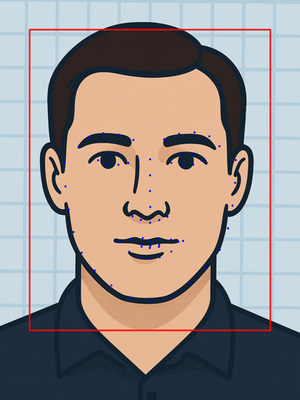
See the power of FaceOFFx with these real-world examples demonstrating our four quality presets. Additional samples for all images and presets are available in the docs/samples/ directory.
| Quality Preset | Original | PIV Processed | ROI Visualization |
|---|---|---|---|
| PIV High (28.8KB) |  |  | 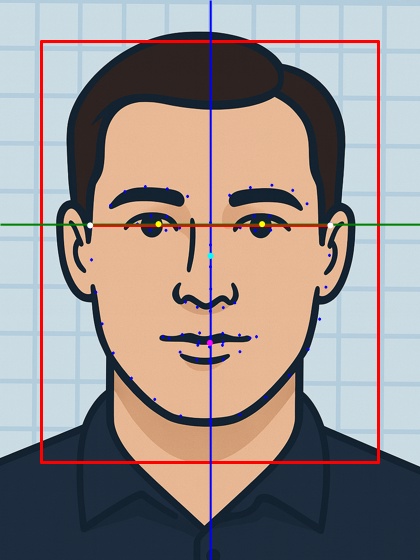 |
| PIV Balanced (20.6KB) | 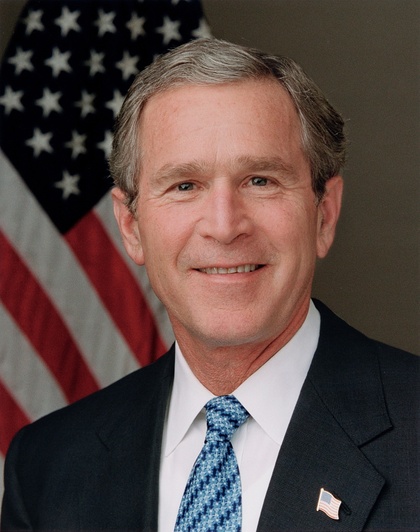 | 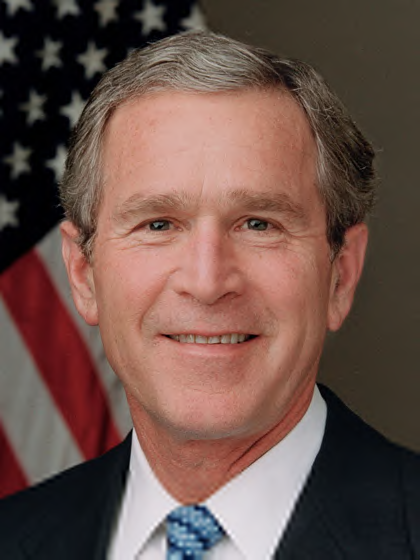 | 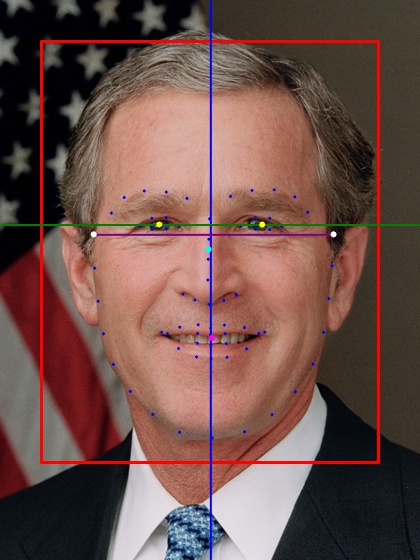 |
| PIV Minimum (11.8KB) | 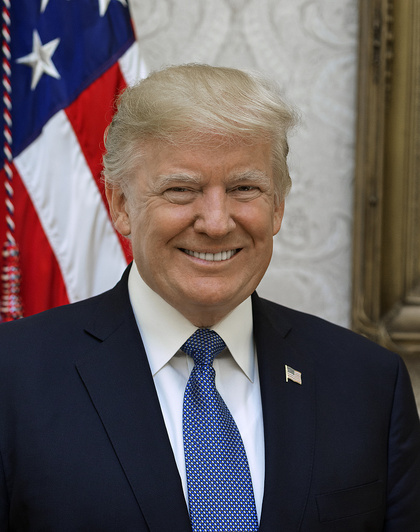 | 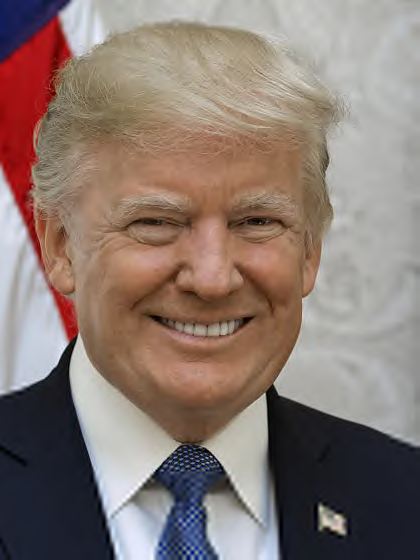 | 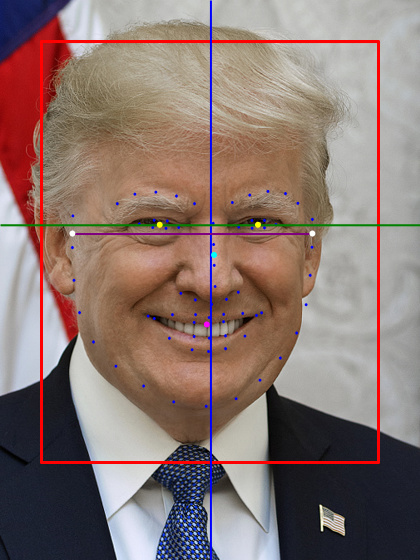 |
| Minimum (8.8KB) | 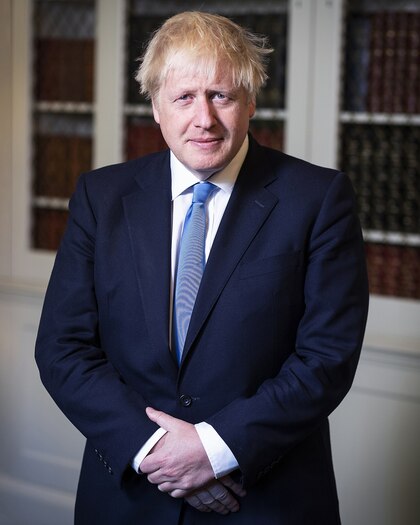 |  | 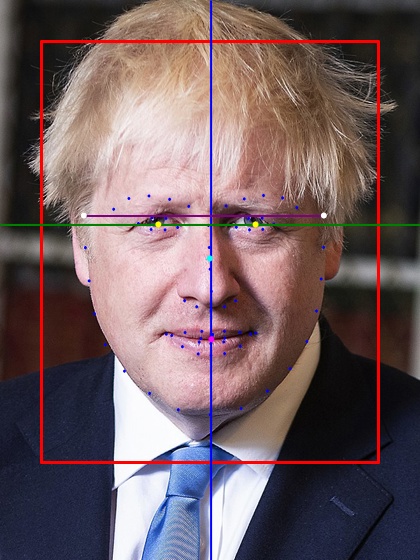 |
Quality Comparison - Keir Starmer
See how JPEG 2000 compression quality affects the final image, from lowest to highest quality:
Row 1: Low-bitrate Quality
| Minimum (8.8KB) | PIV Minimum (11.8KB) | PIV Balanced (20.7KB) |
|---|---|---|
 |  |  |
| Size: 8,845 bytes | Size: 11,789 bytes | Size: 17,723 bytes |
| Rate: 0.35 bpp | Rate: 0.36 bpp | Rate: 0.55 bpp |
| Bare minimum quality | PIV/TWIC compliant | Standard PIV quality |
Row 2: High-bitrate Quality
| PIV High (28.8KB) | PIV Very High (48.6KB) | PIV Archival (80.2KB) |
|---|---|---|
 |  |  |
| Size: 29,485 bytes | Size: 49,732 bytes | Size: 82,127 bytes |
| Rate: 0.96 bpp | Rate: 1.70 bpp | Rate: 4.00 bpp |
| Enhanced PIV quality | High quality | Long-term preservation |
Understanding the Visualizations
- Red Box: ROI region with highest quality preservation
- Blue Line (AA): Vertical center alignment
- Green Line (BB): Horizontal eye line (should be 55-60% from bottom)
- Purple Line (CC): Head width measurement (minimum 240px)
Head Width Measurement (Line CC)
The head width measurement is crucial for PIV compatibility but presents challenges with 68-point facial landmarks:
What we measure: The widest points of the face contour (landmarks 0-16), which represent the jawline from ear to ear. We then create a level line at the average Y-position of these widest points.
Why this approach:
- The 68-point landmark model doesn't include true ear positions
- Using the widest jaw points provides a consistent measurement
- Leveling the line improves visual aesthetics while maintaining accurate width
Limitations:
- The measurement is typically lower than actual ear level
- True head width at the temples/ears may be wider
- This is a fundamental limitation of the 68-point model
PIV Compatibility: The key requirement is that Line CC width ≥ 240 pixels. The exact vertical position is less critical than ensuring the face is large enough in the frame.
API Reference
Direct Service Usage (Advanced)
For advanced scenarios where you need direct control over the services:
// Initialize services (typically done via DI)
var faceDetector = new RetinaFaceDetector(modelPath);
var landmarkExtractor = new OnnxLandmarkExtractor(modelPath);
var jpeg2000Encoder = new Jpeg2000EncoderService();

// Load source image
using var sourceImage = await Image.LoadAsync<Rgba32>("photo.jpg");

// Process with default settings
var result = await PivProcessor.ProcessAsync(
    sourceImage,
    faceDetector,
    landmarkExtractor,
    jpeg2000Encoder);

if (result.IsSuccess)
{
    // Save the processed image
    await File.WriteAllBytesAsync("output.png", result.Value.ImageData);
    Console.WriteLine($"Processing succeeded: {result.Value.ProcessingSummary}");
}
else
{
    Console.WriteLine($"Processing failed: {result.Error}");
}
Custom Processing Options with Direct Services
// Configure processing options
var options = new PivProcessingOptions
{
    BaseRate = 0.8f,        // 24KB target
    RoiStartLevel = 2,      // Conservative ROI
    MinFaceConfidence = 0.9f
};

// Process with custom settings
var result = await PivProcessor.ProcessAsync(
    sourceImage,
    faceDetector,
    landmarkExtractor,
    jpeg2000Encoder,
    options,
    logger);  // ROI enabled by default, no alignment by default

// Handle result
if (result.IsSuccess)
{
    var pivResult = result.Value;

    // Transformation details
    Console.WriteLine($"Rotation: {pivResult.AppliedTransform.RotationDegrees}°");
    Console.WriteLine($"Scale: {pivResult.AppliedTransform.ScaleFactor}x");

    // Compliance validation
    var validation = pivResult.Metadata["ComplianceValidation"] as PivComplianceValidation;
    Console.WriteLine($"Head width: {validation?.HeadWidthPixels}px");
    Console.WriteLine($"Eye position: {validation?.BBFromBottom:P0} from bottom");
}
else
{
    Console.WriteLine($"Processing failed: {result.Error}");
}
Configuration
Processing Options
| Option | Type | Default | Description |
|---|---|---|---|
BaseRate | float | 0.7 | Compression rate in bits/pixel (0.6-1.0) |
RoiStartLevel | int | 3 | ROI quality level (0=aggressive, 3=smoothest) |
MinFaceConfidence | float | 0.8 | Minimum face detection confidence (0-1) |
RequireSingleFace | bool | true | Fail if multiple faces detected |
PreserveExifMetadata | bool | false | Keep EXIF data in output |
Preset Configurations
// Optimized for ~20KB files with smooth quality transitions
var defaultOptions = PivProcessingOptions.Default;

// Maximum quality for archival (larger files)
var highQualityOptions = PivProcessingOptions.HighQuality;

// Fast processing with smaller files
var fastOptions = PivProcessingOptions.Fast;
File Size Tuning
| Preset | Target Size | Actual Size | Compression Rate | Use Case |
|---|---|---|---|---|
| PIV Archival | - | ~82KB | 4.00 bpp | Long-term preservation and archival storage |
| PIV Very High | 50KB | ~49.7KB | 1.70 bpp | Premium quality with excellent detail preservation |
| PIV High | 30KB | ~29.4KB | 0.96 bpp | Enhanced quality for applications requiring superior detail |
| PIV Balanced | 22KB | ~20.6KB | 0.68 bpp | Default - Optimal quality/size balance for ID cards |
| PIV Minimum | 12KB | ~11.8KB | 0.36 bpp | Minimum acceptable quality, works for both PIV and TWIC (14KB max) |
| Minimum | 10KB | ~8.8KB | 0.35 bpp | Smallest possible file size |
CLI Usage
Basic Commands
# Process image with default settings (20KB, ROI enabled)
faceoffx process photo.jpg

# Specify output file
faceoffx process photo.jpg --output id_photo.png

# Generate ROI visualization
faceoffx roi photo.jpg --show-piv-lines
Advanced Options
# Custom file size target (24KB)
faceoffx process photo.jpg --rate 0.8

# Disable ROI for uniform quality
faceoffx process photo.jpg --no-roi

# Different ROI quality levels
faceoffx process photo.jpg --roi-level 0  # Aggressive
faceoffx process photo.jpg --roi-level 2  # Conservative

# Enable ROI alignment (may create harsh boundaries)
faceoffx process photo.jpg --align

# Verbose output with debugging
faceoffx process photo.jpg --verbose --debug
CLI Option Reference
| Option | Description | Default |
|---|---|---|
--output <PATH> | Output file path | input.png |
--rate <RATE> | Compression rate (0.6-1.0) | 0.7 |
--roi-level <LEVEL> | ROI priority (0-3) | 3 |
--no-roi | Disable ROI encoding | ROI enabled |
--align | Enable ROI block alignment | Disabled |
--verbose | Show detailed information | Off |
--debug | Enable debug logging | Off |
Error Handling
// Standard try-catch pattern
try
{
    var result = await FacialImageEncoder.ProcessAsync(imageData);
    Console.WriteLine($"Processed size: {result.Metadata.FileSize} bytes");

    // Check optional values
    if (result.Metadata.TargetSize.HasValue)
    {
        Console.WriteLine($"Target size was: {result.Metadata.TargetSize.Value}");
    }
}
catch (ArgumentNullException ex)
{
    Console.WriteLine($"Invalid input: {ex.Message}");
}
catch (InvalidOperationException ex)
{
    Console.WriteLine($"Processing failed: {ex.Message}");
}

// Or use the Try pattern
var (success, result, error) = await FacialImageEncoder.TryProcessAsync(imageData);
if (!success)
{
    Console.WriteLine($"Failed: {error}");
    return;
}

// Additional processing based on file size
if (result!.Metadata.FileSize > 25000)
{
    // Try with higher compression
    result = await FacialImageEncoder.ProcessWithRateAsync(imageData, 0.5f);
}
Development
Building from Source
# Clone the repository
git clone https://github.com/mistial-dev/FaceOFFx.git
cd FaceOFFx

# Build the solution
dotnet build

# Run tests
dotnet test

# Create NuGet package
dotnet pack --configuration Release
Project Structure
FaceOFFx/
├── src/
│   ├── FaceOFFx/                # Domain models and interfaces
│   ├── FaceOFFx.Infrastructure/ # ONNX implementations
│   ├── FaceOFFx.Models/         # Embedded ONNX models
│   └── FaceOFFx.Cli/           # Command-line interface
├── tests/                      # Unit and integration tests
└── docs/                       # Documentation and samples
Technical Details
PIV Compatibility (FIPS 201-3)
FaceOFFx ensures compatibility with government standards:
- Output: 420×560 pixels (3:4 aspect ratio)
- Face Width: Minimum 240 pixels
- Eye Position: 55-60% from bottom of image
- Rotation: Maximum ±5° correction
- Centering: Face properly centered with margins
JPEG 2000 ROI Encoding
The library uses advanced ROI (Region of Interest) encoding to optimize quality:
- Single Facial Region - Highest quality preservation for the complete facial area
- Background - Lower quality for non-facial areas
- Smooth Transitions - Level 3 default prevents harsh boundaries
Neural Network Models
FaceOFFx uses two specialized ONNX models for facial processing, each optimized for specific tasks in the PIV compatibility pipeline.
Face Detection Model (RetinaFace)
File: FaceDetector.onnx (104MB, stored with Git LFS)
Architecture: RetinaFace single-stage face detector
Input: 640×640×3 RGB image, normalized to [0,1]
Output: Face bounding boxes with confidence scores and 5 key facial points
The RetinaFace model performs initial face detection and provides coarse facial landmarks:
- Bounding boxes: Precise face region coordinates
- Confidence scores: Detection confidence (typically >0.8 for processing)
- 5-point landmarks: Eyes (2), nose tip (1), mouth corners (2)
- Frontal face filtering: Optimized for government ID photo orientations
Pre-processing: Images are resized to 640×640 with letterboxing to maintain aspect ratio, then normalized to floating-point values between 0 and 1.
Post-processing: Non-maximum suppression filters overlapping detections, retaining only the highest confidence frontal face for PIV processing.
Landmark Detection Model (PFLD)
File: landmarks_68_pfld.onnx (2.8MB)
Architecture: PFLD (Practical Facial Landmark Detector)
Input: 112×112×3 RGB face crop, normalized to [0,1]
Output: 136 floats (68 landmarks × 2 coordinates)
The PFLD model extracts precise 68-point facial landmarks using the standard iBUG annotation scheme:
Landmark Layout
- Face outline (0-16): Jawline from ear to ear
- Right eyebrow (17-21): Outer to inner points
- Left eyebrow (22-26): Inner to outer points
- Nose bridge (27-30): Top to bottom
- Lower nose (31-35): Nostrils and tip
- Right eye (36-41): Clockwise from outer corner
- Left eye (42-47): Clockwise from outer corner
- Outer mouth (48-59): Clockwise from left corner
- Inner mouth (60-67): Clockwise from left corner
Coordinate System: All landmarks are normalized to [0,1] relative to the 112×112 input crop and must be transformed back to full image coordinates for PIV processing.
Precision: The PFLD model achieves sub-pixel accuracy for facial feature localization, essential for precise PIV alignment and ROI calculation.
Model Performance Characteristics
| Model | Inference Time* | Memory Usage | Accuracy |
|---|---|---|---|
| RetinaFace | ~50ms | ~200MB | >95% face detection |
| PFLD | ~15ms | ~50MB | <2px landmark error |
*CPU inference on modern Intel/AMD processors
ONNX Models Table
| Model | Purpose | Input Size | Framework |
|---|---|---|---|
FaceDetector.onnx | Face detection | 640×640 | RetinaFace |
landmarks_68_pfld.onnx | Landmark detection | 112×112 | PFLD |
Image Processing Pipeline
FaceOFFx follows a carefully orchestrated pipeline to transform input images into PIV-compatible JPEG 2000 files:
1. Image Loading and Validation
Input Image (any format) → ImageSharp Image<Rgba32>
- Supports JPEG, PNG, BMP, TIFF, and other common formats
- Converts to consistent RGBA32 format for processing
- Validates image dimensions and format compatibility
2. Face Detection Phase
Image<Rgba32> → RetinaFace Model → DetectedFace[]
- Resize image to 640×640 with letterboxing
- Normalize pixel values to [0,1] range
- Run ONNX inference to detect faces
- Filter for frontal faces with confidence >0.8
- Select single best face for PIV processing
3. Face Crop Extraction
DetectedFace → Face Region Crop (Variable Size)
- Extract face region with padding based on detection box
- Maintain original image resolution for landmark precision
- Preserve aspect ratio of detected face region
4. Landmark Detection Phase
Face Crop → Resize to 112×112 → PFLD Model → 68 Landmarks
- Resize face crop to exactly 112×112 pixels
- Normalize to [0,1] for ONNX inference
- Extract 68-point facial landmarks
- Transform coordinates back to full image space
5. PIV Transformation Calculation
68 Landmarks → Geometric Analysis → PivTransform
- Eye angle calculation: Compute rotation needed to level eyes horizontally
- Face centering: Calculate optimal crop region for PIV compatibility
- Scale factor: Determine resize ratio for 420×560 output
- Validation: Ensure rotation is within ±5° PIV limits
6. Image Transformation Sequence
Original Image → Rotate → Crop → Resize → PIV Image (420×560)
Critical Order: Rotation is applied to the full original image first to avoid black borders, then cropping and resizing follow.
Rotation Phase
- Rotate entire source image by calculated angle
- Use high-quality bicubic interpolation
- Maintain full image dimensions during rotation
Cropping Phase
- Calculate face position in rotated image
- Apply PIV-compatible crop with proper margins
- Ensure face occupies 57% of final image width
Resizing Phase
- Scale cropped region to exactly 420×560 pixels
- Use bicubic resampling for optimal quality
- Maintain aspect ratio through padding if needed
7. Landmark Transformation
Original Landmarks → Transform Matrix → PIV Space Landmarks
- Apply same rotation, crop, and scale transforms to landmarks
- Ensure landmarks align with transformed face position
- Validate eye positions are within PIV compatibility zones
8. ROI Region Calculation
PIV Landmarks → Facial Region Analysis → ROI Bounds
- Calculate inner facial region encompassing key features
- Include eyes, eyebrows, nose, mouth, and surrounding area
- Apply 1% padding around detected facial features
- Generate rectangular ROI bounds for JPEG 2000 encoding
9. JPEG 2000 Encoding with ROI
PIV Image + ROI → CoreJ2K → PIV-Compatible JP2 File
- Single tile encoding: Use one 420×560 tile for optimal compression
- ROI priority: Encode facial region at higher quality (levels 0-3)
- Background compression: Apply base compression rate to non-ROI areas
- Target file size: Precise file size control using TargetSize strategy
Processing Flow Diagram
Input Image
    ↓
Face Detection (RetinaFace 640×640)
    ↓
Face Crop Extraction
    ↓
Landmark Detection (PFLD 112×112)
    ↓
Geometric Analysis (Eye angle, face bounds)
    ↓
Image Transformation (Rotate → Crop → Resize)
    ↓
Landmark Transformation (Match image transforms)
    ↓
ROI Calculation (Facial region bounds)
    ↓
JPEG 2000 Encoding (Single tile + ROI)
    ↓
PIV-Compatible JP2 Output (420×560, exact target size)
Coordinate System Transformations
The pipeline involves multiple coordinate space transformations:
- Original Image Space: Source image dimensions (e.g., 1920×1080)
- Detection Space: 640×640 normalized coordinates
- Landmark Space: 112×112 normalized coordinates [0,1]
- Rotated Image Space: Original dimensions after rotation
- PIV Space: Final 420×560 dimensions
Each transformation maintains mathematical precision to ensure accurate facial feature alignment throughout the process.
Requirements
- .NET 8.0 or later
- Dependencies:
- Microsoft.ML.OnnxRuntime (CPU inference)
- SixLabors.ImageSharp (Image processing)
- CoreJ2K (JPEG 2000 encoding)
- CSharpFunctionalExtensions (Error handling)
Contributing
Contributions are welcome! Please read our Contributing Guide for details on our code of conduct and the process for submitting pull requests.
Security and Supply Chain
Software Bill of Materials (SBOM)
A complete Software Bill of Materials is available in sbom/faceoffx-sbom.json in CycloneDX format. This includes:
- All direct and transitive dependencies
- License information for each component
- Version information and checksums
Security Policy
For security vulnerabilities, please see our Security Policy.
License
This project is licensed under the MIT License - see the LICENSE file for details.
Acknowledgments & Credits
Models and Software Used
| Component | Description | License | Source/Credit |
|---|---|---|---|
| FaceONNX | Base facial processing library this project is derived from | MIT | FaceONNX/FaceONNX |
| RetinaFace | Face detection model (FaceDetector.onnx) | MIT | discipleofhamilton/RetinaFace |
| PFLD | 68-point facial landmark detection (landmarks_68_pfld.onnx) | MIT | FaceONNX/FaceONNX.Models |
| ONNX Runtime | High-performance inference engine | MIT | Microsoft/onnxruntime |
| ImageSharp | Cross-platform 2D graphics library | Apache-2.0 | SixLabors/ImageSharp |
| CoreJ2K | JPEG 2000 encoding with ROI support | BSD-2-Clause | cinderblocks/CoreJ2K |
| CSharpFunctionalExtensions | Functional programming extensions | MIT | vkhorikov/CSharpFunctionalExtensions |
| Spectre.Console | Beautiful console applications | MIT | spectreconsole/spectre.console |
Standards and Specifications
| Standard | Description | Organization |
|---|---|---|
| FIPS 201-3 | Personal Identity Verification (PIV) Requirements | NIST |
| INCITS 385-2004 | Face Recognition Format for Data Interchange | ANSI/INCITS |
| SP 800-76-2 | Biometric Specifications for Personal Identity Verification | NIST |
Special Thanks
- FaceONNX - This project is derived from FaceONNX, which provides the foundational facial processing capabilities and model infrastructure
- The 68-point facial landmark annotation scheme was originally developed by the iBUG group at Imperial College London
Quote
"Face... off... No more drugs for that man!" - Watch Scene