This installs a dashboard in the Settings section of Umbraco, showing you the currently applied environment values and where they are coming from.
Get Started
$ dotnet add package Cultiv.EnvironmentInspectReadme
Cultiv.EnvironmentInspect · 


v1 is for Umbraco v9 to v13
v2 is for Umbraco v17+
Cultiv Environment Inspector installs a dashboard in the Settings section of Umbraco, showing you the currently applied environment values and where they are coming from.
For example, we can see some of the values here are coming from appsetting.json and from Umbraco Cloud Environment variables.
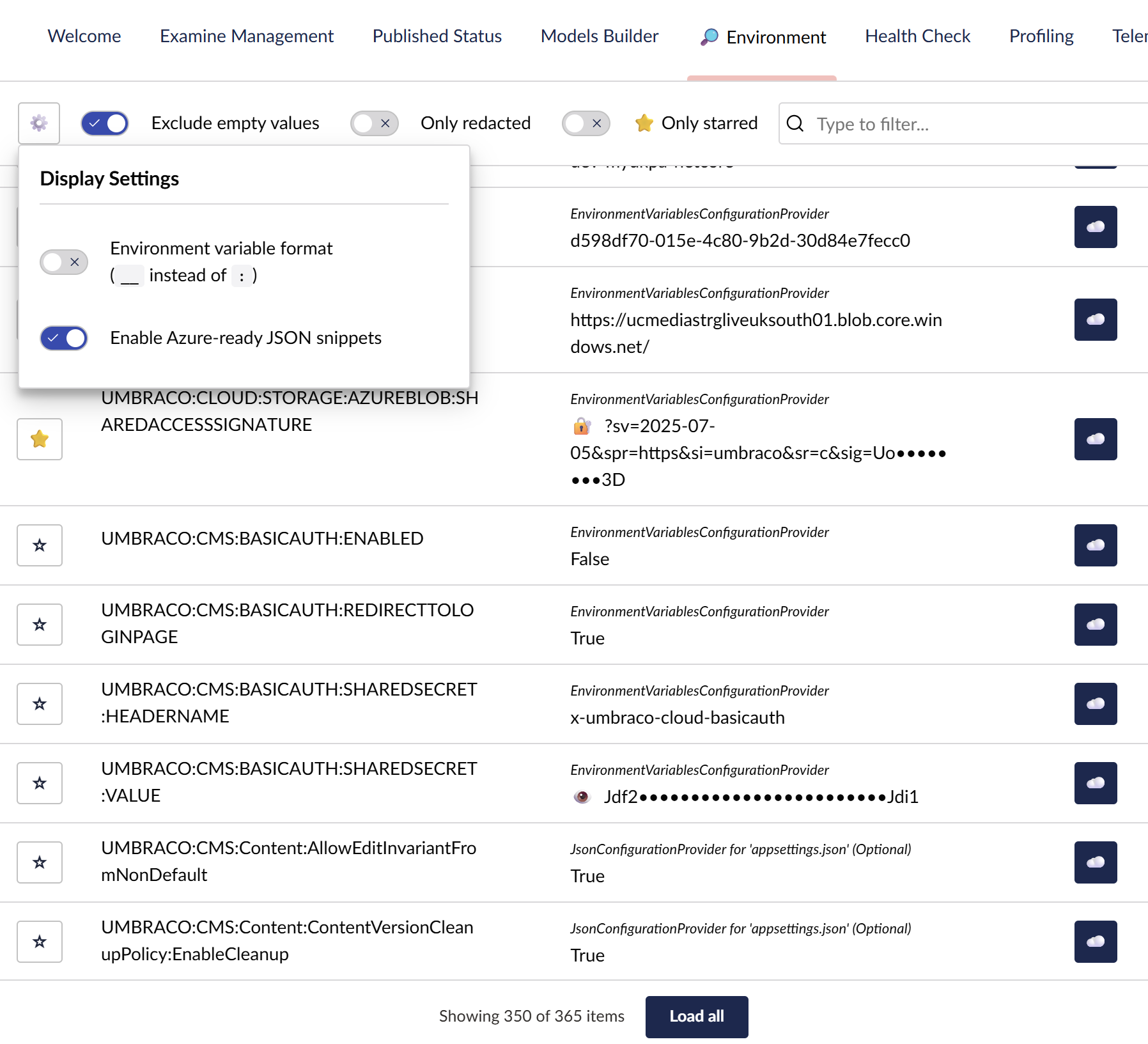
This makes it easier to learn why some variables you expected to work have not been applied.
Features
- 📊 View all configuration values and their sources in the Umbraco backoffice
- ⭐ Star favorites - Pin important configuration keys to the top for quick access (per-user preference)
- 🔍 Search filter - Filter configuration entries by key, value, or provider name
- 🔒 Redact sensitive data with multiple redaction modes (Full, Partial, Advanced)
- 🎯 Exclude configuration keys using regex patterns
- 🔐 Provider-based filtering - match by provider type, source file, or full name
- 📋 Copy keys and values with one-click clipboard support and notifications
- ☁️ Azure Web App JSON export - copy configuration as ready-to-use Azure Web App JSON snippets
- 🔄 Environment variable format - convert keys from
Umbraco:CMS:SettingtoUMBRACO__CMS__SETTING - 👤 Per-user preferences - Display settings, filters, and starred items are saved per user
- 🚀 Performance optimized with runtime caching and change detection
- 🔄 Hot reload support - configuration changes are automatically applied
Installation
Install via NuGet:
dotnet add package Cultiv.EnvironmentInspect
Or via the NuGet Package Manager Console:
Install-Package Cultiv.EnvironmentInspect
Usage
- Install the package
- Access the dashboard in Settings → Environment Inspector
- View all configuration values and their sources
That's it! The package works out of the box with no configuration required.
Dashboard Features
- Star favorites ⭐ - Mark important configuration keys as favorites to keep them pinned at the top of the list (per-user preference)
- Search filter 🔍 - Type to filter configuration entries by key, value, or provider name in real-time
- Settings popover ⚙️ - Access display settings including:
- Environment variable format toggle (
Umbraco:CMS:Setting↔UMBRACO__CMS__SETTING) - Show/hide Azure column (when
AzureWebAppAdvancedCopyis enabled)
- Environment variable format toggle (
- Filter toggles - Quickly filter to:
- Exclude empty values
- Show only redacted items
- Show only starred favorites
- Copy buttons - One-click clipboard copy for keys and values with success notifications
- Azure Web App export ☁️ - Enable
AzureWebAppAdvancedCopyto get a button that copies Azure-ready JSON snippets - Virtual scrolling - Efficiently handles thousands of configuration entries
- Per-user preferences - All display settings, filters, and starred items are saved per user
Configuration (Optional)
If you need to exclude or redact sensitive values, add the EnvironmentInspect section to your appsettings.json:
{
  "EnvironmentInspect": {
    "Exclude": [
      "^APPSETTING_",
      "^AZURE_",
      "^EnvironmentInspect",
      "^\\$schema$"
    ],
    "Redact": [
      {
        "Key": "Umbraco:CMS:Unattended:UnattendedUserPassword",
        "RedactionMode": "Advanced",
        "RedactionOptions": {
          "KeepFirst": 2,
          "KeepLast": 2
        }
      },
      {
        "Key": "ConnectionStrings:.*",
        "RedactionMode": "Advanced",
        "RedactionOptions": {
          "Keys": [ "Password", "PWD" ],
          "KeepFirst": 2,
          "KeepLast": 2
        }
      },
      {
        "Key": ".*Password$",
        "RedactionMode": "Full"
      },
      {
        "Key": ".*Secret.*",
        "RedactionMode": "Full"
      },
      {
        "ProviderType": "AzureKeyVaultConfigurationProvider",
        "RedactionMode": "Full"
      }
    ],
    "RedactionCharacter": "•",
    "PartialVisibleChars": 4,
    "AzureWebAppAdvancedCopy": false
  }
}
Results:
UnattendedUserPassword:12••••90🔐- Connection string password:
7R••••($(extracted from connection string) 🔐 - Keys matching
.*Password$:••••••••🔒 - Keys matching
.*Secret.*:••••••••🔒
For detailed configuration options, see the Configuration Guide.
Umbraco Cloud
For Umbraco Cloud deployments, see the Umbraco Cloud configuration example which includes recommended redaction rules for:
- Azure Blob Storage SAS tokens
- Website authentication keys
- Database connection strings
- Umbraco Forms reCAPTCHA keys
Documentation
- Configuration Guide - Detailed configuration options, examples, and best practices
Best Practices
- Order matters: Place specific redaction rules before general ones
- Test regex patterns: Use regex101.com to validate your patterns
- Use Advanced mode for connection strings: Extract and redact only the sensitive parts
License
MIT License - see LICENSE file for details.