Please note, this package is obsolete as of 10/01/2025 and is no longer maintained or monitored. Refer to our deprecation policy (https://aka.ms/azsdk/support-policies) for more details.
Azure Mixed Reality Authentication client library for .NET
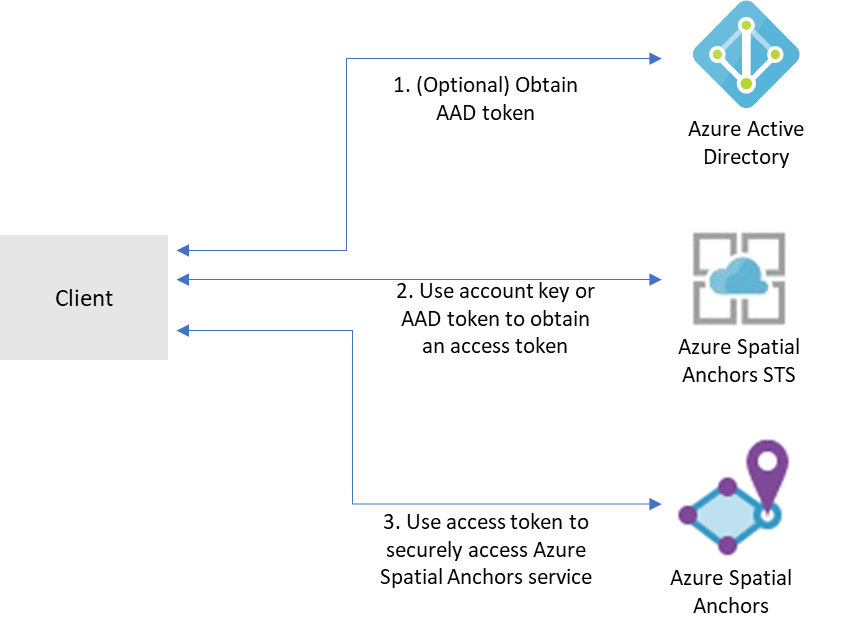
Mixed Reality services, like Azure Spatial Anchors, Azure Remote Rendering, and others, use the Mixed Reality security
token service (STS) for authentication. This package supports exchanging Mixed Reality account credentials for an access
token from the STS that can be used to access Mixed Reality services.
Familiarity with the authentication and credential concepts from Azure.Identity.
Authenticate the client
Mixed Reality services support a few different forms of authentication:
Account Key authentication
Account keys enable you to get started quickly with using Mixed Reality services. But before you deploy your application
to production, we recommend that you update your app to use Azure AD authentication.
Azure Active Directory (AD) token authentication
If you're building an enterprise application and your company is using Azure AD as its identity system, you can use
user-based Azure AD authentication in your app. You then grant access to your Mixed Reality accounts by using your
existing Azure AD security groups. You can also grant access directly to users in your organization.
Otherwise, we recommend that you obtain Azure AD tokens from a web service that supports your app. We recommend this
method for production applications because it allows you to avoid embedding the credentials for access to a Mixed
Reality service in your client application.
See here for detailed instructions and information.
Authentication examples
Below are some examples of some common authentication scenarios, but more examples and information can be found at
Azure.Identity.
Authenticating with account key authentication
Use the MixedRealityStsClient constructor overload accepting an AzureKeyCredential to configure account key
authentication with the Mixed Reality STS:
AzureKeyCredential keyCredential = new AzureKeyCredential(accountKey);
MixedRealityStsClient client = new MixedRealityStsClient(accountId, accountDomain, keyCredential);
Note: Account key authentication is not recommended for production applications.
Authenticating with an AAD client secret
TokenCredential aadCredential = new ClientSecretCredential(tenantId, clientId, clientSecret, new TokenCredentialOptions
{
    AuthorityHost = new Uri($"https://login.microsoftonline.com/{tenantId}")
});

MixedRealityStsClient client = new MixedRealityStsClient(accountId, accountDomain, aadCredential);
Authenticating a user using device code authentication
Task deviceCodeCallback(DeviceCodeInfo deviceCodeInfo, CancellationToken cancellationToken)
{
    Debug.WriteLine(deviceCodeInfo.Message);
    Console.WriteLine(deviceCodeInfo.Message);
    return Task.FromResult(0);
}

TokenCredential deviceCodeCredential = new DeviceCodeCredential(deviceCodeCallback, tenantId, clientId, new TokenCredentialOptions
{
    AuthorityHost = new Uri($"https://login.microsoftonline.com/{tenantId}"),
});

MixedRealityStsClient client = new MixedRealityStsClient(accountId, accountDomain, deviceCodeCredential);

AccessToken token = await client.GetTokenAsync();
See here for more
information about using device code authentication flow.
Interactive authentication with DefaultAzureCredential
Use the DefaultAzureCredential object with includeInteractiveCredentials: true to use default interactive authentication
flow:
TokenCredential credential = new DefaultAzureCredential(includeInteractiveCredentials: true);

MixedRealityStsClient client = new MixedRealityStsClient(accountId, accountDomain, credential);
Key concepts
MixedRealityStsClient
The MixedRealityStsClient is the client library used to access the Mixed Reality STS to get an access token.
Tokens obtained from the Mixed Reality STS have a lifetime of 24 hours.
Thread safety
We guarantee that all client instance methods are thread-safe and independent of each other (guideline). This ensures that the recommendation of reusing client instances is always safe, even across threads.
AzureKeyCredential keyCredential = new AzureKeyCredential(accountKey);
MixedRealityStsClient client = new MixedRealityStsClient(accountId, accountDomain, keyCredential);

AccessToken token = await client.GetTokenAsync();
See the authentication examples above for more complex authentication scenarios.
Using the access token in a Mixed Reality client library
Some Mixed Reality client libraries might accept an access token in place of a credential. For example:
// GetMixedRealityAccessTokenFromWebService is a hypothetical method that retrieves
// a Mixed Reality access token from a web service. The web service would use the
// MixedRealityStsClient and credentials to obtain an access token to be returned
// to the client.
AccessToken accessToken = await GetMixedRealityAccessTokenFromWebService();

SpatialAnchorsAccount account = new SpatialAnchorsAccount(accountId, accountDomain);
SpatialAnchorsClient client = new SpatialAnchorsClient(account, accessToken);
Note: The SpatialAnchorsClient usage above is hypothetical and may not reflect the actual library. Consult the
documentation for the client library you're using to determine if and how this might be supported.
Client libraries supporting authentication with Mixed Reality Authentication
Libraries supporting the Mixed Reality Authentication are coming soon.
Contributing
This project welcomes contributions and suggestions. Most contributions require you to agree to a Contributor License
Agreement (CLA) declaring that you have the right to, and actually do, grant us the rights to use your contribution.
For details, visit https://cla.microsoft.com.
When you submit a pull request, a CLA-bot will automatically determine whether you need to provide a CLA and decorate the
PR appropriately (e.g., label, comment). Simply follow the instructions provided by the bot. You will only need to do this
once across all repos using our CLA.