A set of convenience classes and extension methods to simplify Crash Reporting and Analytics using AppCenter
License
—
Deps
2
Install Size
—
Vulns
✓ 0
Published
Dec 12, 2022
$ dotnet add package AppCenterExtensionsA set of convenience classes and extension methods to simplify Crash Reporting and Analytics using AppCenter
ICommand implementationsThis library is distributed as 4 nuget packages
ICommand implementations, and convenience classes for initializing and configuring AppCenter. This package depends on Microsoft.AppCenter.Analytics and Microsoft.AppCenter.Crashes version 5.0.1ITelemetryInitializer implementations to be used in a ASP.NET Core web app for including AppCenter diagnostic information when logging to Application InsightsThis library is configured almost the same way as the AppCenter SDK. You provide the AppCenter secrets, and specify whether to anonymize the user information. Both Crash Reporting and Analytics are always enabled when using AppCenterSetup.
AppCenterSetup.Instance.Start(
    "[iOS AppCenter secret]",
    "[Android AppCenter secret]",
    "[UWP AppCenter secret]",
    "[MacOS AppCenter secret]",
    "[WPF/WinForms AppCenter secret]",
    anonymizeAppCenterUser: true);
or
await AppCenterSetup.Instance.StartAsync(
    "[iOS AppCenter secret]",
    "[Android AppCenter secret]",
    "[UWP AppCenter secret]",
    "[MacOS AppCenter secret]",
    "[WPF/WinForms AppCenter secret]",
    anonymizeAppCenterUser: true);
The reason for the async API here is because anonymizeAppCenterUser internally relies on an async API. The synchronous API's for starting AppCenter are non-blocking methods that do a fire-and-forget call to StartAsync(string,bool).
The component AppCenterSetup exposes a method called UseAnonymousUserIdAsync() which sets the UserId in AppCenter to the first 8 characters a GUID that is unique per app installation. This can be used as a support key for uniquely identifying application users for instrumentation and troubleshooting. The support key can be attached to all HTTP calls by using the DiagnosticDelegatingHandler
The library exposes extension methods to the Exception class for conveniently reporting Exceptions to AppCenter
Example:
try
{
    // Something that blows up
    explosives.Detonate();
}
catch (Exception e)
{
    // Safely handle error then report
    e.Report();
}This library provides 3 convenience implementations of ICommand that will report the action to AppCenter Analytics after successfully invoking the execute callback method
Action as the Execute callback and a Func<bool> as the CanExecute callbackAction<T> as the Execute callback and a Func<T, bool> as the CanExecute callbackFunc<Task> as the execute callback and a Func<bool> as the CanExecute callback. This also exposes a CompletionTask property that the consumer can await if desired. The Execute(object parameter) method here is a non-blocking callExample:
using System.Threading.Tasks;
using System.Windows.Input;
using AppCenterExtensions.Commands;
using AppCenterExtensions.Extensions;
using Microsoft.AppCenter.Crashes;
using Xamarin.Essentials;

namespace SampleApp.ViewModels
{
    public class AboutViewModel : BaseViewModel
    {
        public AboutViewModel()
        {
            AsyncButtonTappedCommand = new AsyncTrackingCommand(
                OnAsyncButtonTapped,
                nameof(AsyncButtonTappedCommand).ToTrackingEventName(),
                nameof(AboutViewModel).ToTrackingEventName());

            ButtonOneTappedCommand = new TrackingCommand(
                OnButtonOneTapped,
                nameof(ButtonOneTappedCommand).ToTrackingEventName(),
                nameof(AboutViewModel).ToTrackingEventName());

            ButtonTwoTappedCommand = new TrackingCommand<string>(
                OnButtonTapped,
                nameof(ButtonTwoTappedCommand).ToTrackingEventName(),
                nameof(AboutViewModel).ToTrackingEventName());
        }

        public ICommand AsyncButtonTappedCommand { get; }
        public ICommand ButtonOneTappedCommand { get; }
        public ICommand ButtonTwoTappedCommand { get; }

        private Task OnAsyncButtonTapped()
            => Browser.OpenAsync("https://xamarin.com");

        private void OnButtonOneTapped() { }

        private void OnButtonTwoTapped(string obj) { }
    }
}
Specifying the screenName argument in the constructor is optional and when this is not provided manually then it will use the declaring Type name from the method that instantiated the ITrackingCommand instance and convert it to a more analytics friendly event name using the ToTrackingEventName() extension method. In the example above, if the nameof(AboutViewModel).ToTrackingEventName() parameter is not provided then the owner declaring Type is AboutViewModel and the ScreenName will be set to "About"
Automatic page tracking is enabled by replacing the base class of the ContentPage to classes to use TrackingContentPage class. By doing so the library will send page tracking information to AppCenter after leaving every page. Currently, the library will send the page Type, Title, and the duration spent on the screen. The library is rather opinionated on how to log information, and this will only change if I get a request to do so. Duration spent on screen is calculated using a Stopwatch that is started upon Page OnAppearing and is reported to Analytics upon OnDisappearing. The event name is based on the Type name of the Page and is split into multiple words based on pascal case rules and afterwards removes words like Page, View, Model, Async. For example: UserSettingsPage or UserSettingsView becomes User Settings
XAML Example:
<?xml version="1.0" encoding="utf-8"?>

<ext:TrackingContentPage
    xmlns="http://xamarin.com/schemas/2014/forms"
    xmlns:x="http://schemas.microsoft.com/winfx/2009/xaml"
    xmlns:d="http://xamarin.com/schemas/2014/forms/design"
    xmlns:mc="http://schemas.openxmlformats.org/markup-compatibility/2006"
    xmlns:ext="clr-namespace:AppCenterExtensions.XamarinForms;assembly=AppCenterExtensions.XamarinForms"
    mc:Ignorable="d"
    x:Class="SampleApp.Views.ItemDetailPage"
    Title="{Binding Title}">

    <StackLayout Spacing="20" Padding="15">
        <Label Text="Text:" FontSize="Medium" />
        <Label Text="{Binding Item.Text}" d:Text="Item name" FontSize="Small" />
        <Label Text="Description:" FontSize="Medium" />
        <Label Text="{Binding Item.Description}" d:Text="Item description" FontSize="Small" />
    </StackLayout>

</ext:TrackingContentPage>This library includes a trace listener implementation that reports to AppCenter. The reason for this is to cater to those who have implemented error handling or reporting using Trace Listeners, these types of users can just swap out (or add on) the AppCenterTraceListener
This implementation implements the following methods:
Write(object obj)Write(object obj, string category)WriteLine(object obj)WriteLine(object obj, string category)If the object provided is an Exception then this is reported to AppCenter Crash Reporting. If the object provided is an instance of AnalyticsEvent then this is sent to AppCenter Analytics
The AnalyticsEvent exposes 2 properties:
string EventName { get; } - self explanatoryIDictionary<string,string> Properties { get; } - Additional properties to attach to the Analytics eventTo set it up you simply add an instance of AppCenterTraceListener to your existing Trace listeners:
Trace.Listeners.Add(new AppCenterTraceListener());Here's an example of how to use System.Diagnostics.Trace to report errors
try
{
    // Something that blows up
    explosives.Detonate();
}
catch (Exception e)
{
    // Safely handle error then report
    Trace.Write(e);

    // or
    Trace.Write(e, "Error");

    // or
    Trace.WriteLine(e);

    // or
    Trace.WriteLine(e, "Error");
}
and here's an example of to use System.Diagnostics.Trace to send analytics data
public partial class App : Application
{
    private const string StateKey = "State";

    public App()
    {
        // Some initialization code ...

        Trace.Listeners.Add(new AppCenterTraceListener());
    }

    protected override void OnStart()
        => Trace.Write(
            new AnalyticsEvent(
                nameof(Application),
                new Dictionary<string, string>
                {
                    { StateKey, nameof(OnStart) }
                }));

    protected override void OnSleep()
        => Trace.Write(
            new AnalyticsEvent(
                nameof(Application),
                new Dictionary<string, string>
                {
                    { StateKey, nameof(OnSleep) }
                }));

    protected override void OnResume()
        => Trace.Write(
            new AnalyticsEvent(
                nameof(Application),
                new Dictionary<string, string>
                {
                    { StateKey, nameof(OnResume) }
                }));
}This library includes a few Task extension methods with AppCenter error reporting in mind. Possible exceptions that occur in the async operation are swallowed and reported to AppCenter. These extension methods will internally wrap the Task in a try/catch and await the Task using ConfigureAwait(false).
Here are usage some examples
Task (Note: Forget() returns void)var task = someClass.SomethingAsync()
task.Forget()Task (also available for Task<T>)var task = someClass.SomethingAsync()
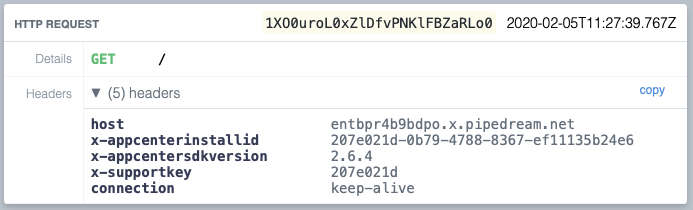
await task.WhenErrorReportAsync();The library provides a HttpMessageHandler implementation that logs non-successfuly HTTP results to AppCenter Analytics. This component will also attach HTTP headers describing the AppCenter SDK Version, Install ID, and a support key to all HTTP requests. The logged failed responses will contain the Endpoint URL (including the HTTP verb), Response status code, how the duration of the HTTP call. This will be logged under the event name HTTP Error
You will in most (if not all) cases would want to keep a singleton instance of the HttpClient. The DiagnosticDelegatingHandler is designed with unit testing in mind and accepts an IAnalytics and IAppCenterSetup interface, it also accepts an inner HttpMessageHandler if you wish to chain multiple delegating handlers.
Example:
var httpClient = new HttpClient(new DiagnosticDelegatingHandler());
await httpClient.GetAsync("https://entbpr4b9bdpo.x.pipedream.net/");
In the example above we made an HTTP GET call to the RequestBin endpoint https://entbpr4b9bdpo.x.pipedream.net. This will result in the following we inspected in RequestBin
The library provides an extension method to IServiceCollection called AddAppCenterTelemetry() that should be called from the ConfigureServices(IServiceCollection services) in your ASP.NET Core Startup class. This enables logging the AppCenter diagnostic information described in the previous section to Application Insights
Here's an example taken from the Startup class in the sample web project
public class Startup
{
    public Startup(IConfiguration configuration)
    {
        Configuration = configuration;
    }

    public IConfiguration Configuration { get; }

    public void ConfigureServices(IServiceCollection services)
    {
        // Configure and register services to the IoC

        services.AddApplicationInsightsTelemetry();
        services.AddAppCenterTelemetry();
    }

    public void Configure(IApplicationBuilder app, IWebHostEnvironment env)
    {
        // Configure app
    }
}
Once this is setup, AppCenter diagnostic information should now be searchable and visible in Application Insights. Here's a screenshot of search results for the x-supportkey header
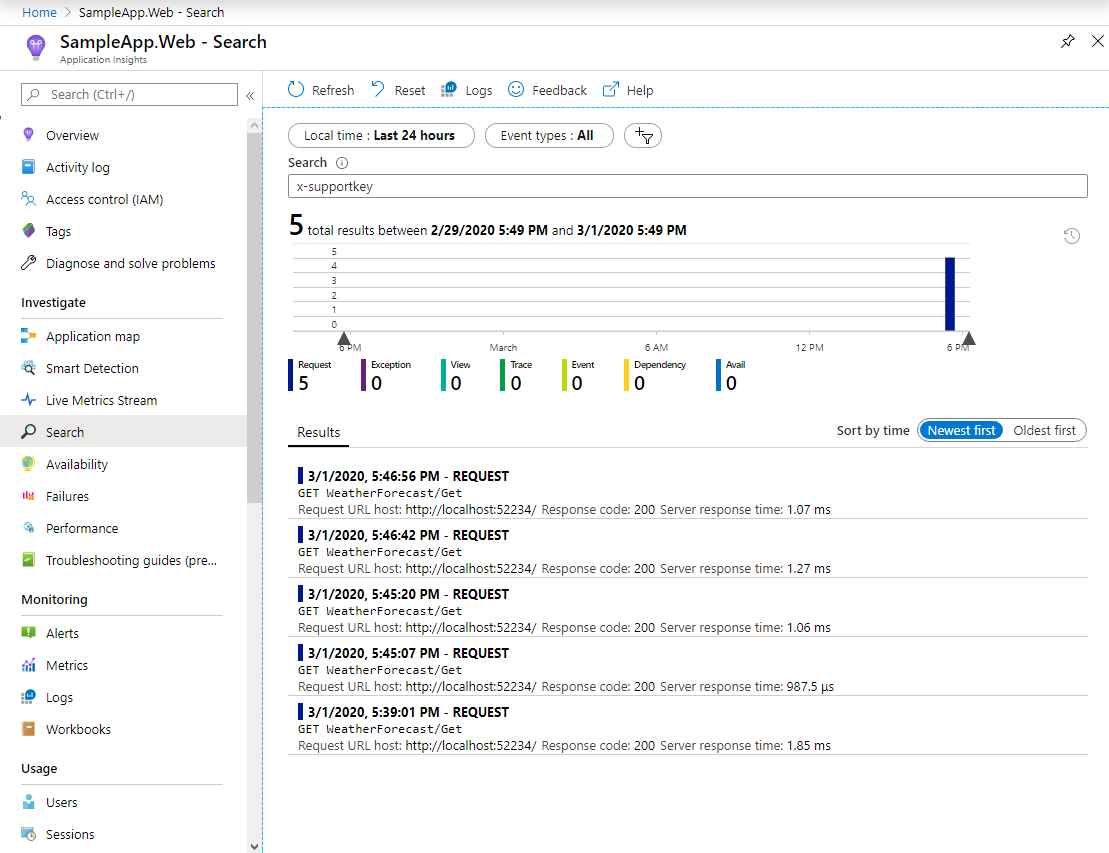
and here's a screenshot of the details of a single request containing AppCenter diagnostic information logged in Application Insights
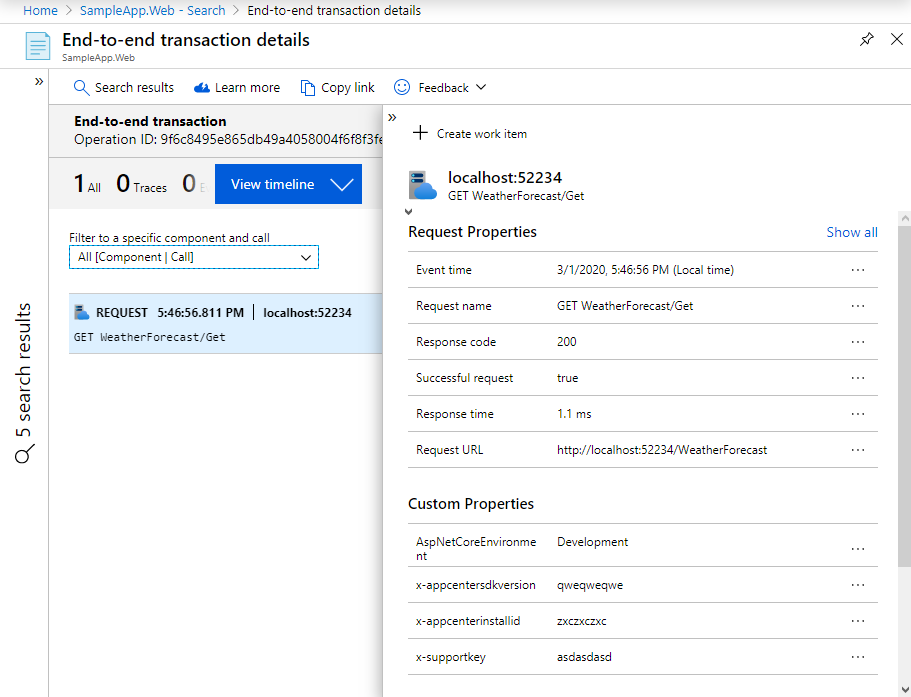
With this flow you can now correlate Crash Reports and Analytics data from AppCenter with the HTTP requests for your backend systems in Application Insights. In the systems that I have been involved with building we include the AppCenter diagnostic information from our API Gateway to all calls to our internal Microservices
For tips and tricks on software development, check out my blog
If you find this useful and feel a bit generous then feel free to buy me a coffee :)